Ansys Assistant will be unavailable on the Learning Forum starting January 30. An upgraded version is coming soon. We apologize for any inconvenience and appreciate your patience. Stay tuned for updates.
Ansys Products

Ansys Products

Discuss installation & licensing of our Ansys Teaching and Research products.

How to extract particle contact information

TAGGED: 

    • cma6301
      Subscriber

      Hello,


      I want to extract raw simulation data such as particles and contact information for post processing. I am having challenges with extracting contact information(contact ID, contact positions, contact vector, normal and tangential forces) at each timestep. I can get particle information(particles ID, particle velocities, particle positions, particle overlap) at each timestep using the script provided by Ansys Rocky, However, there was no script for contact indormation. I modify the particle information script to extract the contact information but getting an error about position argument

      in the script I used

      contacts = study.GetContactData(time_step)

      This is were I get the error. But without "time_step" in the argument I get a single value for each simulation output.


      Best regards,


      Ayuk

    • Lucas Hoenicke
      Subscriber

      Hello Ayuk, I hope you are doing well.

      To collect Contacts data:
      contacts = study.GetContactData()
      contacts.SetCollectContactsData(True)

      Ok, now, run the simulation.
      Once you have the results, we can extract simulation results.
      I will use the Overlap property as an example.
      So, our script snippet will look like this:

      timeset = study.GetTimeSet()  # timeset returns the a list of timesteps in the simulation
      overlap = [ ] # Here, we are declaring a list that will receive the overlap value for each simulation timestep

      for timestep in timeset:
          
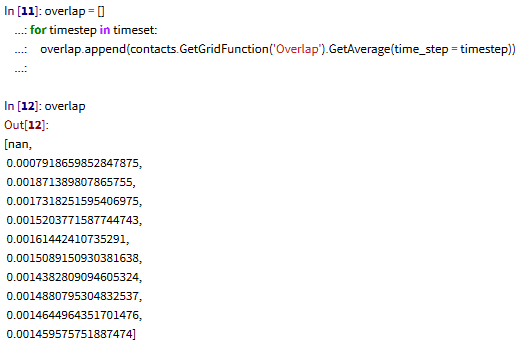
      overlap.append( contacts.GetGridFunction('Overlap').GetAverage(time_step = timestep) )

      # It is necessary to name the property you want to collect, therefore 'Overlap' as a string argument. Then, you must specify what operation you want, so I used the GetAverage() function. As argument to GetAverage(), I passed the timestep variable, that runs inside the loop, this will allow us to collect all aveage values of overlap.

    • cma6301
      Subscriber

      Hello Lucas,

      Thank for this explanation although still not clear.

      What I want is contact information such as contact IDs, contact positions, contact vectors, and contact forces at each timestep (I don't want a single average value). The reason I need this is because I want to post-process my data using Gaussian averaging method. This I need the discrete data. Like I said before If i used the particle information scripts I get this discrete informations for Particle information such as particle ID, particle positions, particle velocities. However, I cannot get these informations for contact information using the same script by modifying the contact to  contacts = study.GetContactData(time_step), But if I used contacts = study.GetContactData() I just get average values which is not what I want. 

    • Lucas Hoenicke
      Subscriber

      Ok, I'm going to show you another workflow, see if this is what you mean.

      We can use the "Particle to Contact" User Process to analyze particle/contact properties.
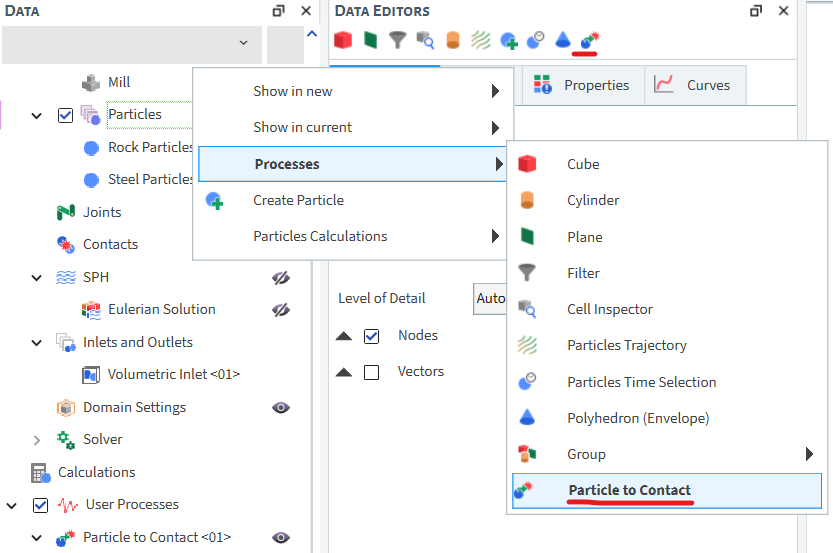
      Now, we can use an association of filters to identify the pair of particles for a given contact event. For example,
      Let's create a Filter process upon the Particle to Contact process. In this fiter, we can select "Particle ID From" to define the first particle of the contact pair.
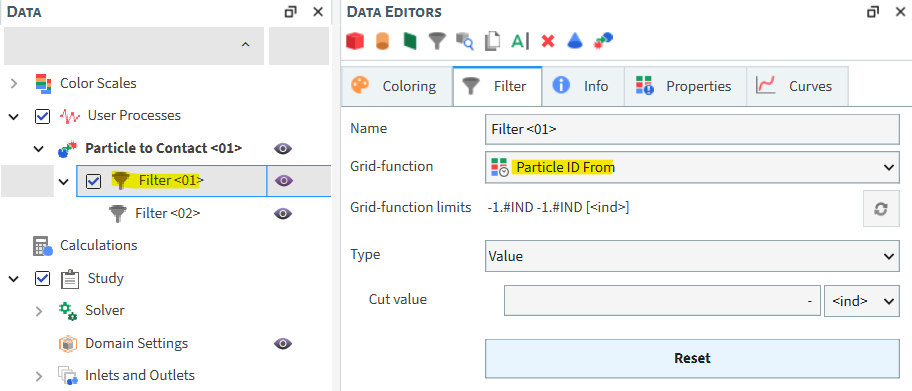
      Now, upon the "Particle ID From" filter, we are going to create another Filter. For this one, we can select the "Particle ID To" property.
      It should look like this.
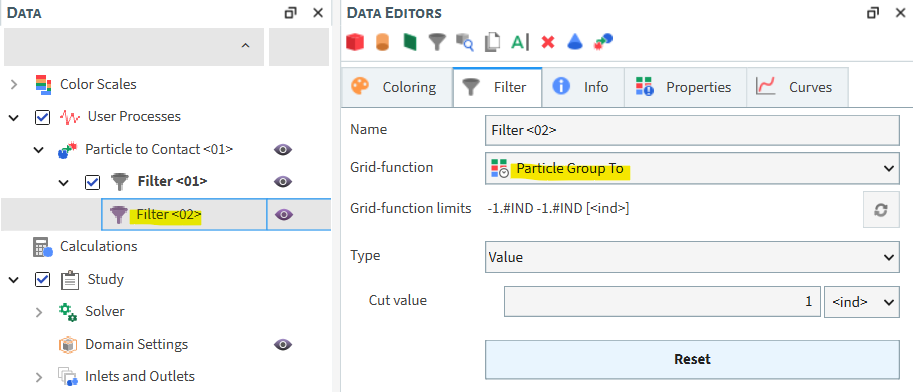
      Now, all of the properties from the second Filter are those of contact pair between particles A and B, for example.
      To know their positions, then you'll have to use filters and ID's to evaluate a certain particle at a given time and extract that information.

      Please, let me know if this is what you are looking for.

    • cma6301
      Subscriber

      Hello Lucas,

      Thank you for your help. This is what I am look for. To my understanding filter is use when one is looking at sectioning your domain. For my case I want to extract the contact info for the entire simulation domain. From your suggestions I was able to figure it out.

    • Lucas Hoenicke
      Subscriber

      Nice, I'm glad I could help. 😉

    • cma6301
      Subscriber

      Hello Lucas,


      I have some problem with my CFD-DEM tutorial. Can you help? I have submiited a ticket on it alreaday.


      Best regards,


      Ayuk

    • Lucas Hoenicke
      Subscriber

      Of course, what is the issue?

    • cma6301
      Subscriber

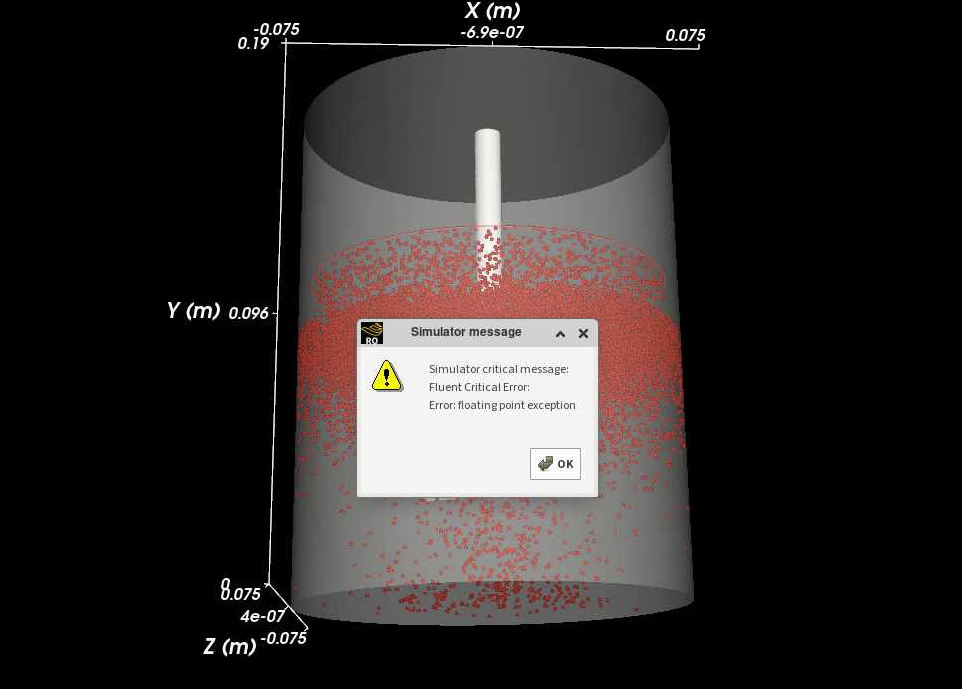
      I am studing the CFD-DEM coupling tutorial 16. I did run the fluent stop and write out both case and dat files. Setup the Rocky part. However, when i started the simulation, I only saw the rocky simulation summary no new dialog for fluent coupling. And as the simulation is runing, I don't see any evidence of fluid in my system. I am running all on a super computer. No error printed but I can't find fluid in the simulation. After running for some time I get this error found on the attached image

    • Lucas Hoenicke
      Subscriber

      This error doesn't explain much : /

      What version of the manual are you accesing?
      What version of Rocky and Fluent are you using?
      Is it Student package?
      Are you trying to run both Rocky and Fluent on GPU?

    • cma6301
      Subscriber

      Hello Lucas,


      I am using version 2025R1 for both Rocky and fluent. It a paid version my school subscribed to it. I am running on a cpu in the school supper computer. Both Rocky and Fluent are install on the supercomputer

Viewing 10 reply threads
  • You must be logged in to reply to this topic.
[bingo_chatbox]