-
-
January 3, 2022 at 4:16 pm
Hassanbutt
SubscriberI have final year project on "Effect of Dimples on airfoil". But i could not able to find any helping material regarding creating dimples on airfoil. Please guide me how to create Dimples on airfoil. It will be much appreciated.
Thanks in advance.
January 3, 2022 at 6:32 pmpeteroznewman
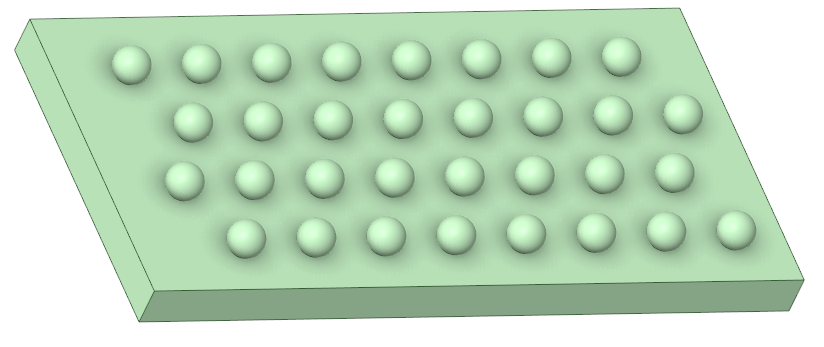
SubscriberDimples can be made by creating an array of spheres and subtracting them from a solid body. In the image below, you can see a set of spheres that interfere with the solid rectangular block below them.
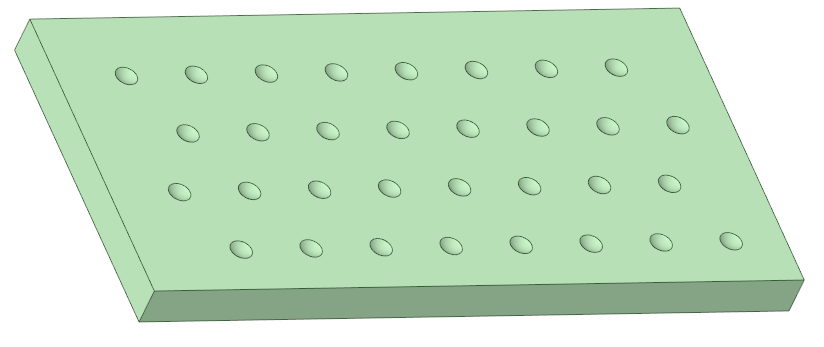
Here is the solid block after the Combine operation has cut the spheres from the block, leaving behind dimples.
February 24, 2022 at 10:57 amMadhu24
SubscriberHi there, I tried to generate an array of spheres on the airfoil surface. But after adding them there is no increase in the solid bodies in the tree diagram. As a result when I was trying to subtract I was not able to select tool bodies and target bodies. Please help me in resolving this. Thanks in advance
February 26, 2022 at 6:10 pmpeteroznewman
SubscriberCreate a new component to make the array of spheres. Then copy in a solid body of wing to do Combine function.
Viewing 3 reply threads- The topic ‘How to create dimple on airfoil’ is closed to new replies.
Innovation SpaceTrending discussionsTop Contributors-
5654
-
1885
-
1404
-
1303
-
1021
Top Rated Tags© 2026 Copyright ANSYS, Inc. All rights reserved.
Ansys does not support the usage of unauthorized Ansys software. Please visit www.ansys.com to obtain an official distribution.
-
Ansys Assistant will be unavailable on the Learning Forum starting January 30. An upgraded version is coming soon. We apologize for any inconvenience and appreciate your patience. Stay tuned for updates.