Ansys Assistant will be unavailable on the Learning Forum starting January 30. An upgraded version is coming soon. We apologize for any inconvenience and appreciate your patience. Stay tuned for updates.
Preprocessing

Preprocessing

Topics related to geometry, meshing, and CAD.

How to create 5 x 5 meshing in ANSYS APDL?

    • wh05
      Subscriber

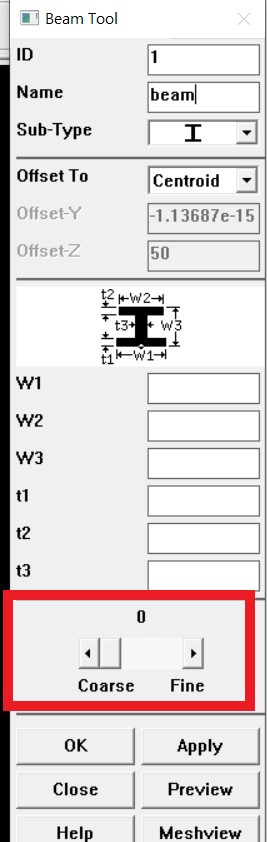
      Hi, I choose beam type for the element type in APDL. Then I draw lines to create the model and mesh the model using first picture setting. But why the result is not 5x5 meshing (second picture) ? I supposed there should be 5 horizontal in each steel beam as well.


    • jj77
      Subscriber

      Have in mind a line is 1D and can only subdivided along the length (similar for a beam element which is subdivided along the length).


      There are 5 divisions and thus 5 elements on each line, so both ver. columns and hor. beams are subdivided into 5 finite elements. Obviously your element size is longer for the beams since these members are longer than the ver. columns (say each hor. beam member is 10 m long then each beam element there is 2 m long, while if the columns are say 5 m long, then each element on the column will be 1 m long).


      It is easier perhaps for you to understand the subdivison if you plot the mesh without rendering the I beam cross section (this is only graphics is is still a beam element)


    • wh05
      Subscriber

      Thank you so much. I get your point. I will increase my number of element division.


      Btw, can you explain what is the mean of the "size: element edge length" ? (in the above first picture) Do I need to revise it?

    • jj77
      Subscriber

      That is instead of saying 5 subdivision which in the example I made would result in 1 m element length in the columns, and 2 m in the beams, one can give the actual element size in meters. In this example if we set an element size of 1 m, then we would get 5 elements on the columns and 10 elements on the beams (since the line is 10 m long there say).


      I would also strongly recommend to take a course, especially related to beam elements and their application in structural engineering.


      The edx course covers that a bit, and is free to take:


      https://www.edx.org/course/a-hands-on-introduction-to-engineering-simulations

    • wh05
      Subscriber

      Sorry, I might misunderstanding your mean. 


      The beam is 6m long and column is 3m long in my model. My steel member section is 192.8mm width x 467.2mm depth.


      I increased my number of element division to 200. But why still cannot increase the horizontal line in beam and vertical line in column ? (below picture)


      Thanks for your link. Do you have any video tutorials for APDL as well? because there is workbench tutorial in the link.

    • jj77
      Subscriber

      Very confusing, because you do not specify which mesh you talk about and you are not aware how beams are used in an FEA software.


      I think you talk about the cross section mesh, but normally when people say mesh they mean along the length of a beam, and not the sectional mesh (which is used by the solver for NL calculations, stress calculations and showing results).


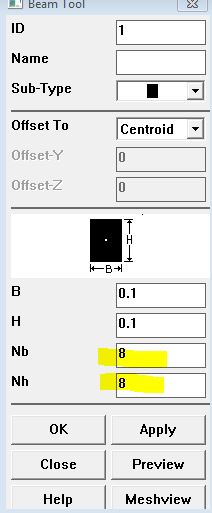
      That is changed at the cross section level, thus it can be done when you define the cross section. See below how that can change from a default of 4 (2X2) elements for a square solid beam to 8 X 8 elements .




    • wh05
      Subscriber

      Thanks. yes, I am talking about the cross section mesh. But your example is concrete beam. Should I adjust the "coarse and fine" for steel I beam?


Viewing 6 reply threads
  • The topic ‘How to create 5 x 5 meshing in ANSYS APDL?’ is closed to new replies.
[bingo_chatbox]