We have bumpled to issues running HFSS on our Slurm clusters. Slurm version is 24.11.7
We run HFSS 2025R2 with SP4 patched. However issue might be related to other versions as well.
We work with the very same HFSS project. Domain Decomposition is used in all runs.
- First issue. We have 2 clusters. The first one with icelake nodes. The second one has Emerald Rapids and they should be faster. We run batch jobs with stsandard guidelines provided by Ansys. Something like this in sbatch file
export ANSYSEM_GENERIC_MPI_WRAPPER=${AppFolder}/schedulers/scripts/utils/slurm_srun_wrapper.sh
export ANSYSEM_COMMON_PREFIX=${AppFolder}/common
export ANSYSEM_TASKS_PER_NODE="${SLURM_TASKS_PER_NODE}"
export ANSYSEM_ROOT232=${AppFolder}
export I_MPI_SHM_LMT=0
export I_MPI_OFI_PROVIDER=tcp
export I_MPI_TCP_NETMASK="xx.xx.xx.xx" (our IP addresses mask, can't specify them in this forum)
export PBS_JOBID="${SLURM_JOBID}"
export ANSYSEM_FEATURE_F539685_MPI_INTEL21_ENABLE=1
export ANS_IGNOREOS=1
export ANS_NODEPCHECK=1
export ANSYSEM_ENV_VARS_TO_PASS="ANSOFT_*;ANS_*;ANSYSEM_*;DEBUG_*;FI_*;I_MPI_*"
and in Oprtion file
'HFSS/SolveAdaptiveOnly'=0
'HFSS/MPIVendor'='Intel'
'HFSS 3D Layout Design/MPIVendor'='Intel'
'HFSS/MPIVersion'='2021'
'HFSS 3D Layout Design/MPIVersion'='2021'
'HFSS/RemoteSpawnCommand'='scheduler'
'HFSS 3D Layout Design/RemoteSpawnCommand'='scheduler'
'HFSS/NumCoresPerDistributedTask'=8
'Desktop/Settings/ProjectOptions/AnsysEMPreferredSubnetAddress'='xx.xx.xx.xx' (our IP addresses mask, can't specify them in this forum)
'tempdirectory'='/tmp'
We order 16 nodes with 8 cores either with -c slurm option or with --ntasks-per-node option.
We also run with SSH instead of shcduler as spam command. We change it in options file as well as in sbatch add
export I_MPI_HYDRA_BOOTSTRAP=ssh
To our surprise runs with more slower cluster nodes are done much faster than exacltly the same jobs with faster nodes. This is observed consistently.
What we noticed in the process log is that the trace where 'Generating solution data set' or 'Post process solution data' is much longer on cluster with Emerald nodes and this makes runs much longer.
2. After bumping to above issue we took the same project file to run from GUI reserving Slurm session in advance. We have Open On Demand on clusters. This reserved session and then providing Linux GUI with something like VNC.
ansysedt command was started like this
ansysedt -Auto -machinelist numcores=16
What we did is we reserved 1 node with 16 cores, then 2 nodes with 8 cores, 4 by 4, 8 by 2, and 16 with 1 node.
We did not specify any addtional environment variables starting session or on terminal.
Firtst of all, all runs on faster cluster were performed faster.
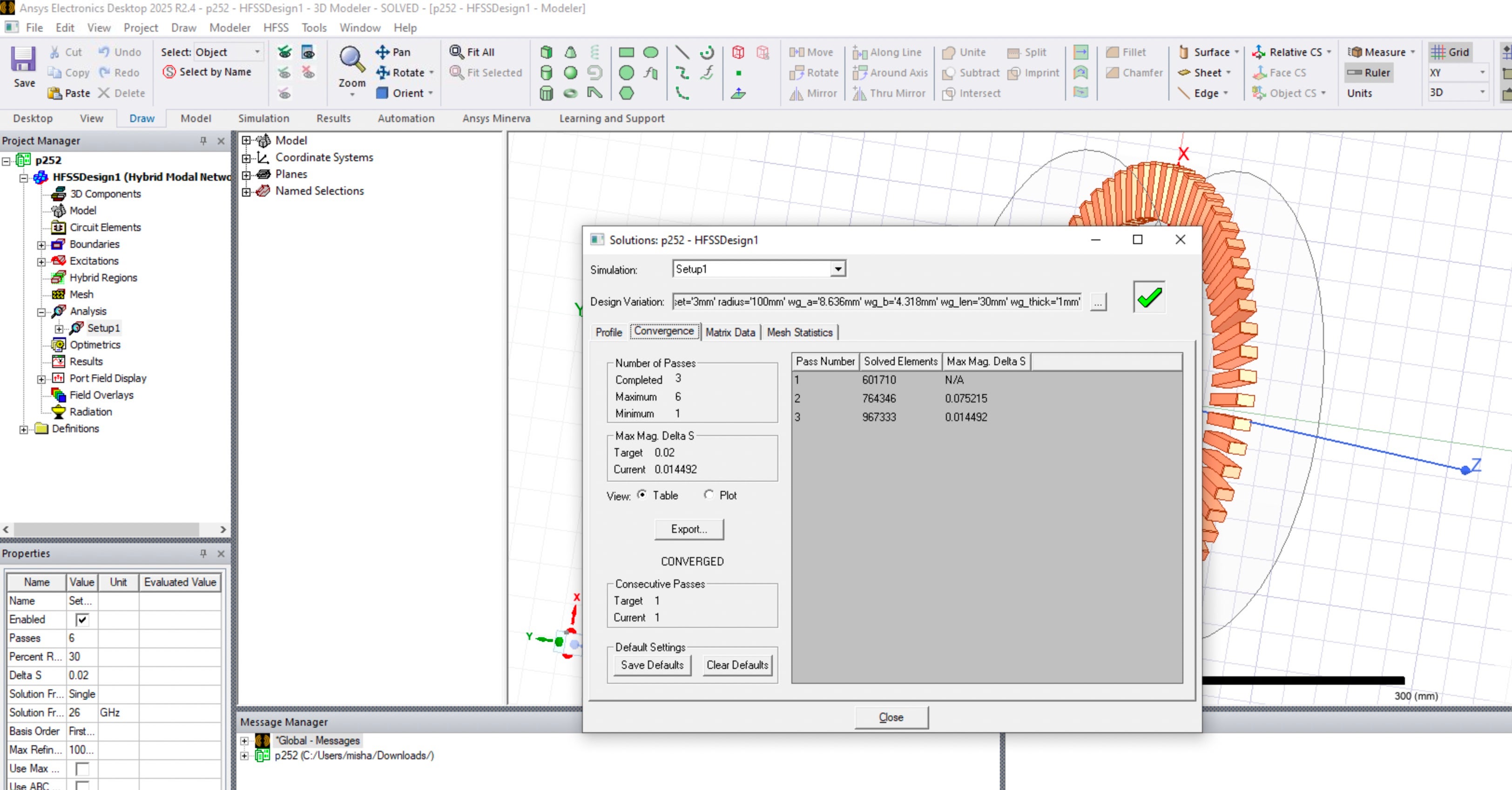
However, we bumped to more discouraging issue. In this analisys setup adaptive process should always converge in 3 steps. This project was originally created many years ago and ran using multiple HFSS versions. We use it as a benchmark to test advancing with clusters and versions. It might be a slight difference in the trace with a little different number of elements reported. However, phhysically results were and are always the same. They were the same in above batch runs too. I also took this project and ran on local Windws computer. Attached is picture with convergance from there.
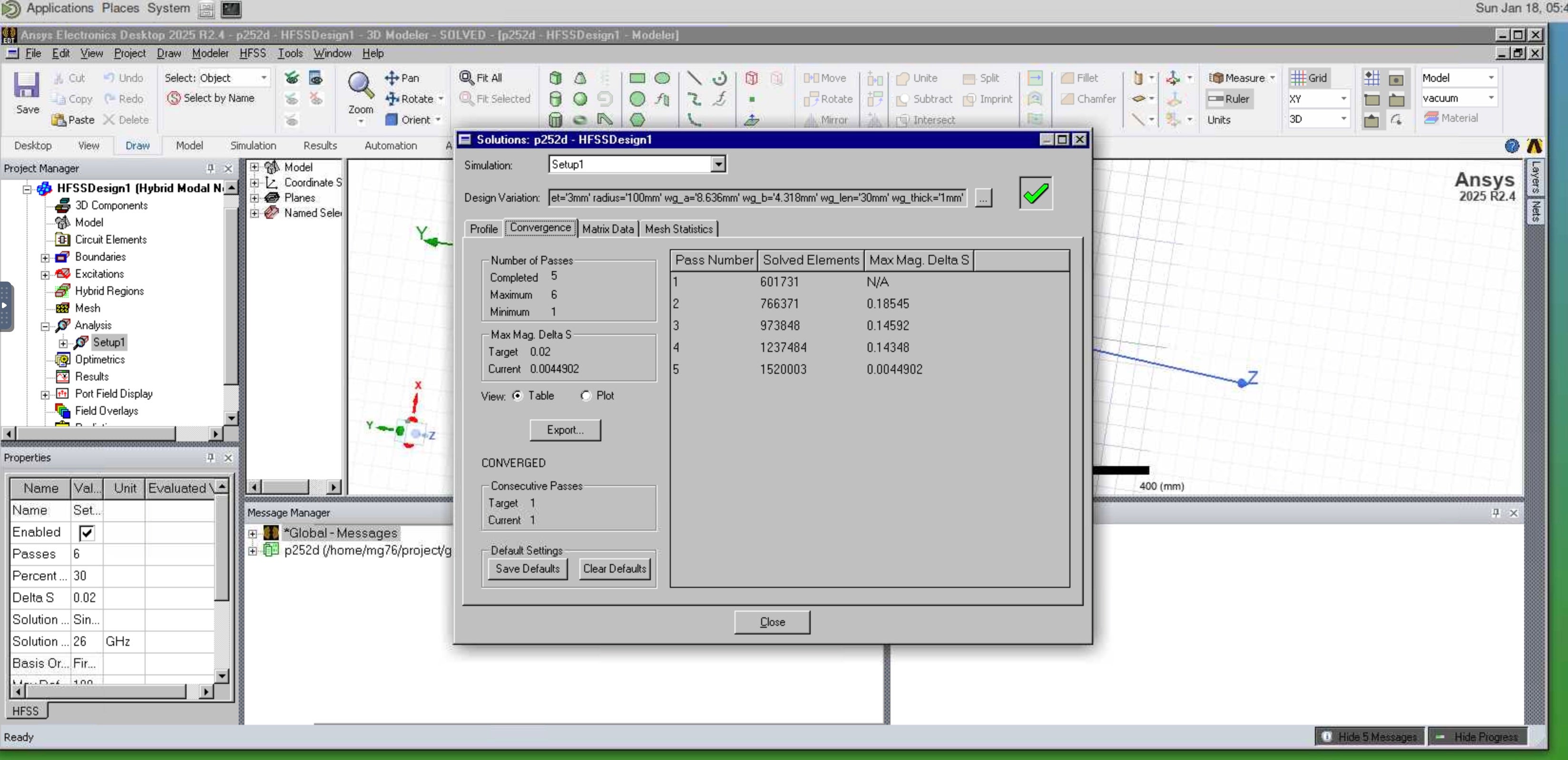
To my surprise, in the case of running on 8 nodes with 2 cores, adaptive process converged with 5 steps. I also attach pictture here.
We found that consistently on both clusters.



















 You are navigating away from the AIS Discovery experience