

TAGGED: ansys-fluent, mesh-generating, meshing, surface-meshing
-
-
November 17, 2021 at 3:06 am
xmyn
SubscriberHello,
I'm using Fluent (2019 R2) meshing mode on a 3D room geometry, and having problems to create surface mesh in the Watertight Geometry workflow.
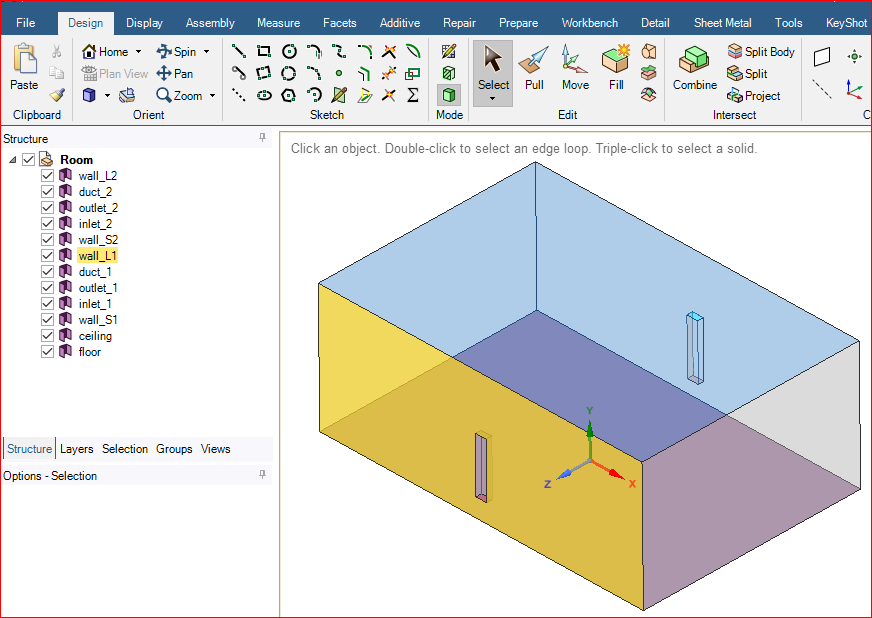
The geometry is a room (0.9 x 0.6 x 0.35m), consisting of all surfaces, with 2 ducts on the wall that can be considered as part of the wall extruded inward to the room's internal direction. See screenshots below.
Then in Fluent Meshing Mode, Watertight Geometry workflow, I imported the above geometry successfully.
I didn't add local sizing, and went on to Create Surface Mesh, and got an error saying:
Error: No regions were created. Dis-connected surface models are not supportedError Object: #fI also noticed there are several warnings in the console, such as:
Warning : No regions computed.Check for leaks and self-intersections in the mesh.doneregion-name number of baffles zone ids of baffles-------------------- -------------------- --------------------external baffles 1 (68)Does anyone have any idea?
Thanks a lot.
November 17, 2021 at 3:42 pmSubscriber
November 30, 2021 at 3:51 pmKeyur Kanade
Ansys EmployeeAs error suggests, there is leak and it can not find any closed region.
Please make sure that you have solid bodies in SpaceClaim instead of surface bodies.
Please go through help manual for more details
Regards Keyur
How to access Ansys Online Help Document
Guidelines on the Student Community
Viewing 2 reply threads- The topic ‘Help needed — Got error when creating surface mesh using Fluent Meshing Mode on a room geometry’ is closed to new replies.
Innovation Space Trending discussions
 Top Contributors
-
peteroznewman
 4678
4678 -
scabo
 1565
1565 -
Dennis Chen
 1386
1386 -
javat33489
 1241
1241 -
Shyam Prasad V Atri
1021
Top Rated Tags
© 2025 Copyright ANSYS, Inc. All rights reserved.
Ansys does not support the usage of unauthorized Ansys software. Please visit www.ansys.com to obtain an official distribution.
-


 You are navigating away from the AIS Discovery experience

