Ansys Products

Ansys Products

Discuss installation & licensing of our Ansys Teaching and Research products.

GPU Usage in Fluent

    • ahmed.kandil
      Subscriber

      Hello,

      I am a student working on a CFD project, I'm using research license which i installed on my PC and im unable to find the gpu selection settings when i search the internet for the solution. Has something gone wrong with my installation or have i forgotten to change a setting. Please help me i need my simulations to run faster (even if its not that much faster). Any solution regarding this appreciated.

      Thanks 

    • Rob
      Forum Moderator

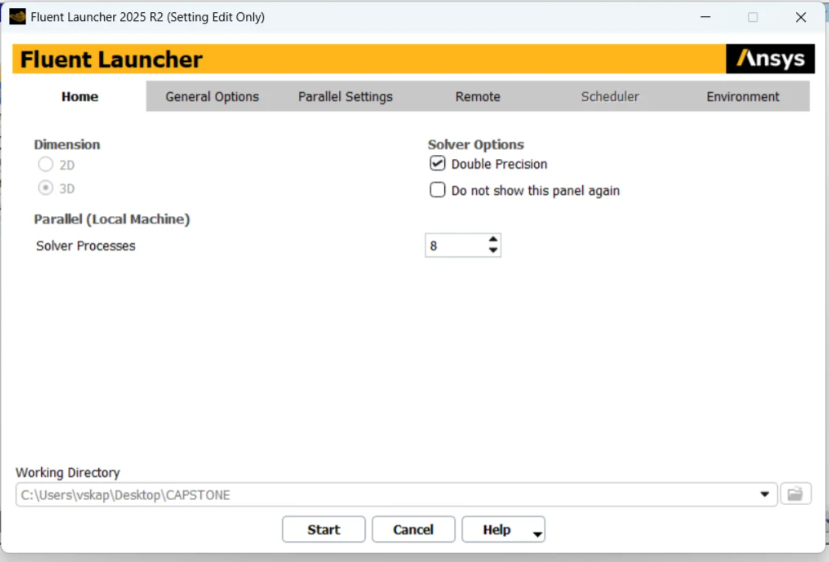
      The lack of working folder and licence options suggests you're in Workbench. Launch Fluent from the Start menu, set the licence level to Enterprise and you should see the options. You'll need to export the mesh from WB to then read into Fluent. 

    • ahmed.kandil
      Subscriber

      Thank you for your response. I was able to launch Fluent directly from the Start menu. However, I noticed that the only option available to run simulations using the GPU is for a 3D model, while my current simulation is 2D.

      Is there any way to use GPU acceleration for a 2D model, or is GPU support strictly limited to 3D simulations in Fluent?

      Additionally, I would like to ask whether it is possible to run a parametric study when Fluent is launched independently (i.e., outside of ANSYS Workbench), or if parametric studies must be set up through Workbench.

      Thanks

Viewing 2 reply threads
  • You must be logged in to reply to this topic.