Ansys Assistant will be unavailable on the Learning Forum starting January 30. An upgraded version is coming soon. We apologize for any inconvenience and appreciate your patience. Stay tuned for updates.
Hi, I have some errors on running Workbench.nI downloaded 2021R1 version, and installed it.nWhen I tried to start Modal Analysis, Mechanical window doesn't work.nIt has only gray windows, and there is no other things like menu bars or etc.nAnd there was some error windows about jscript errors(error code 80004005, 80070005).nnI tried to re-install it, install older versions(2020R1, 2020R2), and registering dll by command prompt.nAlso tried to delete the appdata folder, but all didn't work well.nEven I re-installed my windows, but it didn't work, too.nnWhat should I try to solve this problem?nAny suggestion would be helpful. Thanks.n
February 19, 2021 at 1:21 pm
ANSYS_MMadore
Forum Moderator
Arrayplease share screenshots of the issue you are seeing and the error messages encountered. Do you have any antivirus installed? Can you open a Windows command prompt and run the command set without quotes and share the complete output?n
February 19, 2021 at 1:59 pm
Eclair
Subscriber
nThanks for quick reply.nI have 4 error messages before Mechanical window open, and one more after I tried to close the Mechanical.nThere are some korean character because I'm korean, but they are all saying about microsoft jscript runtime error.nAnd I was mistaken that error code I posted above was about what I encountered when I tried to register dll manually on command prompt, without run as administrator. nThe right error code were 80004005 and 800a138f, 800a1391 as shown below.nnAnd this is the result of command prompt of set command.nMaybe it's too small, so hard to read, but to capture in one shot, it was unavoidable. Sorry...nI hopt that those information could help you to get some solution to my problem.nThank you.nn
February 19, 2021 at 2:04 pm
ANSYS_MMadore
Forum Moderator
could you please try what has been mentioned in this post?n/forum/discussion/comment/92545#Comment_92545n
February 19, 2021 at 3:16 pm
Eclair
Subscriber
Hi mmadore.nnI tried what you suggested in links, and it really worked!nAfter Changing language setting in Ansys once from english to japanese, and to english again made Machanical works well.nI really struggled with this problem for many days, so I couldn't believe that it would be solved in this easy way.nBut anyway, I have solved the problem, so it will be good thing.nnThanks for your helps and suggestions, I really appreciate for it.nHave a nice day!n
March 3, 2021 at 6:56 am
hee
Subscriber
?????? ?????!n?? ??? ?? ???? ??? ? ?????n
March 3, 2021 at 7:07 am
Eclair
Subscriber
안녕하세요.n이게 벌써 며칠이 넘게 지난거라서 제가 했던게 정확히 기억나지는 않지만 한번 따라해보시는 것도 좋을 것 같습니다.nnWorkbench를 켜고 위쪽 툴바(File View Tools 이런게 있는 곳)에서 Tools를 누르고 Options에 들어갑니다. Options 창에서 왼편 목록에서 Regional and Lnaguage Options를 n눌러서 현재 언어를 확인해 보면 아마 영어로 되어있을 겁니다. 그걸 일본어(Japanese)로 바꿔 Ok 버튼을 눌러 나와서 Workbench를 한번 껏다 켜는등 일본어 상태로 nWorkbench를 구동시켜 보세요.n그렇게 하고 나서 다시 동일한 경로로 들어가 언어를 다시 영어로 바꾼다음에 한번 돌려보세요.n저는 이렇게 하니까 해결이 되더라구요. 저랑 증상이랑 이런게 다 똑같았다면 아마 높은 확률로 해결이 될거라고 생각합니다만, 혹여나 안되면 저처럼 포럼에 해결책을 n물어보는 것도 좋은 방법인것 같습니다. (영어 실력이 조금은 되어야겠지만요)nn모쪼록 문제가 잘 해결되길 바라겠습니다
January 29, 2023 at 9:24 pm
Taewoo Kim
Subscriber
안녕하세요 덕분에 잘 해결되었습니다! 감사합니다~
Viewing 7 reply threads
The topic ‘Got some errors on running Workbench’ is closed to new replies.
The Ansys Learning Forum is a public forum. You are prohibited from providing (i) information that is confidential to You, your employer, or any third party, (ii) Personal Data or individually identifiable health information, (iii) any information that is U.S. Government Classified, Controlled Unclassified Information, International Traffic in Arms Regulators (ITAR) or Export Administration Regulators (EAR) controlled or otherwise have been determined by the United States Government or by a foreign government to require protection against unauthorized disclosure for reasons of national security, or (iv) topics or information restricted by the People's Republic of China data protection and privacy laws.
Please Login to Report Topic
Please Login to Share Feed
Edit Discussion
You are navigating away from the AIS Discovery experience
The Ansys Learning Forum is a public forum. You are prohibited from providing (i) information that is confidential to You, your employer, or any third party, (ii) Personal Data or individually identifiable health information, (iii) any information that is U.S. Government Classified, Controlled Unclassified Information, International Traffic in Arms Regulators (ITAR) or Export Administration Regulators (EAR) controlled or otherwise have been determined by the United States Government or by a foreign government to require protection against unauthorized disclosure for reasons of national security, or (iv) topics or information restricted by the People's Republic of China data protection and privacy laws.




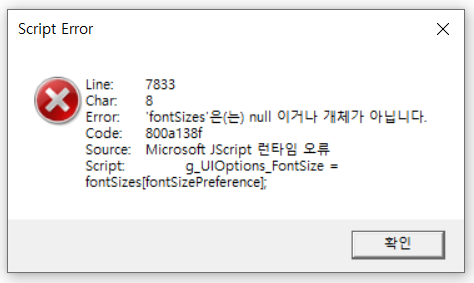
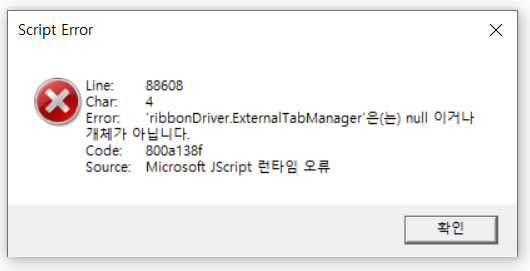
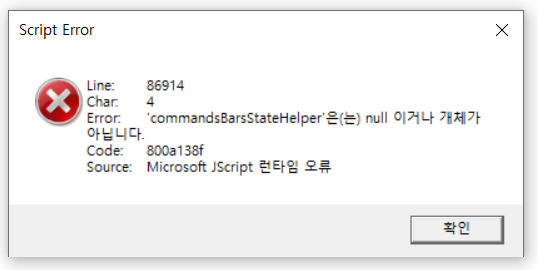

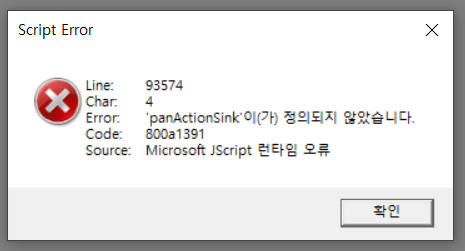 nAnd this is the result of command prompt of set command.nMaybe it's too small, so hard to read, but to capture in one shot, it was unavoidable. Sorry...n
 I hopt that those information could help you to get some solution to my problem.nThank you.nn
















 You are navigating away from the AIS Discovery experience