General Mechanical

General Mechanical

Topics related to Mechanical Enterprise, Motion, Additive Print and more.

Getting Geometric Parameters in APDL

    • Jake
      Subscriber

      Hello, 


      I have a parametric thread model, and I'm trying to get the parametrized pitch dimension from the model geometry on each run and pass it to APDL. Is there anyway to achive this? 


      Thanks. 

    • wrbulat
      Ansys Employee

      Hi Jake,

      Was your parameterized geometry created in a CAD application outside of MAPDL? What do you intend to do with the thread pitch dimension once you have it in MAPDL? Do you want MAPDL to change the geometry if you change the value of the thread pitch in MAPDL, or do you instead intend to use the pitch doimension in some other way - say, in some kind of expression for post processing purposes?

      --Bill

    • Chandra Sekaran
      Ansys Employee

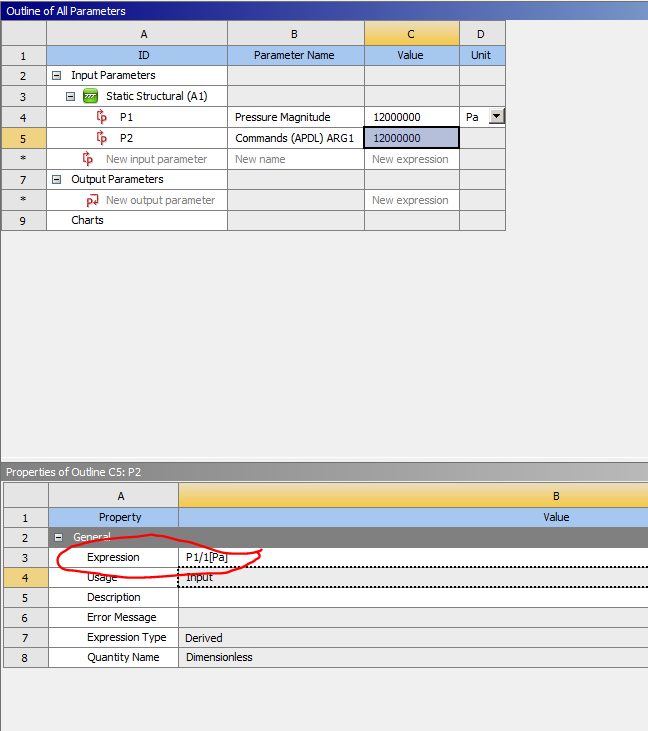
      You can take an already defined parameter in Workbench and assign it to a APDL parameter in the 'commands' object as shown below. Here I marked a pressure load in WB/Mechanical as a parameter (P1). Then I created a command object and made ARG1 a parameter (P2 in picture). Then you can set P2's expression as "P1/1 [Pa]" as shown in red circle in picture below. This is required to make it dimensionless MAPDL quantity. This will make arg1 equal the pressure value. Then in the commands you can use arg1.

    • Chandra Sekaran
      Ansys Employee

      You should be able to use this method for geometric parameters or any parameter that shows up in parameter set.

    • Jake
      Subscriber

      Hi Bill,


      The geometry is created in Autodesk Inventor, I am loading the geometry into workbench and simplifying/modifying with Spaceclaim then setting up my analysis in mechanical. I am using Spaceclaim to take the 3D Inventor geometry and turn it into a 2D axisymmetric cross section and to access the geometrical parameters from Inventor.

      I intend to use the pitch to calculate thread dimensions so I can dynamically create named selections for each thread contact and retrieve the reaction force data for each thread contact as the pitch/geometry changes. The pitch will be changed via a parameter in a DesignXplorer and passed back to inventor for the model to be updated automatically.  

      I was originally trying to accomplish this via ADPL but it appears as if ADPL cannot access contacts. I believe I will need to use the python scripting feature in mechanical.


      Thanks. 

    • wrbulat
      Ansys Employee

      Hi Jake,

      Thanks for the additional details.

      This (APDL code below) may (or may not) be helpful. If the number of threads is paramemetrized ("n_threads") and your 2D axisymmetric model contact is asymmetric, then this code might work on your model. It's objective is to create a unique named component for each group of the nodes used by the contact elements on each thread face. This assumes there are gaps in the contact elements as you go up the threaded fastener (e.g., there aren't any contact elements on the non-contacting face of each thread). If, in your project, you save nodal force results (under Analysis Settings Details), then you should be able to select each nodal component and use FSUM, then *GET,name,FSUM,,ITEM,FY to get net thread contact force for each thread individually.


      n_threads=5

      C*** ASSIGN UNIQUE COMPONENT NAMES TO NODES USED BY CONTACT ELEMENTS ON EACH THREAD FACE
      esel,s,ename,,172 ! SELECT CONTACT ELEMENTS
      nsle
      cm,contact_e,elem ! NAME CONTACT ELEMENTS
      cm,contact_n,node ! NAME NODES USED BY CONTACT ELEMENTS
      cm,contact_n_i,node ! UNPROCESSED CONTACT NODES IN PASS i IN DO LOOP
       
      *do,i,1,n_threads ! LOOP OVER # OF THREADS
       
       cmse,s,contact_n_i ! SELECT UNPROCESSED CONTACT NODES
       
       *get,ymin,node,,mnloc,y ! ymin = MIN Y LOCATION OF SELECTED NODES
       nsel,r,loc,y,ymin ! RESELECT THE NODE AT y=ymin
       n_start_i=ndnext(0) ! n_start_i = THIS NODE'S NODE NUMBER
       
       d_eselnum=1 ! INITIALIZE CHANGE IN NUMBER OF SELECTED ELEMENTS
       
       *dowhile,d_eselnum ! DO WHILE CHANGE IN # OF SELECTED CONTACT ELEMENTS IS NONZERO
       
        esln ! SELECT ALL ELEMENTS USED BY SELECTED NODES
        cmsel,r,contact_e ! RESELECT CONTACT ELEMENTS
        *get,n_esel_1,elem,,count ! n_esel_1 = # OF SELECTED ELEMENTS
        nsle ! SELECT ALL NODES USED BY SELECTED ELEMENTS
        esln ! SELECT ALL ELEMENTS USED BY SELECTED NODES
        cmsel,r,contact_e ! RESELECT CONTACT ELEMENTS
        *get,n_esel_2,elem,,count ! n_esel_2 = # OF SELECTED ELEMENTS
        d_eselnum=n_esel_2-n_esel_1 ! d_eselnum = CHANGE IN # OF SELECTED ELEMENTS
       
       *enddo
       
       cm,contact_n_%i%,node ! NAME CONTACT NODES ON THREAD i
       nsel,inve ! REDEFINE contact_n_i TO NOT INCLUDE NODES ON THREAD i
       cmse,r,contact_n_i
       cm,contact_n_i,node
       
      *enddo ! END DO LOOP


      esel,all                     ! THE FOLLOWING POST PROCESSING (UNDER SOLUTION BRANCH) IS UNTESTED
      esel,u,ename,,172
       
      *do,i,1,n_threads
       cmsel,s,contact_n_%i%
       fsum
       *get,net_FY,fsum,,item,fy
       my_net_FY_%i%=net_FY
      *enddo



Viewing 5 reply threads
  • The topic ‘Getting Geometric Parameters in APDL’ is closed to new replies.