-
-
April 17, 2023 at 10:07 am
Antonio Györög Chang
SubscriberHello Ansys-Community,
Is there a way to get the objects that a Named Selection is containing?Â
My Problem:Â
I am creating cylindrical coordinate systems (CS) and define the Origin Location by a Named Selection.
Of course I also want to change the CS for the geometry body. I can't do that with Named Selections (at least I think so?)
How do I get the Body that is in my Named Selection?
Best Regards,
ToniÂ
Â
Â
-
April 18, 2023 at 9:15 am
Akshay Maniyar
Ansys EmployeeHi Antonio Györög,
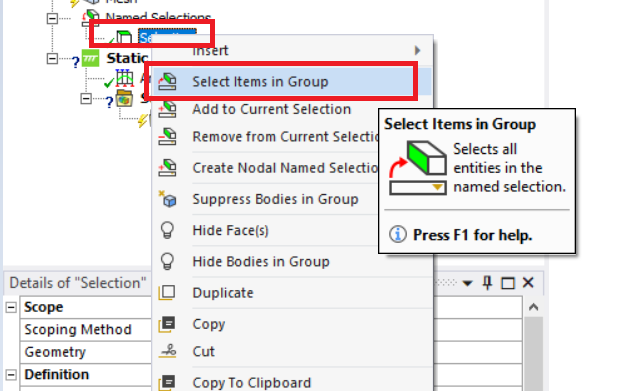
You can select the objects in the named selection using "Select item in group" as shown below.
I am not sure if understand your query correctly, but you can edit the origin for the coordinate system(if you don't want it at the centroid of geometry you defined using the named selection) by changing the coordinate values as shown in the image. Can you share some images of the issue you are facing, so that it will be easy to understand and help?
Thank you,
Akshay Maniyar
How to access Ansys help links
Guidelines for Posting on Ansys Learning Forum
Â
-
April 18, 2023 at 12:18 pm
Antonio Györög Chang
SubscriberHello Akshar Maniyar,
sorry for my bad despriction of my problem. I didn't mention that I'm doing this in a script. And trying to get the Items in the Named Selection via script. It looks like follows:
model = ExtAPI.DataModel.Project.Modelmesh = model.Meshmaterials = model.Materialsanalysis = model.Analyses[0]solution = analysis.SolutionÂnsel = DataModel.GetObjectsByType(DataModelObjectCategory.NamedSelection)nsel_str = [obj_nsel.Name for obj_nsel in nsel]Âbase_NSel = ['Example1', 'Example2', 'Example3']Âfor i in nsel:  for j in base_NSel:    if i.Name == j:      coordinate_system = Model.CoordinateSystems.AddCoordinateSystem()      coordinate_system.OriginDefineBy = CoordinateSystemAlignmentType.Component      coordinate_system.OriginLocation = i      coordinate_system.CoordinateSystemType = CoordinateSystemTypeEnum.Cylindrical
      # Here I need some code to assign the Items of the Named Selection (since you can just assign coordinate systems to bodies not Named Selections)
      # to the just created cylindrical coordinate system
      # The thing is I don't know how to get the ID of the body that is in a Named Selection    else:      passI hope this made it a bit clearer.
Best regards,
Toni -

April 18, 2023 at 1:17 pm
ErKo
Ansys EmployeeÂ
Â
Â
Hi
The below code should help to get the body ID (nID)
model = ExtAPI.DataModel.Project.Model
analysis=model.Analyses[0]
ns=model.NamedSelections.Children
for n in ns:
  print(n.Name)
  nId=n.Location.Ids
  print(nId[0])Â
To then assign it (nId):
coordinate_system=ExtAPI.DataModel.Project.Model.CoordinateSystems.AddCoordinateSystem()
selection = ExtAPI.SelectionManager.CreateSelectionInfo(SelectionTypeEnum.GeometryEntities)
selection.Ids = nId
coordinate_system.OriginLocation = selectionÂ
You can record when scripting to see the commands.
Â
All the best
Erik
Â
Â
-
April 20, 2023 at 7:58 am
Antonio Györög Chang
SubscriberHello Erik,Â
thank you for the response, but this was not quite what I was looking for. So the Coordinate Systems are created that is quite fine.Â
But the next step is to assign the coordinate systems to the bodies, that are in the Named Selections.
Until now my script and also yours, creates the coordinate systems based on the Named Selections (coordinate_system.OriginLocation = selection)Â
This step was also already in my code
But when I go to the geometry in the tree, the body (which is in the named selection) is still assigned to the Default Coordinate SystemWith this code I only get the IDs from the Named Selection right?Â
model = ExtAPI.DataModel.Project.Model
analysis=model.Analyses[0]
ns=model.NamedSelections.Children
for n in ns:
  print(n.Name)
  nId=n.Location.IdsWhat I actually need to assign the geometrical body to my new created coordinate systems is the body ID or? So basically I want to extract the Body IDs from the Bodies that are in my named selection
This step is still missing for meÂ
I hope I could make my issue clearer.
Thanks a lot,
Toni -
April 20, 2023 at 8:43 am
ErKo
Ansys EmployeeÂ
Hi. No the nId is the Body Id (geobody id).
To go from this geobody id (if needed) to a treebody id we can use (this is confusing but for another discussion, for geobody and treeebody):
body = ExtAPI.DataModel.GeoData.GeoEntityById(nId[0])
treebody=ExtAPI.DataModel.Project.Model.Geometry.GetBody(body)
Erik
Â
-
- The topic ‘Get Objects/Bodies from Named Selections’ is closed to new replies.
-
4989
-
1675
-
1386
-
1243
-
1021
© 2026 Copyright ANSYS, Inc. All rights reserved.