-
-
September 19, 2023 at 11:24 pm
Sunil Prakash
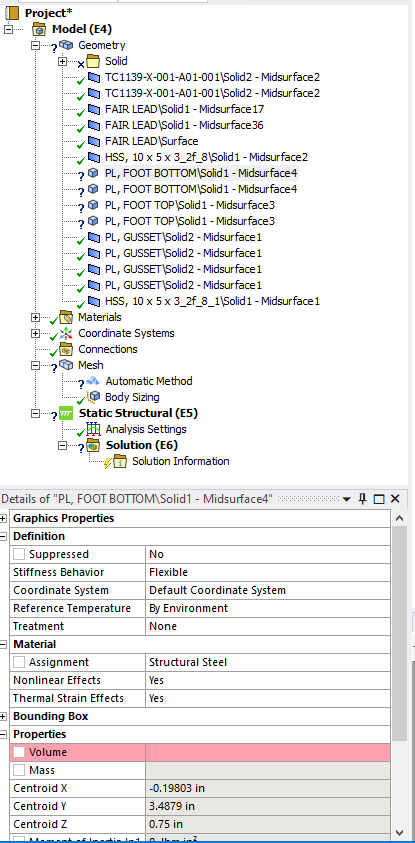
SubscriberGeomtery was cleaned and mid surface extracted in SpaceClaim. When I read the model into Ansys Mechanical, only few surfaces show up with "?" against them and rest of the surfaces are ok. I see what's wrong with surfaces with "?" against them and notice that it does not have option to enter thickness, it has MATERIAL assigned, still NO mass and NO volume. How to fix this problem?
Â
-
September 20, 2023 at 1:41 pm
Rahul Kumbhar
Ansys EmployeeHi @Sunil,
If you look at the icons next to the question mark, it appears they are imported as solids. The problem might be that there could be duplicate extracted mid-surfaces, which got merged to create zero thickness volumes. I suggest you to check these bodies in Spaceclaim, use Detach option to separate faces
-
September 20, 2023 at 2:49 pm
Sunil Prakash
SubscriberÂ
Based on response from Ansys Technical Team:
Open Spaceclaim, identify part in tree, right click detach. Supress the solid surface. This fixed the problem.
Â
-
- The topic ‘Geometry – not showing thickness, mass, volume’ is closed to new replies.

-
4904
-
1598
-
1386
-
1242
-
1021
© 2026 Copyright ANSYS, Inc. All rights reserved.