-
-
November 14, 2018 at 12:10 pm
Josh
SubscriberHey together,
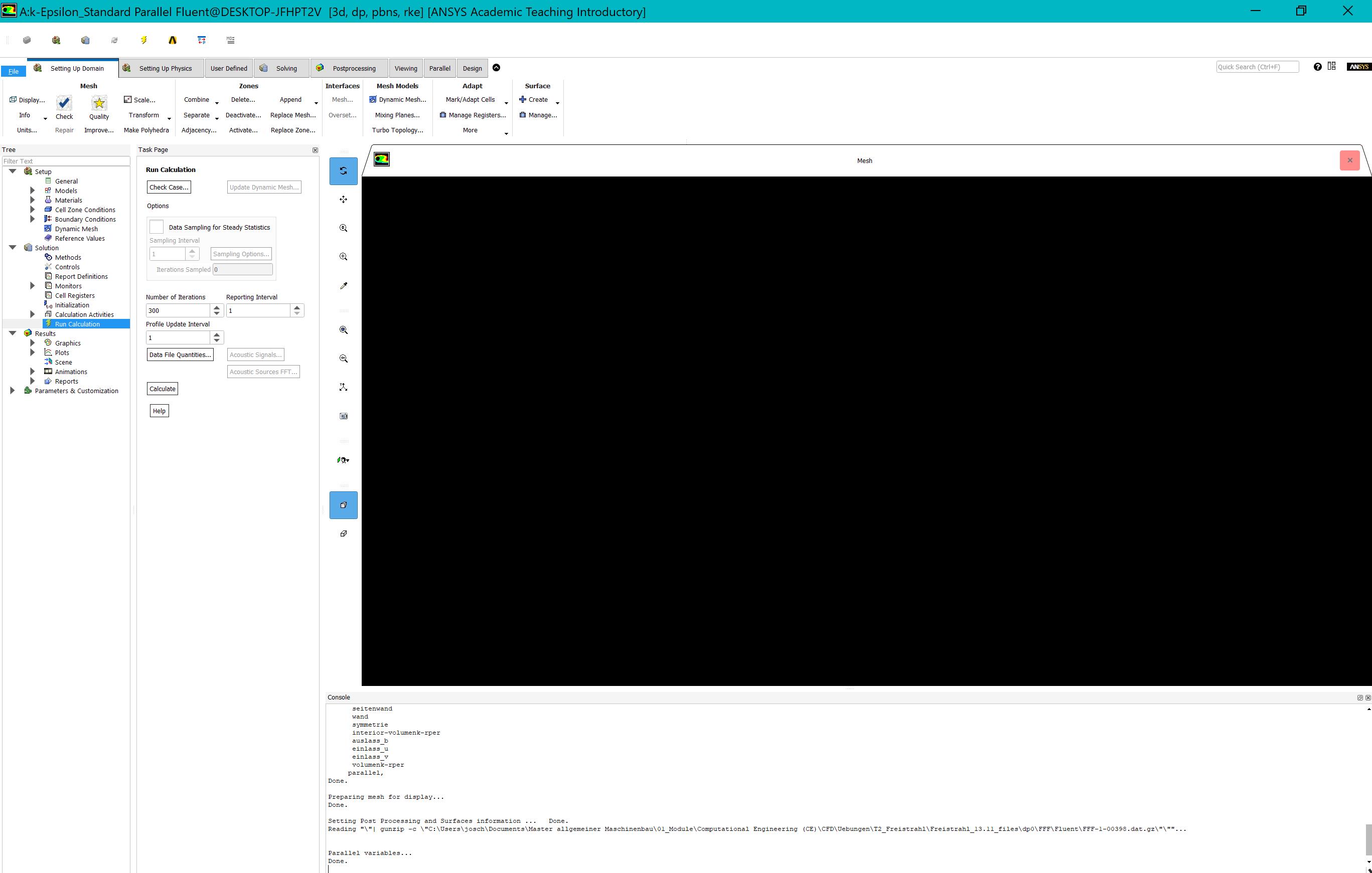
I have a problem with the black screen in fluent (ANSYS Workbench: Academic Student Release 19.2):Changing the color scheme was not solving the problem.
The intel graphic driver is updated
•   I have no NVIDIA graphic card, only a Intel Iris Plus Graphics 640 (Surface pro).
•   Display Resolution: 2736x1824
•   Win10, 8gb RAM
I don´t have “Intel Graphics Driver Control panel“, so I can´t disable the "Multi-Sample Anti-Aliasing" (I saw this solution in a other thread)
Is there someone who can help me?
Thank you,
Josh -

November 14, 2018 at 1:36 pm
DrAmine
Ansys EmployeeThe graphics in Fluent are demanding and Iris is not supported and not a mean to work with Fluent. Please try to start with the flag "msw".Using msw instead of opengl instructs ANSYS Fluent to use the Operating Systems Windows driver rather than the hardware OpenGL driver.Â
-
November 21, 2018 at 10:36 am
Bruss
SubscriberHi I have the same problem too but I can not find where can I flag the "msw"
-
November 21, 2018 at 4:34 pm
Rob
Forum ModeratorI think you need to add  -driver msw into the environment variables in the launcher panel: I can't easily test as my machine works..... I've also only ever done this on an old UNIX box about 15 years ago and that used command prompts to launch everything. Â
An alternative will be to disable the graphics in Fluent via the text interface and then restart them using the msw option. This is described in Section 33.1.7 of the R19 User's Guide; replace opengl with msw.Â
Â
-
November 23, 2018 at 9:12 am
Bruss
Subscriberthank you very much it workedÂ
-
November 27, 2018 at 6:45 am
seeta gunti
Ansys EmployeeCan you make the thread as resolved.
-
March 5, 2019 at 10:07 am
Ambrose
SubscriberI used to work fine with 19.2 but i dont know why Fluent became "black screen"
I have the exact same computer, configuration and the same "black screen" problem in ANSYS Academic 19.2 with Josh. But after going through all articles regarding this, I still can't figure out how to solve it, especially the "msw / opengl" idea.
Can someone please help?
Thank you so much.Â
-
March 5, 2019 at 10:22 am
DrAmine
Ansys EmployeeLog a new thread and provide all information regarding release and graphics.
-
- The topic ‘Fluent’s Black/ Empty Graphic Window’ is closed to new replies.
-
5664
-
1890
-
1419
-
1304
-
1021
© 2026 Copyright ANSYS, Inc. All rights reserved.