TAGGED: #anysys-#licences, #fluent-#cfd-#ansys, ansys-cfd-post, fluent
-
-
September 17, 2024 at 4:55 pm
-
September 19, 2024 at 11:53 am
Rajeshwari Jadhav
Forum ModeratorHi Aamin,
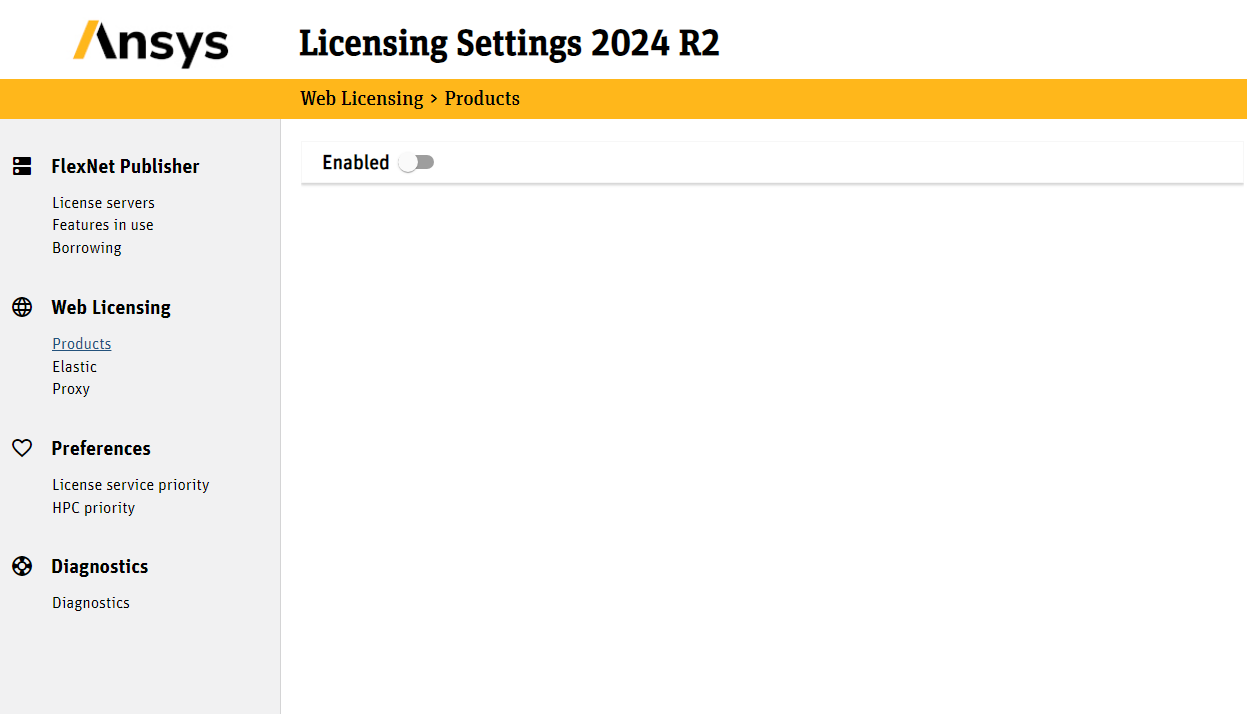
Please launch Ansys Licensing Settings> Product under web> disable it, if you are not using it.
Is this a student version?
-
September 23, 2024 at 3:33 pm
-
October 4, 2024 at 11:30 am
Rajeshwari Jadhav
Forum ModeratorHi Aamin,
Try rename the Ansys folder under %appdata%.
Â
-
October 4, 2024 at 3:19 pm
aamin1
SubscriberTried that. Same issue. Getting the same error.
-
February 22, 2026 at 7:40 pm
s214590
SubscriberI have the exact same problem. I also tried renaming in %appdata%, and I am still dealing with the issue. I am using my university's license server.
-
February 22, 2026 at 7:54 pm
aamin1
SubscriberFor us, it was the licensing error. We were given a wrong license file, which was not able to recognize the license kept on the server.
If you are recently acquiring a license for your institution, please make sure
1. You are given the right license file
2. The computers are pointing to the correct server and ports
3. You are running the correct program for which you were given the license file.
Hope this helps. -
February 23, 2026 at 3:54 pm
s214590
SubscriberHello Aamin,
Thanks for the reply.
I don't believe I have a license file? I am simply utilizing a server.
Br. -
February 23, 2026 at 3:59 pm
aamin1
SubscriberAsk your school administrator and check whether a license for your program is available. Before doing that, you might want to see if you are getting a ping from the license host ip. Your school admin will be able to guide you better in this regard.Â
-
- You must be logged in to reply to this topic.
-
5654
-
1890
-
1414
-
1303
-
1021
© 2026 Copyright ANSYS, Inc. All rights reserved.