-
-
April 28, 2020 at 10:56 am
rahulgundre
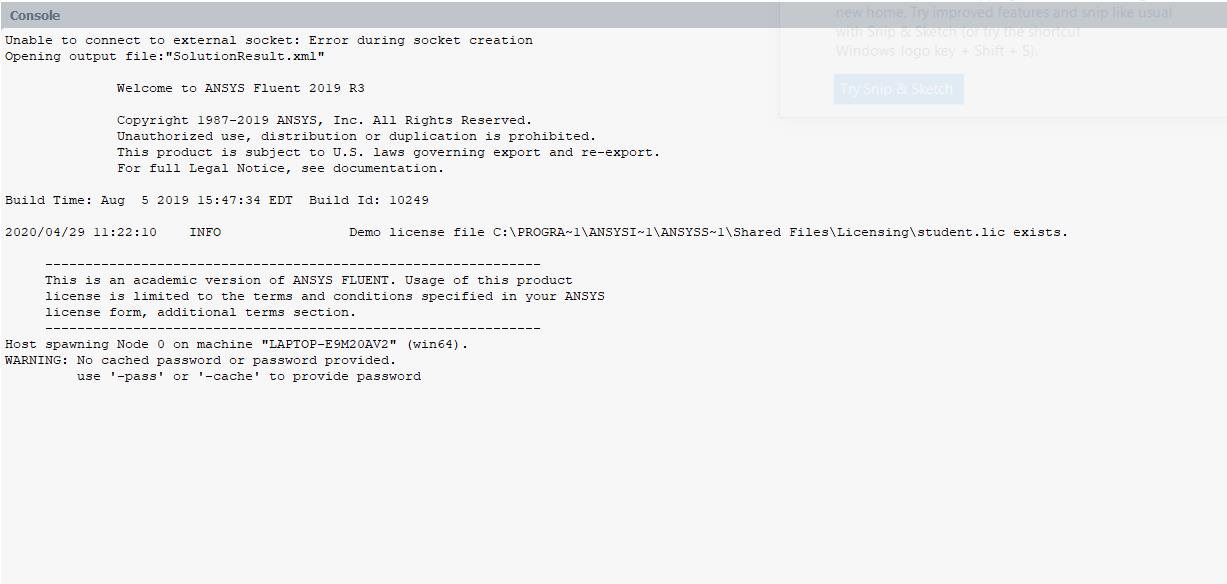
Subscriberafter meshing when I try to open fluent its failing to open.Â
I have many times uninstalled it and also deleted temporary files also still I am giving the same problem.Â
Can someone help me?Â
-
April 28, 2020 at 4:15 pm
Amine Ben Hadj Ali
Ansys EmployeeIf you open Fluent standalone which error messages are printed,? -
April 29, 2020 at 5:58 am
-
April 30, 2020 at 5:13 am
Amine Ben Hadj Ali
Ansys EmployeeSeems it dies keep spawning: check if the rules are set correctly in Firewall. You can also try to reboot computer, start Fluent again using another parallel method -
April 30, 2020 at 5:48 am
rahulgundre
SubscriberThanks you very much Amine.Â
I am able to access fluent after disabling firewall. But can you help me regarding how firewall setting should be there so that I can access fluent after enabling Firewall.
Â
Thanks and Regards,
RahulÂ
-
April 30, 2020 at 12:27 pm
Amine Ben Hadj Ali
Ansys EmployeeYou should pay attention to the messages showing up asking for permissions. It might occur that theses messages won't pop-up and you need to include the rules for in/out for the Fluent executable and MPI services. Check with your IT (if university) on that, if you do not know what to do.Â
Â
Please mark this as is solved.
-
- The topic ‘FLUENT application Failed to start in 19R3 version’ is closed to new replies.

-
4678
-
1565
-
1386
-
1242
-
1021
© 2025 Copyright ANSYS, Inc. All rights reserved.
.jpg?width=690&upscale=false)