Ansys Free Student Software

Ansys Free Student Software

Topics cover installation and configuration of our free student products.

Fluent application failed to start

    • Reece99
      Subscriber

      When i try to open fluent within workbench it fails with the prompt fluent application fails to start. when i try to open fluent by itself it opens but never really loads. 

    • tsiriaks
      Ansys Employee

      Hi Reece99,


      The error says it can't read certain file in the installation directory.


      Did you install ANSYS with 'run as admin' ?


      Check the permissions on your installation directory and make sure your username at least has read permission.


      A potential temporary workaround might be to run Fluent with 'run as admin' .


      Thanks,


      Win

    • Reece99
      Subscriber

      I'm pretty sure i installed with run as admin and that my username have admin privilege. I got the same results when i ran fluent with run as admin 

    • tsiriaks
      Ansys Employee

      Something is wrong with your permissions. Please uninstall this and manually remove D:ANSYS Inc folder afterwards. Then re-install again, make sure you 'run as admin' and see if the issue persists.


      Thanks,


      Win

    • Reece99
      Subscriber

      I uninstalled and re downloaded ansys and it getting the same result 

    • tsiriaks
      Ansys Employee

      If you look at the console text output, this is now a different issue. It can now go farther but Fluent is still not completely launched , so the screen is still grey.


      Try launching it with this mode


      Processing Options : Parallel


      Processes : 0


      Does this help ?


      Also, open CMD Prompt and issue this command


      ping %computername% -4


      and post the screenshot of the output of i


    • Reece99
      Subscriber

      fluent opened fully when i ran it parallel. Here is the command prompt 

    • Reece99
      Subscriber

      When i try to run it in workbench it opens and then the second i try to do anything it fails 

    • tsiriaks
      Ansys Employee

      Can you elaborate on this 'fail' ?


      Is there any error message ?


      Does it crash ?


      What if you specify


      Processing Options : Parallel


      Processes : 2

    • Reece99
      Subscriber

      For both using processes: 0 or 2 i receive the same error each time:


      fluent failed to start 


    • tsiriaks
      Ansys Employee

      Now, I'm confused.


      What do you mean when you said "fluent opened fully when i ran it parallel."


    • Reece99
      Subscriber

      From what I could tell it appeared as though fluent opened and fully loaded, but once i tried to do anything the program crashed. 

    • tsiriaks
      Ansys Employee

      If you launch stand-alone Fluent, do you have any issue (try both 0 and 2 processors) ?


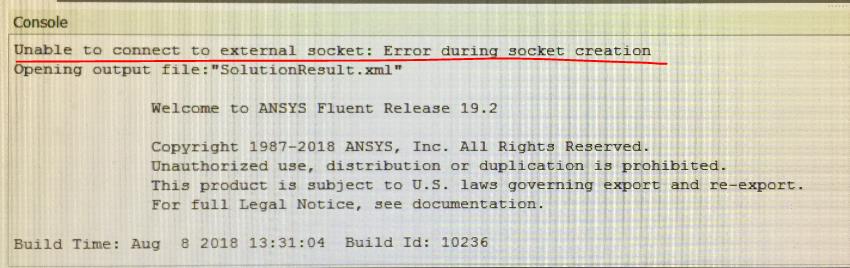
      Your issue with Workbench-Fluent is because of that error "unable to connect to external socket, error during socket creation" . This is likely because Firewall or Anti-virus software on the machine is blocking this.


    • Reece99
      Subscriber

      Ok so It open and ran fine when i used o processors but i received this when I ran 2 processors


      if the error on workbench is a problem with my firewall or anti-virus software, how would i fix that?


    • tsiriaks
      Ansys Employee

      so there is no graphics-related issue here (which was one of the main culprits I was thinking about)


      All of these issues are related to your Firewall or Anti-virus software. Just for a test, turn every security software on your machine off temporarily and see if it works. If it works, then turn them back on one-by-one and see which one is the one that causes the issue, then make sure you add ANSYS Inc folder to the 'exclusions' list of that software.

    • rchristensen
      Subscriber

      I have been having the same issue with ANSYS 19.2 and 2019 R2. I have turned off the anti-virus as well as the firewall. But I still get the issue which states "Unable to connect to external socket: Error during socket creation". 


      Thanks,
      Rich

    • tsiriaks
      Ansys Employee

      Hi Rich,


      I would recommend to create a new thread for your own.


      There is still something blocking socket connections. Are you on VPN ? Are you using any remote desktop visualization tool ?


      Do you see the same error if you launch it in non-GUI mode, something like


      "%awp_root194%fluentntbinwin64fluent.exe" -r19.4.0 3d -g


      Thanks,


      Win

    • rchristensen
      Subscriber

      Hello Win,
      I read on another forum that this can be solved by trying you use the fluent stand-alone from the "Component Systems" and then importing the model/mesh from another study. I did that and this resolved the problem. 

      Since then, the application is finding looking up the correct license and is not giving me any issues. I don't know why this worked, but it seems to have resolved the issue for me. 


      Thanks,
      Rich

    • tsiriaks
      Ansys Employee

      Hi Rich,


      That's very odd. Thank you for sharing the resolution.


      Thanks,


      Win

    • mohanpannirselvam08
      Subscriber

      Hallo everyone, I faced this same problem for past two weeks and finally solved it.


      My Fluent keep pointing the error " Fluent application failed to start".


      and in the Fluent log box says "Unable to connect to external socket: Error during socket creation Opening output fil".


      Based on this I assumed there is a connection failure between a Host and client.


      My set Up is a Client Side on Windows 10 with a VPN (Cisco) where i am receiving the license for Anysy from my university.


      I did everything as mentioned turning off firewall, reinstalling as admin, reconfiguring my VPn. but neither was working.


      Solution


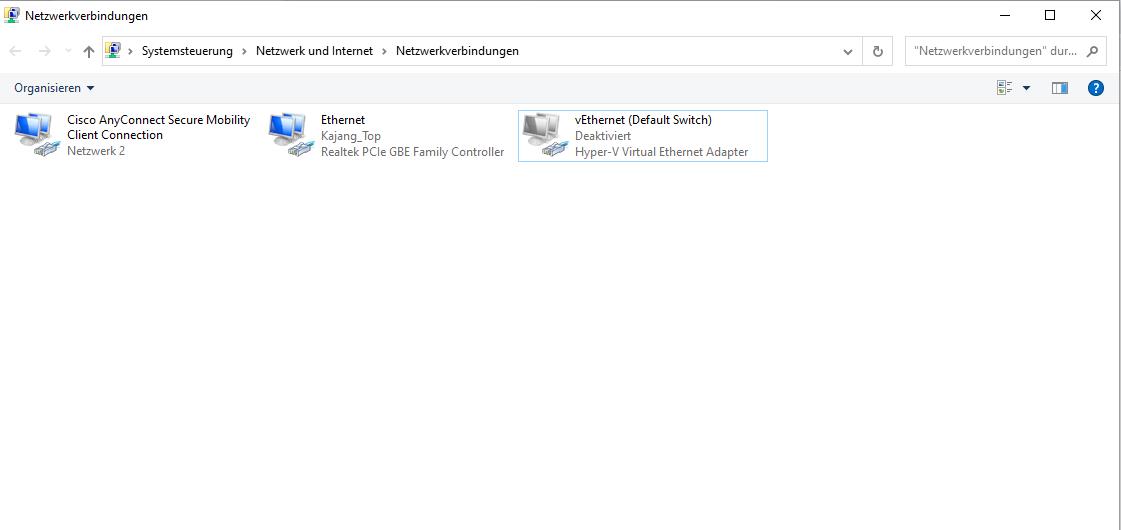
      In the end , i traced back the problem to my Hyper-V Virtual Adapter Ethernet. If you are a Android Studio developer most probably you have this one too.


      Deactiavte it as i showed in this image. After that restart the pc and all error will not show again.




Viewing 19 reply threads
  • The topic ‘Fluent application failed to start’ is closed to new replies.