Electronics

Electronics

Topics related to HFSS, Maxwell, SIwave, Icepak, Electronics Enterprise and more.

Field Distribution

    • omiduga
      Subscriber

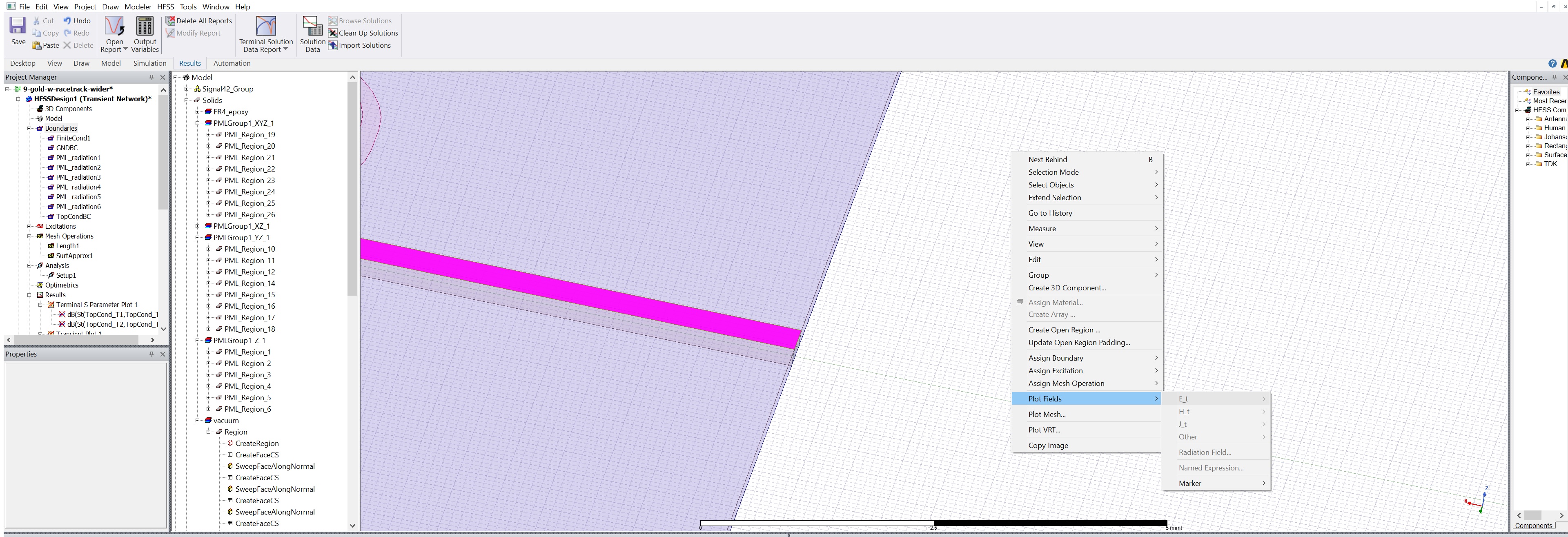
      1- How can I see the electrical field distribution after the simulation in the transient time domain? (When I right click on the surface of structure, the plot fields are deactivated, and I cannot choose the E field)


      2- Can I see the field distribution in the terminal mode solver? What about eigenvalue solver in hfss?


      3- How can I change the frequency for the field distribution? (I can only see one frequency in the simulation)


      Thanks

    • Sorceress Gia
      Ansys Employee

      With any solver you need to select the object or face to plot the fields on - if you are trying to look at the fields in a solid object where "solve-inside" is disabled (most metals) then you won't see anything because there is no solved data there. It may be better to enter face select mode (press 'f' on the keyboard after clicking somewhere in the modeler window) and select the face of the object where field data exists and then create your plot.


      To plot in a cut-plane through an object, select one of the planes in the modeler tree and then plot your field data.

      Yes, you can only see the data from one frequency at a time with the main solution frequency as the default. If you added a discrete frequency sweep then you can choose another frequency point in the sweep by right clicking on 'Results' and then 'Browse Solutions' - then you can select the active design variation (again assuming there is solved field data from a sweep and you enabled the 'save fields' checkbox in the sweep setup window).

    • omiduga
      Subscriber

      Thanks Peter,

      But as I attached the screen-shot, the E-field is deactivated for Transient simulation.

    • Sorceress Gia
      Ansys Employee

      Can you please upload a higher resolution screenshot?

    • Sorceress Gia
      Ansys Employee

      Check out the HFSS help guide "Procedure for Viewing Transient Radiated Fields" - Have you enabled the "Save time domain radiated fields" check box"?


      To display transient radiated fields:

      1. Add a radiation boundary. Radiated field calculations will only be done for designs with radiation boundaries.

      2. If a radiation boundary is present the transient Solve Setup contains the Radiated Fields tab with a "Save time domain radiated fields" check box. Select this option to make radiated fields available from a given setup. This applies to Transient with or without Network Analysis.

    • tomas.monopoli
      Subscriber
      .

      I have a setup with a radiation boundary box with a Transient solution type. I have ticked the box to save time domain radiated field (max number of samples =1000).

      Still if I select the boundary box, then left click to plot fields, the field options are deactivated as omiduga shows in the screenshot.

      Also the saved fields tab in the solution setup is deactivated:

      any ideas anyone?

      Thanks ,

      Tomas

      .
Viewing 5 reply threads
  • The topic ‘Field Distribution’ is closed to new replies.