Electronics

Electronics

Topics related to HFSS, Maxwell, SIwave, Icepak, Electronics Enterprise and more.

Excitation of lumped port

    • Shayla Sharmin
      Subscriber

      Why is there no option for drawing an integration line to excite lumped port?? It is causing error as I cannot excite the ports properly.

    • GeorgM
      Subscriber


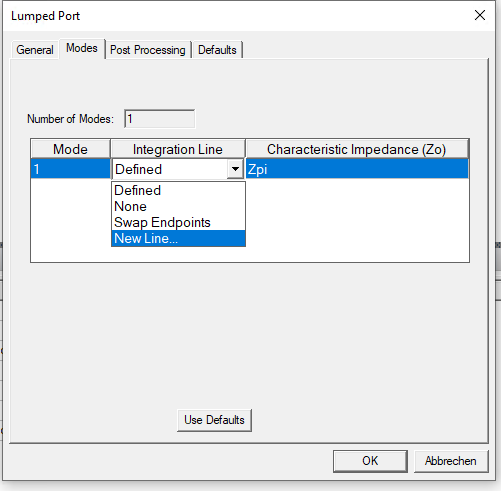
      In the Modes tab of the lumped port, you have the option to draw an integration line:

      Alternatively, you can choose the Terminal solution type instead of Modal. Then you don’t need an integration line. 

      I hope this helps.


      Regards

      Georg


    • Shayla Sharmin
      Subscriber


      Thanks. I was in the terminal mode already. That’s why the modes option was not coming up. I am a new student here. If you could tell me something about the following error it would be of great help.

       “Terminals cannot be assigned because either there are no conducting objects or all conducting objects have been designated as terminal reference conductors.” 


    • GeorgM
      Subscriber


      Your port (a sheet object) must touch two different conducting objects on two opposite edges of the port object. Then one (and only one) of the conducting objects must be declared as the terminal reference. If the two sheet edges touch the same conducting object, then it is better to choose the modal solution type and draw an integration line. Alternatively, you can split the conducting object into two.

      This is the simplest form where you have one terminal per port. However, it is possible to have more terminals, i.e. conductors which are not reference. This would be equivalent to different modes in the modal solution type. 


Viewing 3 reply threads
  • The topic ‘Excitation of lumped port’ is closed to new replies.