3D Design

3D Design

Topics related to Ansys Discovery and Ansys SpaceClaim.

Errors with Geometry interface and PlugIn

    • mobleysn
      Subscriber

      I recently installed ANSYS 13 on my computer by copying the v130 file folder and some other relevant files over from a different computer. The current project (also copied over) has no issues with meshing, but when I try to make a new project, I cannot do the meshing step. I import geometry (an IGES file saved in SolidWorks) then try to mesh, and I get the errors "PlugIn error: Geometry Interface not found" and "Unable to attach geometry".


      Is this an issue with my model or a file issue with my installation? Or something else?


    • Aniket
      Forum Moderator

      1. Ansys employees can not download images in attachments kindly attach them in as inline images


      2. try downloading latest version of Ansys from student from https://www.ansys.com/en-in/academic/free-student-products


      3. Solidworks geometries can not be imported in free student version. please refer to /forum/forums/topic/solidworks-integration-gone-with-ansys-student-19-0/?order=all#comment-754774e5-82c8-464b-9fb3-a87d0111c2fe


      -Aniket


      Guidelines on the Student Community


      How to access ANSYS help links

    • mobleysn
      Subscriber

      I don't actually have the free student version, I just don't know of a better place to post questions. The project I'm working on requires Fluent, so I need to fix my issue on that version. I have a more recent version downloaded already, it is just not suitable for my specific need.

    • Aniket
      Forum Moderator

      Do you have a commercial license? if yes you can log in on the customer portal and post this query.

    • mobleysn
      Subscriber

      Where would I post a query on that site? I don't see an obviously marked link to posting my own questions, I just see the "solutions search" option.

    • Rob
      Forum Moderator

      If you have an academic licence you'll need to post here: Aniket's missed that you may have a research licence which removes some of the limitations. If you have a commercial licence then you should have a "support" option somewhere. 


      If you're using v13 you're about 10 years out of date, current release is 2019R3 or 2020R1 (Student & paid for respectively) and it's possible the Solidworks export is too advanced for the v13 CAD reader. 

    • mobleysn
      Subscriber

      I was using v13 on the computer I transferred the v130 file from and it was working well with SolidWorks models while on that computer. It is only after I copied over the v130 file to try and install v13 on a different computer that I encountered issues.


      The current project, which I copied over at the same time, works fine, but any new projects I try to create with SolidWorks models result in the error shown in my initial post. I am trying to figure out if this issue is a result of me incorrectly copying over the file or if it is due to something else.


      I have v19 on my current computer, but I require FLUENT for my project so as far as I know I need to use v13.


    • Aniket
      Forum Moderator

      copying and pasting is not a recommended way of installing Ansys. If you are able to login to the customer portal, check https://support.ansys.com/AnsysCustomerPortal/en_us/Downloads/Current+Release which has versions going back till 17.0. 


      But even if you require Fluent, it is available in all the latest version.


      -Aniket


      Guidelines on the Student Community


      How to access ANSYS help links

    • mobleysn
      Subscriber

      I don't have access to the correct way to install v13, so I just did my best. Where is Fluent in the newer versions? I don't see it outright labelled, did it get integrated into a different sub-program?

    • Aniket
      Forum Moderator

      was it selected while installing? I can still see the stand-alone app of fluent in the latest version along with workbench integration. 

    • mobleysn
      Subscriber

      I just installed the "Fluids" primary package for v19, and fully set it up, but I do not see fluent in my list of analysis systems. Do I need to do something specific with the files I downloaded? Do they need to be in a specific folder?

    • Rob
      Forum Moderator

      If you've downloaded the nonStudent version you need to set up the licence manager & add a valid key. 


      If it's ANSYS Student, the licence for R19.x has expired, you'll need to follow the instructions in the Installation section sticky and download 2019R3 for the licence. 

    • mobleysn
      Subscriber

      I have a license for "Academic Research Mechanical & CFD", would that cover the Fluent? I would assume so, since Fluent is in the CFD. I am installing all of my v19 files from the customer portal.

    • Rob
      Forum Moderator

      Yes, that should include Fluent. Have you also set up the licence manager and pointed it at the licence file?  You'll need to do the install & setup as Admin. 

    • mobleysn
      Subscriber

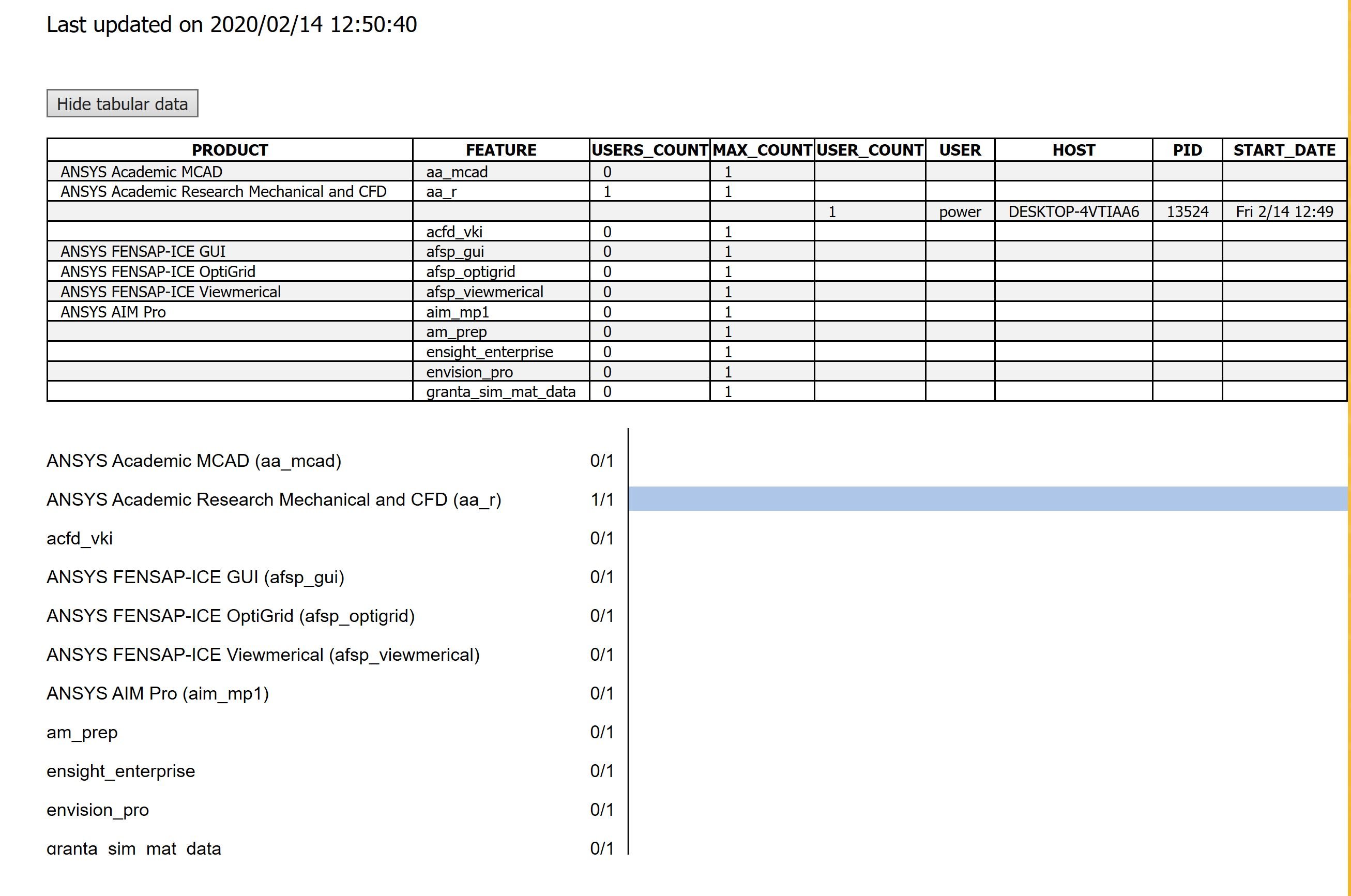
      I have the license management center up and running, yes. The "View Status" tab says that the license manager is running. I checked on the license usage and it appears to have activated the correct program:


      However, my v19 still does not show fluent, or acknowledge having CFD at all:


    • Keyur Kanade
      Ansys Employee

       Hi, 


      This question looks like as installation specific. Can you please create a question under category of 'Installation and Licensing' so that somebody from installation will reply. Please mention all details of your license in the question. 


      Regards,


      Keyur

Viewing 15 reply threads
  • The topic ‘Errors with Geometry interface and PlugIn’ is closed to new replies.