-
-
April 4, 2019 at 3:55 pm
shtsai
SubscriberHi Win,
This is a follow up to my previous post entitled "Error running single large time simulation on multiple nodes". Sorry for creating a new discussion, but I have not been able to reply or add a post to that thread. Not sure why.
Thank you so much for your response. I tried to follow the suggestion in the link you pointed me to, but I am still not able to get MPI to work on multiple nodes. Our queueing system is Torque/Moab and my test job is allocated 2 nodes and 20 cores per node.
When I use 'HFSS/RemoteSpawnCommand'='Scheduler' with this command:
ansysedt -distributed -machinelist num=40 -monitor -ng -batchoptions "'HFSS/EnableGPU'=0 'HFSS/HPCLicenseType'='pool' 'HFSS/MPIVendor'='Intel' 'HFSS/RemoteSpawnCommand'='Scheduler'" -batchsolve HFSSDesign1:Nominal:Setup1 SampleDesign.aedt
I get the error:
"[error] Batch option HFSS/RemoteSpawnCommand has invalid value Scheduler; this value is only allowed when running under an LSF or SGE/GE/UGE scheduler."
Is there a way to use the Scheduler option when using Torque/Moab?
When I run the ansysedt command with 'HFSS/MPIVendor'='Intel', but use 'HFSS/RemoteSpawnCommand'='SSH', and export the environment variable I_MPI_TCP_NETMASK=ib0, such as (using bash shell):
export I_MPI_TCP_NETMASK=ib0
ansysedt -distributed -machinelist list="n278:4:10:90%,n279:4:10:90%" -monitor -ng -batchoptions "'HFSS/EnableGPU'=0 'HFSS/HPCLicenseType'='pool' 'HFSS/MPIVendor'='Intel' 'HFSS/RemoteSpawnCommand'='SSH'" -batchsolve HFSSDesign1:Nominal:Setup1 SampleDesign.aedt
(where n278 and n279 are the two hosts allocated to the job by the queueing system), I still get the error:
Design type: HFSS
Allow off core: True
Using manual settings
Two level: Disabled
Distribution types: Variations, Frequencies, Transient Excitations, Domain Solver
Machines:
n278 [191904 MB]: RAM: 90%, task0
cores, task1
cores, task2:2 cores, task3:2 cores
n279 [191904 MB]: RAM: 90%, task0
cores, task1
cores, task2:2 cores, task3:2 cores
[info] Project:SampleDesign, Design:HFSSDesign1 (DrivenTerminal), Setup1 : Sweep distributing Frequencies (2:50
5 PMÂ Apr 03, 2019)
[error] Project:SampleDesign, Design:HFSSDesign1 (DrivenTerminal), Could not start the memory inquiry solver: check distributed installations, MPI availability, MPI authentication and firewall settings. -- Simulating on machine: n278 (2:52
6 PMÂ Apr 03, 2019)
I also tried to export I_MPI_TCP_NETMASK=ib and I_MPI_TCP_NETMASK=255.255.0.0 (our netmask), but these didn't work either.
What is the correct way to define the I_MPI_TCP_NETMASK variable? Is exporting it before invoking ansysedt an appropriate way?
Any other suggestions of what I can do to get this MPI capability working?
Can you also suggest a simple command (and arguments) that I can use to test this MPI capability using multiple nodes, if the command I am using is not the most appropriate?
Thank you very much again!
Shan-Ho -
April 5, 2019 at 10:41 am
ANSYS_MMadore
Forum ModeratorHi Shan-Ho,
Please provide the following:
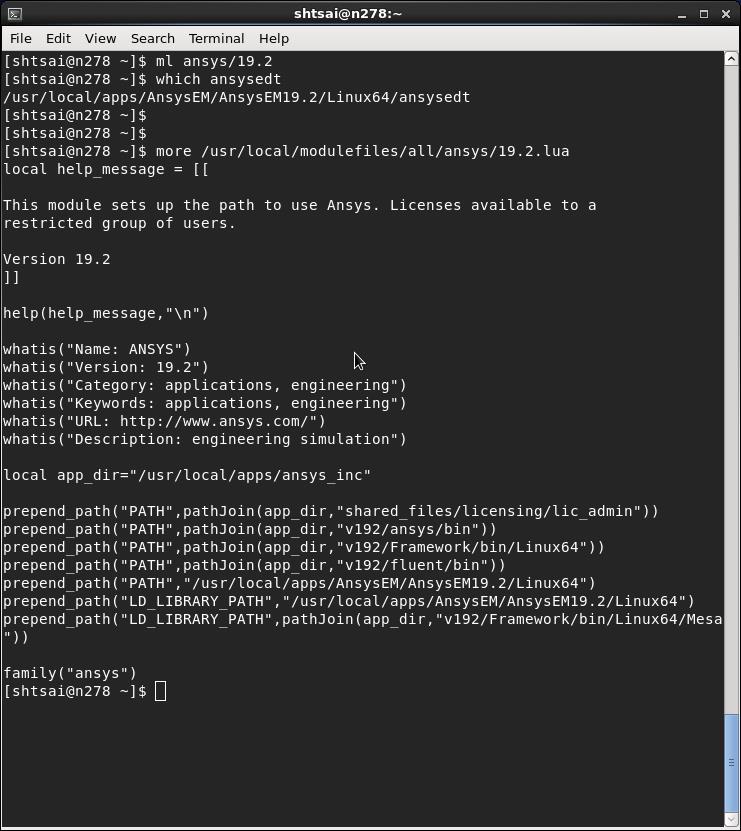
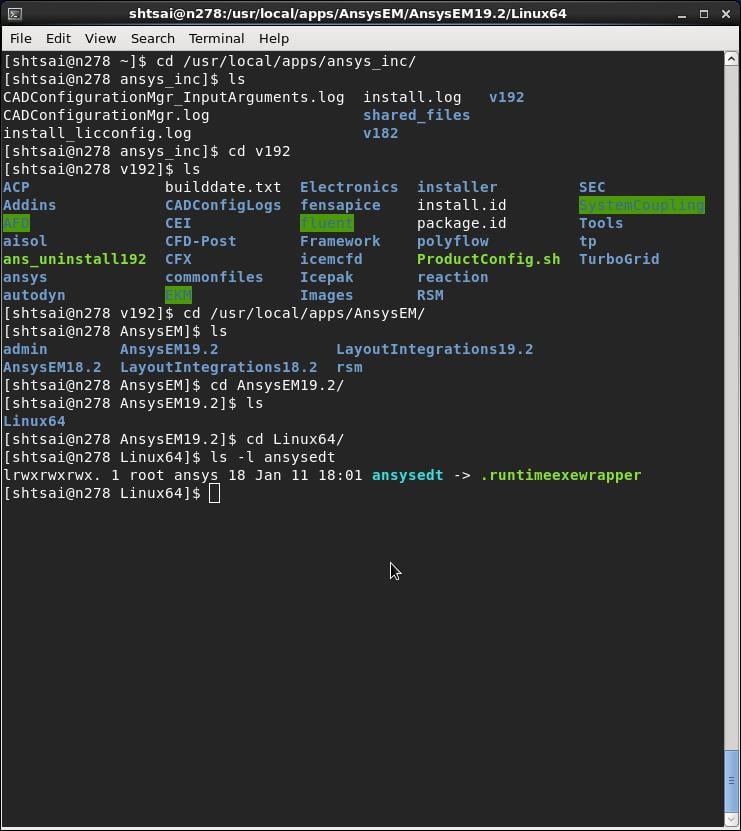
1. Location of the AnsysEM installation - ex:Â /opt/AnsysEM/AnsysEM19.1/Linux64/ansysedt
2. Screenshots of the following six commands (run in succession)
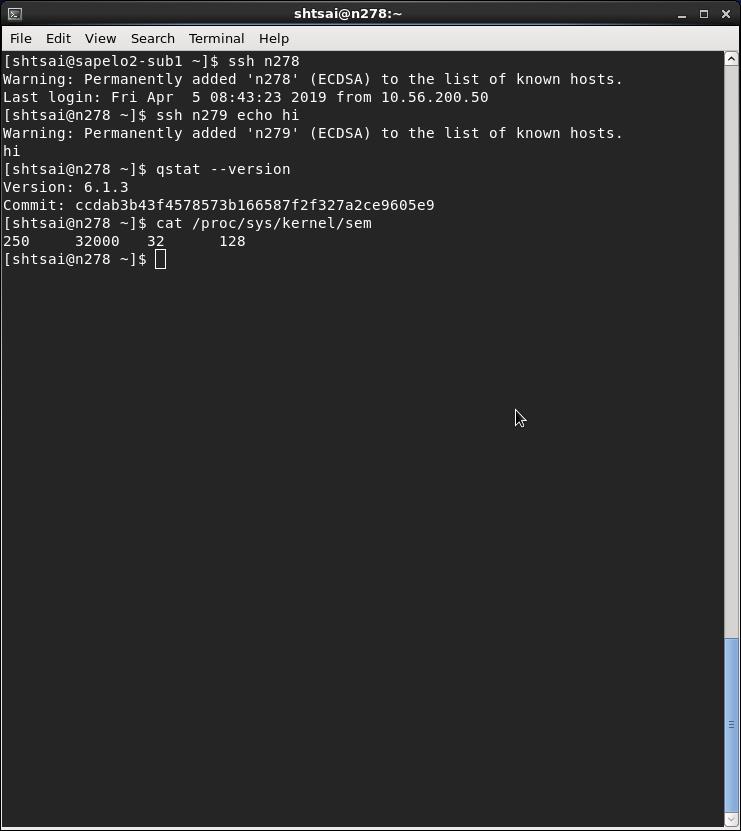
$ ssh n278Â
$ ssh n279 echo hi
$ qstat --version
$ cat /proc/sys/kernel/sem
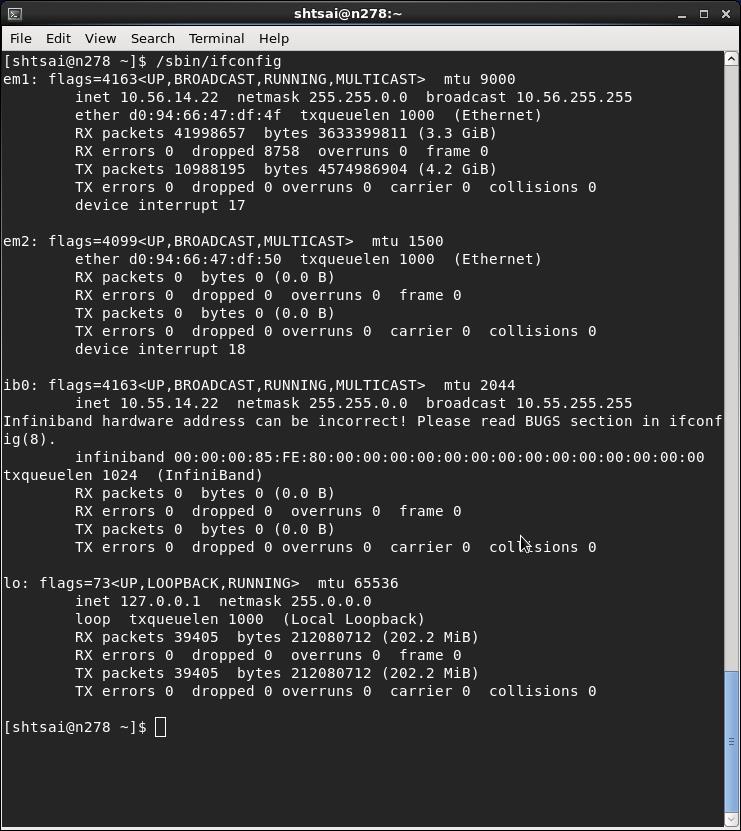
$ /sbin /ifconfig - Please remove the space between /sbin and /ifconfig. It will not post properly on the forum if I take out the space.
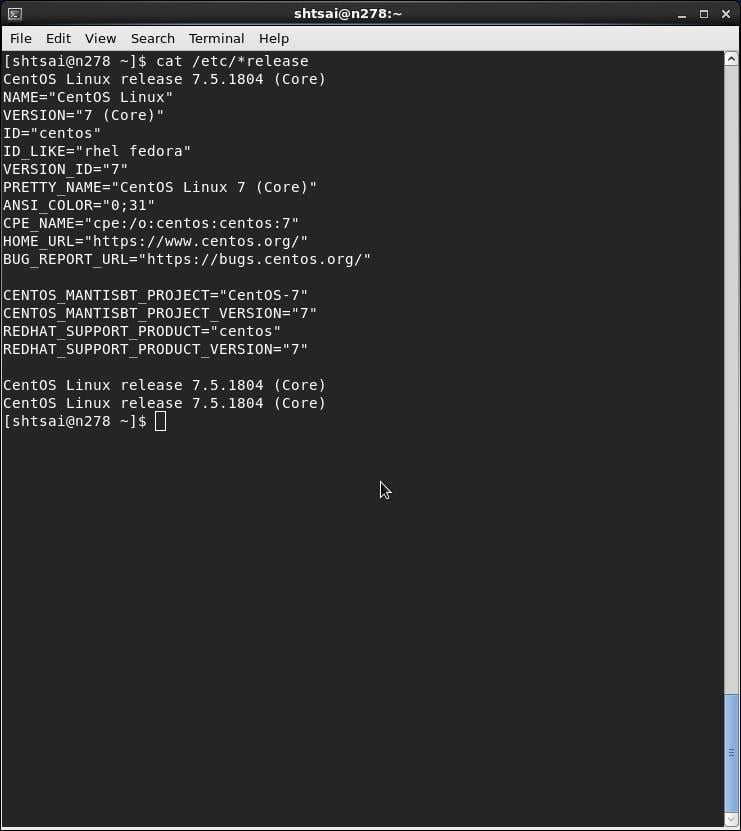
$ cat / etc/ *release
Thank you,
Matt -
April 5, 2019 at 12:51 pm
-
April 5, 2019 at 12:52 pm
-
April 5, 2019 at 12:52 pm
-
April 5, 2019 at 12:54 pm
shtsai
SubscriberHi Matt,
Thank you so much for your response. Please see the screenshots above.
Thanks again,
Shan-Ho
Â
Â
-
April 5, 2019 at 12:58 pm
-
April 5, 2019 at 12:59 pm
randyk
Forum ModeratorHi Shan-Ho,
Â
Thank you, that should help.
Please provide the installation location of AEDT as well.
thanks
Randy
Â
-
April 5, 2019 at 1:13 pm
-
April 5, 2019 at 1:23 pm
randyk
Forum ModeratorHi Shan-Ho,
Unfortunately, I cannot post a response that has embedded "/" characters.
Please copy all the remainder to a text editor and replace all occurrences of "|" with "/"
==================================================================================
(as Root user)Â
cd |usr|local|apps|AnsysEM19.2|Linux64
.|UpdateRegistry -set -ProductName ElectronicsDesktop2018.2 -RegistryKey "HFSS|HPCLicenseType" -RegistryValue "Pool" -RegistryLevel install
.|UpdateRegistry -set -ProductName ElectronicsDesktop2018.2 -RegistryKey "HFSS 3D Layout Design|HPCLicenseType" -RegistryValue "Pool" -RegistryLevel install
.|UpdateRegistry -set -ProductName ElectronicsDesktop2018.2 -RegistryKey "HFSS-IE|HPCLicenseType" -RegistryValue "Pool" -RegistryLevel install
.|UpdateRegistry -set -ProductName ElectronicsDesktop2018.2 -RegistryKey "2D Extractor|HPCLicenseType" -RegistryValue "Pool" -RegistryLevel install
.|UpdateRegistry -set -ProductName ElectronicsDesktop2018.2 -RegistryKey "Circuit Design|HPCLicenseType" -RegistryValue "Pool" -RegistryLevel install
.|UpdateRegistry -set -ProductName ElectronicsDesktop2018.2 -RegistryKey "Maxwell 2D|HPCLicenseType" -RegistryValue "Pool" -RegistryLevel install
.|UpdateRegistry -set -ProductName ElectronicsDesktop2018.2 -RegistryKey "Maxwell 3D|HPCLicenseType" -RegistryValue "Pool" -RegistryLevel install
.|UpdateRegistry -set -ProductName ElectronicsDesktop2018.2 -RegistryKey "Q3D Extractor|HPCLicenseType" -RegistryValue "Pool" -RegistryLevel install
.|UpdateRegistry -set -ProductName ElectronicsDesktop2018.2 -RegistryKey "Desktop|Settings|ProjectOptions|AnsysEMPreferredSubnetAddress" -RegistryValue "10.55.0.0|16" -RegistryLevel install
Â
Â
That will create |usr|local|apps|AnsysEM19.2|Linux64|config|default.XMLÂ Â resulting the those values becoming system default and eliminating a requirement to specify in each submission.
Â
From there, try the following submission test (adjust as needed):
Â
 job.sh
#!|bin|sh
#PBS -j oe
export ANSOFT_MPI_INTERCONNECT=ib
export ANSOFT_MPI_INTERCONNECT_VARIANT=ofed
export ANS_NODEPCHECK=1
export ANSOFT_PBS_VARIANT=pbspro
|usr|local|apps|AnsysEM19.2|Linux64|ansysedt -distributed -machinelist numcores=12 -auto -monitor -ng -batchoptions "" -batchsolve HFSSDesign1:Nominal:Setup1 SampleDesign.aedt
Â
Then Â
qsub job.sh
Â
note: Your system semaphores do not meet ANSYS recommeneded, you may see failures in larger jobs.
The following kernel semaphore settings are recommended:
· SEMMSL (maximum number of semaphores per semaphore set) = 256
· SEMMNS (system-wide limit on the number of semaphores in all semaphore sets) = 40000
· SEMOPM (maximum number of operations that may be specified in a semop() call) = 32
· SEMMNI (system-wide limit on the number of semaphore identifiers) = 32000
Â
The following guidance may help correct these on each solver node:
(as root user)
To dynamically change SEMMSL, SEMMNS, SEMOPM, and SEMMNI:
$Â Â echo 256 40000 32 32000 > |proc|sys|kernel|sem
To make the change permanent at the next reboot add the change to the file |etc|sysctl.conf file which is used during the boot process
$Â Â echo "kernel.sem=256 40000 32 32000" >> |etc|sysctl.conf

-
April 5, 2019 at 5:25 pm
shtsai
SubscriberHi Randy,
Thank you so much for your detailed response and your very helpful note on the semaphores. We will definitely look into that.
For now I've run all the UpdateRegistry commands you suggested and a config/default.XML file was created.
Then I submitted a job using essentially your job.sh script, with the 4 export lines and the same ansysedt command line, except that I changed -machinelist numcores=12 to -machinelist numcores=40, as I requested 2 nodes and 20 cores per node with
The MPI error that I was seeing before is not occurring anymore, which is great. However, the job only uses 4 cores on one node. The log file contains these lines:
Machines:
localhost [unknown MB]: RAM: 90%, task0:4 cores
Not sure why my job is only using 4 cores on one node.
What could I be missing?
Thanks so much again for your kind help!
Shan-Ho
Â
Â
Â
-
April 5, 2019 at 5:37 pm
randyk
Forum ModeratorHi Shan-Ho,
Are you running the job by submitting to the cluster "qsub job.sh" ?
The log snippet you shared indicates localhost and not the actual hostname.
Â
Please share the SampleDesign.aedt.batchresults/*.log
Â
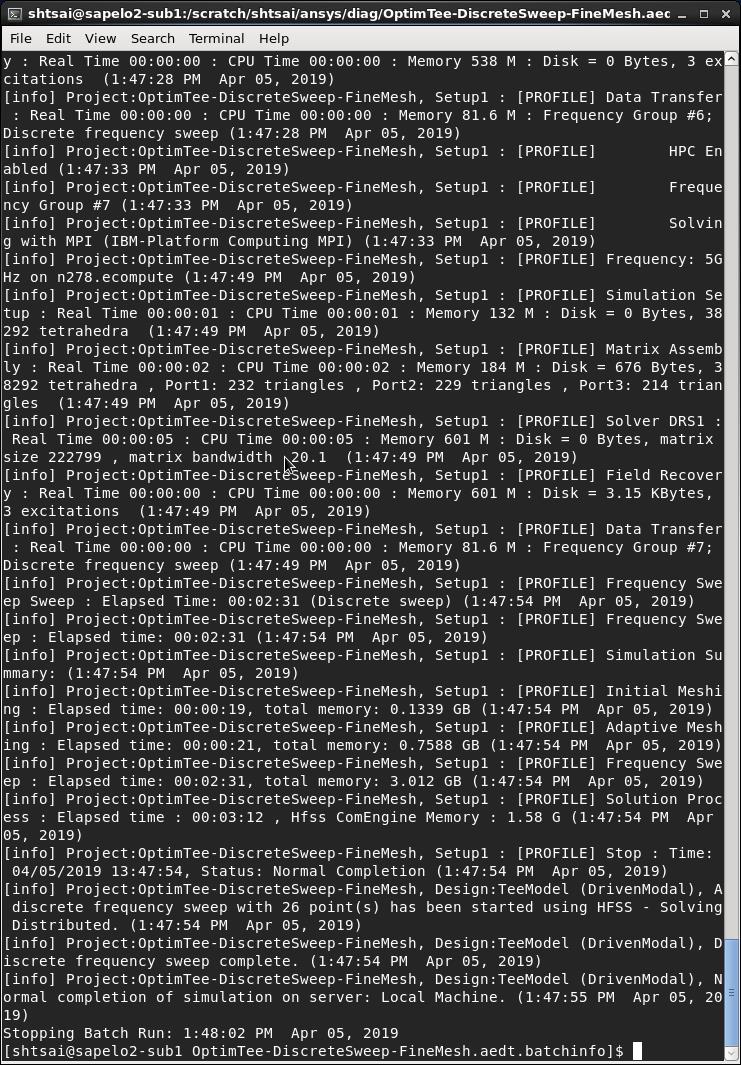
Consider copying and testing with:Â Â |usr|local|apps|AnsysEM19.2|Linux64|schedulers|diagnostics|Projects|HFSS|OptimTee-DiscreteSweep-FineMesh.aedt
Â
 job.sh
#!|bin|sh
#PBS -j oe
export ANSOFT_MPI_INTERCONNECT=ib
export ANSOFT_MPI_INTERCONNECT_VARIANT=ofed
export ANS_NODEPCHECK=1
Â
export ANSOFT_PBS_VARIANT=pbspro
|usr|local|apps|AnsysEM19.2|Linux64|ansysedt -distributed -machinelist numcores=40 -auto -monitor -ng -batchoptions "" -batchsolve  TeeModel:Nominal:Setup1OptimTee-DiscreteSweep-FineMesh.aedt
Â
-
April 5, 2019 at 6:11 pm
shtsai
SubscriberHi Randy,
Yes, I submitted the job with "qsub job.sh" and the job got allocated nodes n278 and n279. Per your suggestion, I copied the sample file OptimTee-DiscreteSweep-FineMesh.aedt to my working directory and submitted the job to the queue, using "qsub job.sh" (and using your job.sh file). This job also appears to only use one of the nodes (n278).
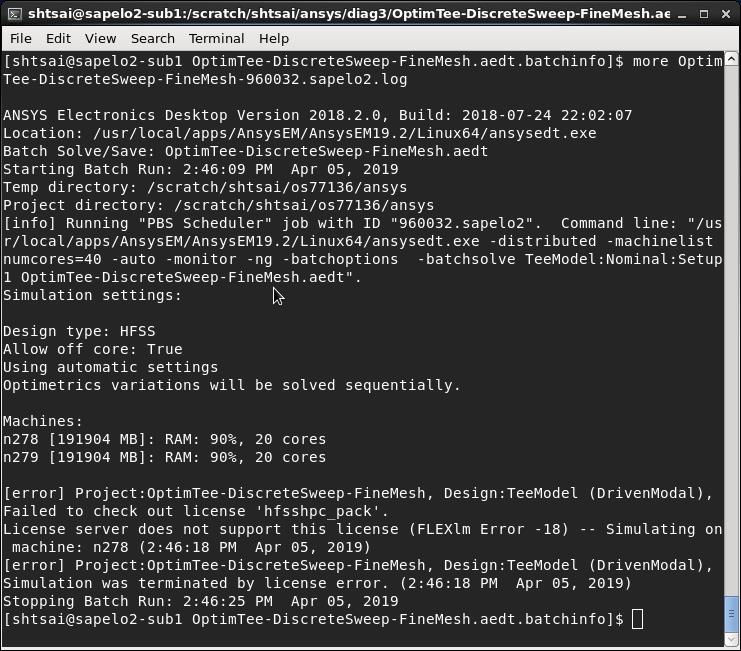
Is there a way I can attach the log file to share with you? I haven't found this option, so I will post an image of the beginning of the file OptimTee-DiscreteSweep-FineMesh.aedt.batchinfo/OptimTee-DiscreteSweep-FineMesh-959886.sapelo2.log
Â
Â
Â
Â
-
April 5, 2019 at 6:12 pm
-
April 5, 2019 at 6:24 pm
randyk
Forum ModeratorHi Shan-Ho,
Â
Header of that file was sufficient to show it recognizes it is running under a PBS scheduler.
However, it is apparently failing to parse the $PBS_NODEFILE as it is referencing "localhost" and not the assigned solver nodes.
Â
Please try once more without:
   export ANSOFT_PBS_VARIANT=pbspro
Â
share the top of the OptimTee-DiscreteSweep-FineMesh.aedt.batchinfo/OptimTee-DiscreteSweep-FineMesh???.log
Â
thanks
Randy
Â
-
April 5, 2019 at 7:15 pm
-
April 5, 2019 at 7:25 pm
randyk
Forum ModeratorHi Shan-Ho,
That is good news!
Regarding default.cfg and HPC license:
1. is / usr / local / apps /Â AnsysEMÂ Â a common mount?
- if not, then the default.XML would need to be copied to each solver node
2. Personal preferences would override the system settings - reset these byÂ
$ mv ~/Ansoft/ElectronicsDesktop2018.2Â ~/Ansoft/ElectronicsDesktop2018.2.oldÂ
$ mv ~/.mw ~/.mw.old
thanks
Randy
-
April 5, 2019 at 7:54 pm
shtsai
SubscriberHi Randy,
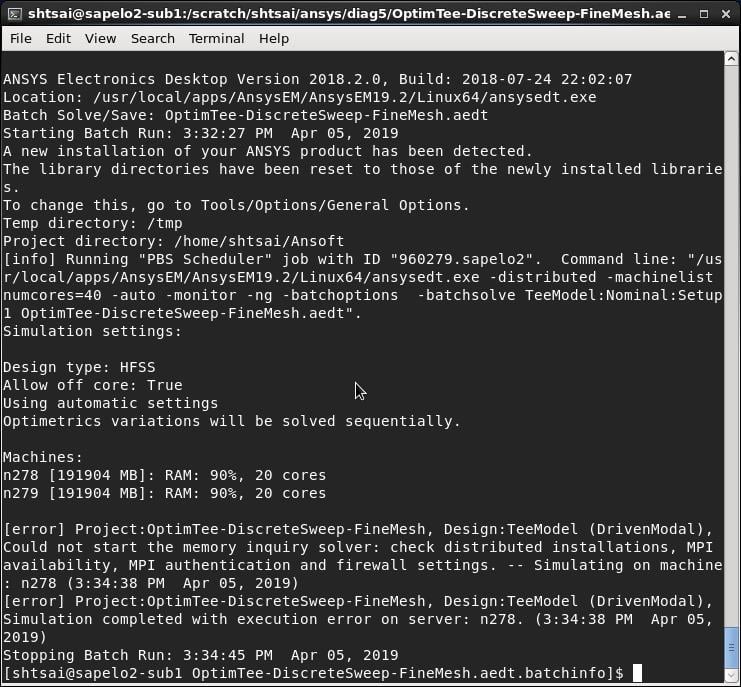
Yes, / usr /local / apps / AnsysEM is a common mount on all nodes. I did the two "mv" commands in your item 2 and now I don't get the license error any more. But I am sorry to say that I still get the MPI error that I was seeing originally. My job.sh file does include the other 3 export lines that you suggested. And config/default.XML is unchanged (and available on all nodes).
By the way, I increased the semaphore settings on the two nodes, per your kind suggestion.
Not sure what I am still missing.
Thanks so much,
Shan-Ho
-
April 5, 2019 at 8:00 pm
randyk
Forum ModeratorHi Shan-Ho,
I will be contacting you directly.
thanks
Randy
-
April 10, 2019 at 2:00 am
randyk
Forum ModeratorCustomer set StrictHostKeyChecking=no  in /etc/ssh/ssh_config file to resolve the MPI related issue.
-
- The topic ‘Error running single large time simulation on multiple nodes – follow up’ is closed to new replies.
-
4673
-
1565
-
1386
-
1236
-
1021
© 2025 Copyright ANSYS, Inc. All rights reserved.