-
-
January 18, 2019 at 4:31 pm
soloviev
SubscriberHello,
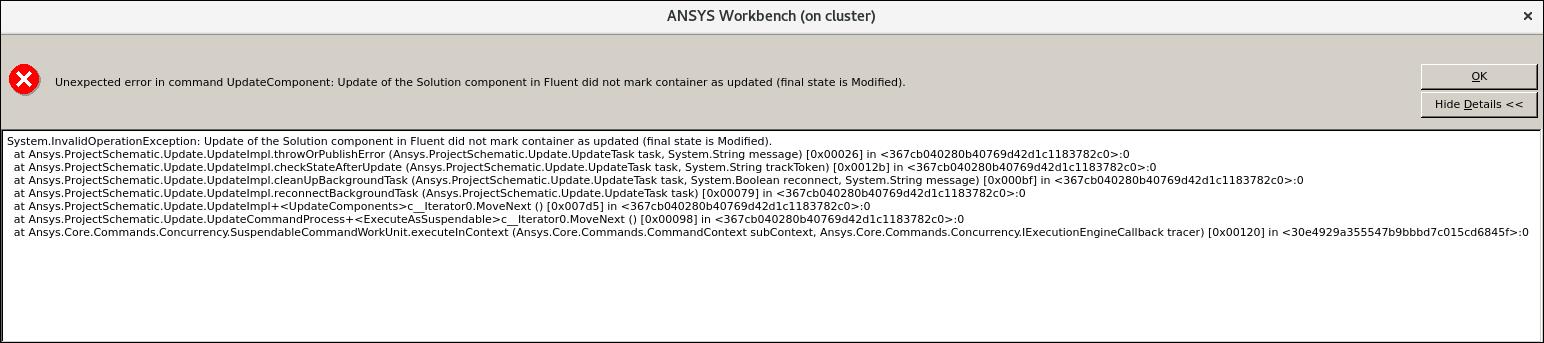
I am attempting to send someone a model through workbench so that they can run it on their computer. We have gotten the files loaded and saved on the other computer, but when attempting to run it, it gives the following error (see photo screenshot). The model is a VOF to DPM. As proposed, I checked if Aluminum was deleted from the materials, and it is not, it is still listed, so that should not be causing the error.
Â
Thanks,
Alex
-
January 18, 2019 at 5:18 pm
Rob
Forum ModeratorDid you archive the project before moving it? If you do then unarchive/extract Workbench will sort out all of the paths etc in the new project; otherwise links can become unstable and/or broken.Â
Alternatively if you're running Fluent you can also export (or write) the case & data out and then run Fluent in stand-alone mode. This may help as you're only transferring the files you need rather than geometry, mesh etc.Â
Â
Â
-
January 18, 2019 at 8:16 pm
soloviev
SubscriberOur first method was standalone, but the person I'm sending it to is unable to run fluent in stand alone mode, so I recreated the model in workbench.Â
Â
The project was not archived before sending!
Â
Thanks,
Alex
-
January 22, 2019 at 4:26 pm
-
January 22, 2019 at 4:32 pm
Rob
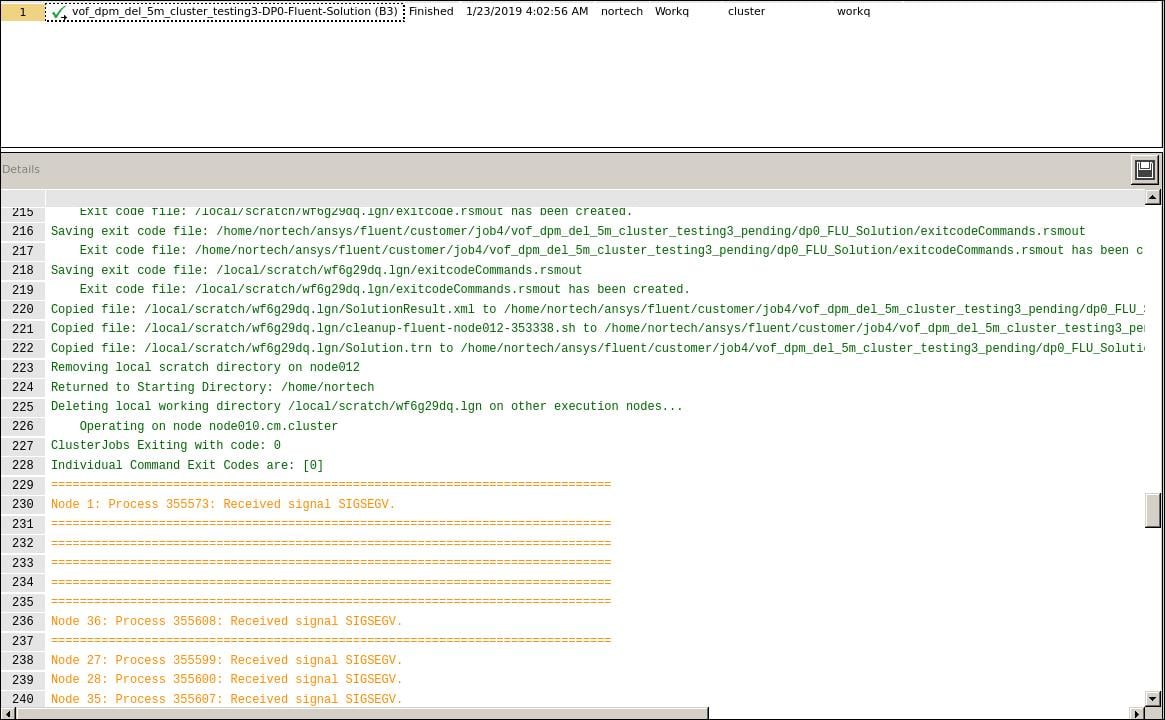
Forum ModeratorSIGSEV means something has failed in the parallel system, this can be triggered by a setting (as above) or the system. I'm slightly surprised that you can't launch Fluent in standalone mode - it's usually easier than using Workbench!Â
Please can you archive the project and then send it over?Â
-
January 22, 2019 at 5:09 pm
soloviev
SubscriberSo we should try archiving the workbench project, sending the project, then having the receiver unarchive the project to run it?
-
January 22, 2019 at 5:23 pm
Rob
Forum ModeratorYes. It stops the file links getting messed up. Depending on which part of the workflow they're opening the solver could have lost a settings file.Â
-
January 22, 2019 at 5:28 pm
soloviev
SubscriberGreat, I will try that.Â
Thank you.
-
January 23, 2019 at 3:04 pm
soloviev
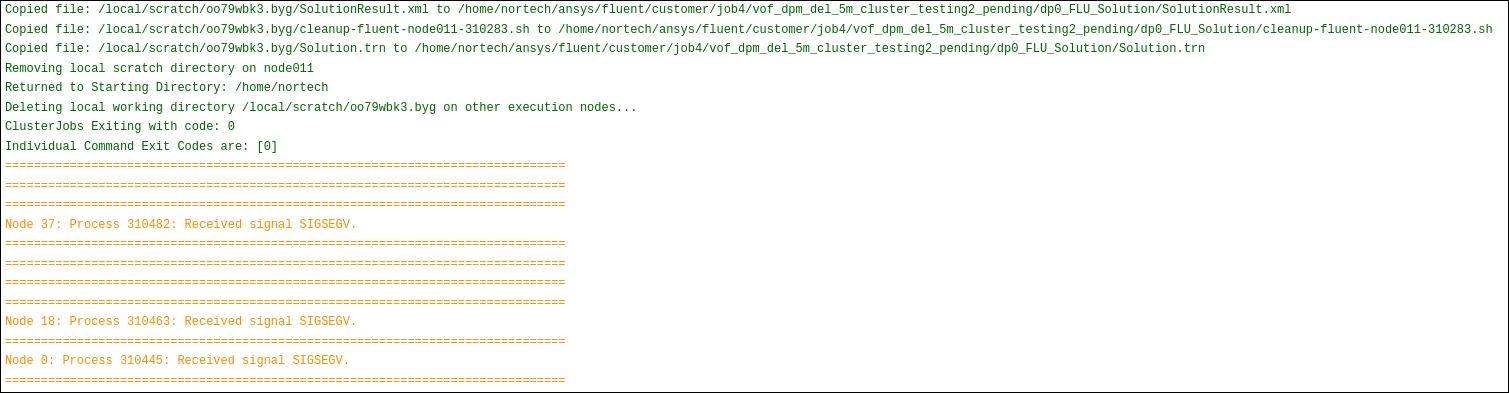
SubscriberWe tried archiving, sending, then unarchiving, and the same error occurred.Â
I have attached the screenshots sent to me regarding the error if that helps.Â
Â
Â
Â
When running in standalone fluent after being sent, the model runs temporarily, then reads error:Â
"Error at host:Â
failed to open file
Â
MPI Application rank 0 exited before MPI_Finalize() with status 2
The fluent process could not be started"
Â
Â
-
January 23, 2019 at 3:30 pm
Rob
Forum ModeratorIf it's running for some iterations then failing is it trying to read/write any files? The tool uses PUMA adaption, so it's possible this conflicts with something within Workbench, but I'm not aware of any issues.Â
-
January 23, 2019 at 4:00 pm
soloviev
SubscriberIt seems that the error after running for a bit occurs right after the first time Fluent writes files. I will attach the text of that error as well, it may be helpful.Â
" iter continuity x-velocity y-velocity z-velocity    time/iter
  424 3.0553e-03 3.6034e-05 3.8117e-06 2.4146e-05 0:00:03   9
Â
reversed flow in 60 faces on pressure-outlet 9.Â
   425 2.2063e-03 2.6529e-05 3.1669e-06 1.8143e-05 0:00:02   8
Â
reversed flow in 60 faces on pressure-outlet 9.Â
   426 1.5943e-03 1.9433e-05 2.3766e-06 1.3548e-05 0:00:02   7
Â
reversed flow in 60 faces on pressure-outlet 9.Â
   427 1.1468e-03 1.4050e-05 1.8090e-06 1.0176e-05 0:00:02   6
Â
reversed flow in 60 faces on pressure-outlet 9.Â
! 428 solution is converged
  428 8.2515e-04 1.0209e-05 1.3728e-06 7.6083e-06 0:00:01   5
Host receiving summary from compute node zero.
Writing "/home/nortech/ansys/fluent/customer/job1/vof_dpm_del_5m_testing-1.cas"...
  60000 hexahedral cells, zone 2, binary.
  60000 cell partition ids, zone 2, 44 partitions, binary.
 174400 quadrilateral interior faces, zone 1, binary.
   2000 quadrilateral wall faces, zone 5, binary.
   3000 quadrilateral wall faces, zone 6, binary.
    360 quadrilateral velocity-inlet faces, zone 7, binary.
    240 quadrilateral periodic faces, zone 8, binary.
    360 quadrilateral pressure-outlet faces, zone 9, binary.
   3000 quadrilateral wall faces, zone 10, binary.
   2000 quadrilateral wall faces, zone 11, binary.
    240 quadrilateral shadow faces, zone 12, binary.
    240 shadow face pairs, binary.
  65751 nodes, binary.
  65751 node flags, binary.
Done.
Â
Writing "/home/nortech/ansys/fluent/customer/job1/vof_dpm_del_5m_testing-1-00050.dat"...
Done.
Â
Â
Error at host:Â
failed to open file
Â
MPI Application rank 0 exited before MPI_Finalize() with status 2
The fluent process could not be started."

-
January 23, 2019 at 4:04 pm
Amine Ben Hadj Ali
Ansys Employee
Does it run on local computer without any issues? Please check permissions and quota on cluster
By the way I recommend using HDF file format whenver you are working with gradient apdation.
-
January 23, 2019 at 4:10 pm
Rob
Forum ModeratorYou also need to make sure you set the system to save case & data otherwise you won't be able to open the data files.Â
-
January 23, 2019 at 4:16 pm
Amine Ben Hadj Ali
Ansys EmployeeAre you writing some DPM reports?
-
January 23, 2019 at 5:16 pm
soloviev
SubscriberIt does run locally without errors. I am only writing a particle export file, no other reports other than case and data files.Â
I will have them check the permissions and quota, as well as ensure the case and data files are being saved on their end.Â
Thank you,
Alex
Â
-
- The topic ‘Error Message Running Fluent from Workbench’ is closed to new replies.
-
4607
-
1515
-
1386
-
1209
-
1021
© 2025 Copyright ANSYS, Inc. All rights reserved.