-
-
January 1, 2019 at 10:16 pm
Muhammed
SubscriberHi everyone,
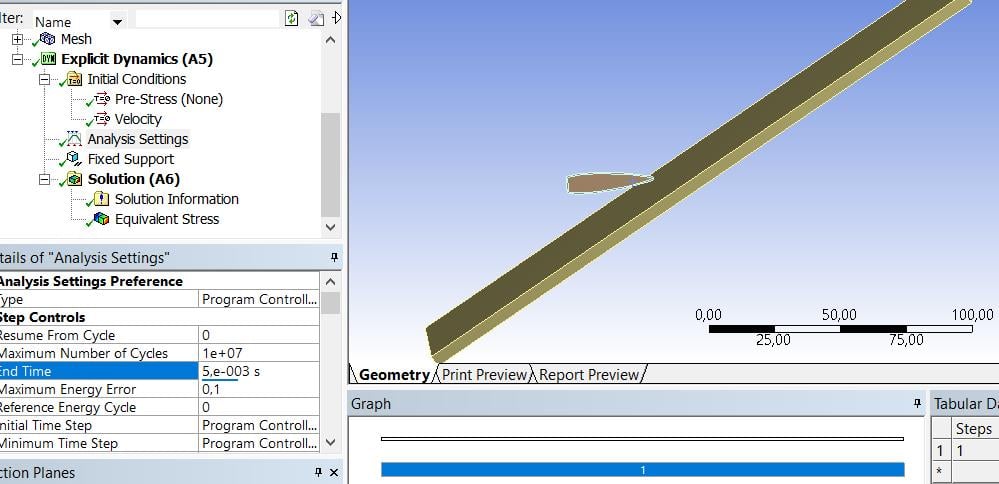
I'm trying to make a bullet impact analysis. However, the program gives the results in the middle of the analysis. I'm increasing the 'End Time' step by step. End time was 5e-4s and now 5e-3s. But bullet doesn't go anymore or bounce from the target. It must go further. What's the problem with that. Any help is appreciated. Thanks in advance.Â
-
January 1, 2019 at 11:44 pm
Sandeep Medikonda
Ansys EmployeeMuhammed,
The elements are distorting so much that the time step is falling down significantly. Since the Minimum Time Step is set to program controlled in your Analysis settings, the value will be chosen as 1/10th the initial time step. So once your time step falls beyond this value your simulation is failing. Now, you can decrease this value manually for the solver to proceed. However, you are not addressing the bigger issue by doing this and the simulation will be very slow.
Alternatively, you can introduce some mass scaling to overcome the problem as well. i.e., Automatic Mass scaling introduces additional mass into the system to increase the computed CFL time step. However, introducing too much mass can lead to non-physical results.
You also would need to focus on some kind of erosion criteria for removing excessively distorted elements. Under Erosion Controls of the Analysis Settings, I would recommend turning on Geometric Strain Limit and use the default value of 1.5 or you can also use the Minimum Element Time Step as erosion criteria (you can combine as well). From the image you shared, your projectile looks like it is being modeled as a flexible body, so basically the elements are getting crushed upon impact, hence it is recommended to use some kind of erosion criteria for the analysis to proceed.
P.S: Please post any explicit dynamics questions in the Structural Mechanics category in the future.
Regards,
Sandeep -

January 1, 2019 at 11:55 pm
Muhammed
SubscriberI don't know which number should I choose for the Initial Time Step. Do you have any recommendations?
-
January 2, 2019 at 12:01 am
Sandeep Medikonda
Ansys EmployeeThe Initial time step when left on Program Controlled, the time step will be automatically set to ½ the computed element stability time step. The Program Controlled setting is recommended. But you can always reduce the Time Step Safety Factor. You can read about the CFL time step here.
-
January 2, 2019 at 1:00 am
Muhammed
SubscriberThank you, Sir. I will try.
-
January 2, 2019 at 11:19 am
Muhammed
SubscriberI turned on Geometric Strain Limit and use the default value of 1.5 but the results didn't change. In my work, the size of the target is 245mmx245mm and the thickness is 4.5 mm. At first, element size for the meshing of the target was 1 mm. After I changed it to 2 mm and the problem was solved. Now, I made it 1.5 mm and the results are still OK. Is it can be an acceptable solution?
-
January 2, 2019 at 2:47 pm
Sandeep Medikonda
Ansys EmployeeMuhammed,
It is very hard for me to answer that. FEA is a mesh dependent analysis, so if you don't see a significant difference in the results between 1.5 and 2mm, I would be tempted to say that. But in general, a mesh convergence study needs to be performed for any problem. Peter has a very good post where he refers to an ASME V&V10.1 document. You would have to go through this and draw your conclusions accordingly.
Regards,
Sandeep -
February 28, 2021 at 3:29 am
djtan
Subscriberthis has helped me with the issue i also encounterednn
-
- The topic ‘‘End Time’ Problem’ is closed to new replies.
- LPBF Simulation of dissimilar materials in ANSYS mechanical (Thermal Transient)
- Nonlinear load cases combinations
- Real Life Example of a non-symmetric eigenvalue problem
- How can the results of Pressures and Motions for all elements be obtained?
- Contact stiffness too big
- Test post on Forum – LLM response – SC
- 13-Node Pyramid Element Shape Function
- Element Birth and Death
- Python-Script to Export all Children of a Solution Tree
- Which equations and in what form are valid for defining excitations?
-
4562
-
1494
-
1386
-
1209
-
1021
© 2025 Copyright ANSYS, Inc. All rights reserved.