-
-
March 9, 2022 at 5:16 pm
kaleor
SubscriberHello,
I have a large simulation that I am trying to solve with domain decomposition. The simulation has a layered impedance boundary on the bottom of the computational domain, a radiation boundary on the top, and periodic boundaries on the sides. Finally, it is excited with an incident plane wave.
I am executing the simulation on a remote HPC cluster that utilizes SLURM for managing/submitting jobs, and I have allocated 3 nodes to my simulation.
I have encounter a problem when the HFSS solver starts doing the adaptive passes. I have copied a few lines from the log file from the simulation job below. It appears that the solver begins using the domain decomposition as can be seen from the 3rd line. The error that comes up is a "No matched vertex found" error on the 5th line.
[info] Project:, Setup1 : [PROFILE] Initial Meshing : Elapsed time: 00:45:00
[progress:Â 1%] (3) Setup1: Adaptive Pass #1 - Solving single frequency for adaptive meshing ... on Local Machine
[info] Project:, Setup1 : [PROFILE] Domain Partitioning : Real Time 00:00:19 : CPU Time 00:00:18 : Memory 1.06 G : Disk = 21 MBytes, 313390 tetrahedra , 3 domains
[progress:Â 3%] (3) Setup1: Adaptive Pass #1 - Solving single frequency for adaptive meshing ... on Local Machine: Assembling and factorizing domain matrices
[error] Project: , Design:HFSSDesign1 (DrivenModal), Solving adaptive frequency ... (Domain solver), process hf3d error: No matched vertex found.. Please contact ANSYS technical support.
Would you potentially be able to help me understand what may be causing the "no matched vertex" error? I have also posted the script I used to submit the job for reference (minus a few administrative details).
#!/bin/bash
##### The name of the job
#SBATCH --job-name=jobnme
##### When to send e-mail: pick from NONE, BEGIN, END, FAIL, REQUEUE, ALL
#SBATCH --mail-type=FAIL
##### Resources for your job
# number of physical nodes
#SBATCH --nodes=3
# number of task per a node (number of CPU-cores per a node)
#SBATCH --ntasks-per-node=4
# memory per a CPU-core
#SBATCH --mem-per-cpu=24gb
##### Maximum amount of time the job will be allowed to run
##### Recommended formats: MM:SS, HH:MM:SS, DD-HH:MM
#SBATCH --time=04:00:00
########## End of preamble! #########################################
# Slurm starts the job in the submission directory.
#####################################################################
ansysedt -UseElectronicsPPE -Ng -Monitor -logfile log_file_name.log -BatchSolve "Project Name.aedt"

March 9, 2022 at 6:09 pmkaleor
SubscriberUpdate from my side: I made some adjustments to how I submit my simulation to the HPC cluster so that HFSS knows which machines/nodes are available for the simulation (at least that is what I understand). Here is my updated job submission script:
#!/bin/bash
# #SBATCH directives that convey submission options:
##### The name of the job
#SBATCH --job-name=jobnme
##### When to send e-mail: pick from NONE, BEGIN, END, FAIL, REQUEUE, ALL
#SBATCH --mail-type=FAIL
##### Resources for your job
# number of physical nodes
#SBATCH --nodes=2
# number of task per a node (number of CPU-cores per a node)
#SBATCH --ntasks-per-node=4
# memory per a CPU-core
#SBATCH --mem-per-cpu=24gb
##### Maximum amount of time the job will be allowed to run
##### Recommended formats: MM:SS, HH:MM:SS, DD-HH:MM
#SBATCH --time=04:00:00
########## End of preamble! #########################################
# Slurm starts the job in the submission directory.
#####################################################################
nodelist=`scontrol show hostnames $SLURM_JOB_NODELIST`
# set the number of tasks per node
TPN=1
# set the number of cores per node
CPN=4
# set memory usage per node
MMPN="99%"
a=1
for NODE in $nodelist
do
if [ $a -eq 1 ]
then
hostlist="${hostlist}${NODE}:${TPN}:${CPN}:${MMPN}"
else
hostlist="${hostlist},${NODE}:${TPN}:${CPN}:${MMPN}"
fi
a=$(($a + 1))
done
echo "Machine list: ${hostlist}"
ansysedt -UseElectronicsPPE -distributed -machinelist list="${hostlist}" -Ng -Monitor -logfile log_file_name.log -BatchSolve "Project name.aedt"
The log file shows which command was given to the HPC system:
[info] Using command line: "/(relevant path)/ansysedt.exe -UseElectronicsPPE -distributed -machinelist list=gl3003:1:4:99%,gl3004:1:4:99% -Ng -Monitor -logfile log_file_name.log -BatchSolve Project Name.aedt".
With this adjustment, I do not encounter the "no matched vertex" error. The simulation begins adaptive meshing on the gl3003 machine. The log file indicates domain partitioning takes place, but does not specify how may domains are used. During the 2nd adaptive pass, however, the solver runs into an error with exit code -99. What may cause a -99 error?
[info] Project:, Setup1 : [PROFILE] Domain Partitioning : Real Time 00:00:00 : CPU Time 00:00:00 : Memory 188 M : Disk = 0 Bytes
[error] Project:, Design:HFSSDesign1 (DrivenModal), Solving adaptive frequency ..., process hf3d exited with code -99. -- Simulating on machine: gl3003
March 22, 2022 at 7:14 pmrandyk
Forum ModeratorHi galileo57 My response would require you are using SLURM version 20.11 (or newer) and AEDT 2021R2 (or newer)

Create: options.txt
$begin 'Config'
'HFSS/RemoteSpawnCommand'='scheduler'
'HFSS 3D Layout Design/RemoteSpawnCommand'='scheduler'
$end 'Config'
job.sh
#!/bin/bash
#SBATCH --job-name=jobnme##### The name of the job
#SBATCH --mail-type=FAIL##### When to send e-mail: pick from NONE, BEGIN, END, FAIL, REQUEUE, ALL
#SBATCH --nodes=2# number of physical nodes
#SBATCH --ntasks-per-node=4 # number of task per a node (number of CPU-cores per a node)
#SBATCH --mem-per-cpu=24gb# memory per a CPU-core
#SBATCH --time=04:00:00##### Maximum amount of time the job will be allowed to run
########## End of preamble! #########################################
# Slurm starts the job in the submission directory.
#####################################################################
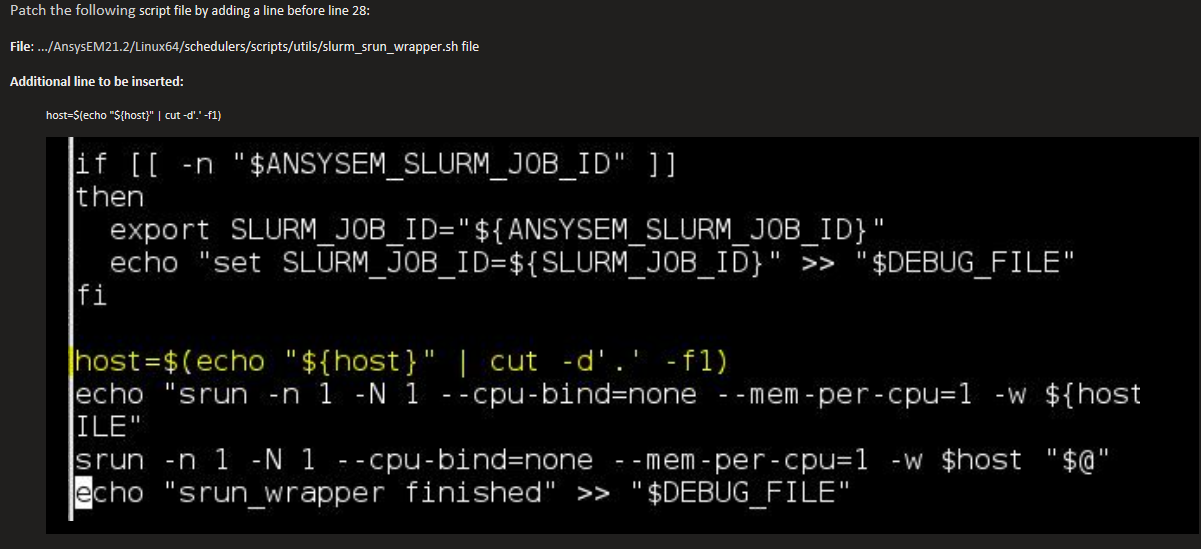
export ANSYSEM_GENERIC_MPI_WRAPPER=${InstFolder}/schedulers/scripts/utils/slurm_srun_wrapper.sh
export ANSYSEM_COMMON_PREFIX=${InstFolder}/common
srun_cmd="srun --overcommit --export=ALL-n 1 -N 1 --cpu-bind=none --mem-per-cpu=0 --overlap "
# Autocompute total cores from node allocation
AutoTotalCores=$((SLURM_JOB_NUM_NODES * SLURM_CPUS_ON_NODE))
export ANSYSEM_TASKS_PER_NODE="${SLURM_TASKS_PER_NODE}"
# skip OS/Dependency check
export ANS_IGNOREOS=1
export ANS_NODEPCHECK=1
# run analysis
${srun_cmd} ${InstFolder}/ansysedt -ng -monitor -waitforlicense -useelectronicsppe=1 -distributed -machinelist numcores=${AutoTotalCores} -auto -batchoptions "options.txt" -batchsolve ${AnalysisSetup} ${JobFolder}/${Project}
Viewing 2 reply threads- The topic ‘Domain decomposition error: no matched vertex found’ is closed to new replies.
Innovation SpaceTrending discussionsTop Contributors-
4633
-
1540
-
1386
-
1225
-
1021
Top Rated Tags© 2025 Copyright ANSYS, Inc. All rights reserved.
Ansys does not support the usage of unauthorized Ansys software. Please visit www.ansys.com to obtain an official distribution.
-
Ansys Assistant
Welcome to Ansys Assistant!
An AI-based virtual assistant for active Ansys Academic Customers. Please login using your university issued email address.
Hey there, you are quite inquisitive! You have hit your hourly question limit. Please retry after '10' minutes. For questions, please reach out to ansyslearn@ansys.com.
RETRY