To the Technical Support Team,
I am writing to report a persistent and critical issue with Ansys Student Version [2025 r2] running on Windows [11].
Despite several days of troubleshooting, I am unable to run any simulation. The error appears immediately upon clicking "Solve".
The Error: "An error occurred while starting the solver module. Please refer to the Troubleshooting section..."
Crucial Symptom: The solver does not seem to launch at all.
No solve.out file is created in the project directory (_files/dp0/SYS/MECH).
The Solution Information window remains completely blank (no text, no log).
No active solver processes (ansys.exe, mapdl.exe) appear in Task Manager.
List of Troubleshooting Steps already taken (None worked):
1. Model & License Checks:
Verified node count: Reduced mesh to 117,000 nodes (well below the 128k Student limit).
Verified File Path: Saved project to a root folder C:\ANSYS_TEMP to avoid spaces, special characters, and OneDrive/Network conflicts.
2. Solver Configuration:
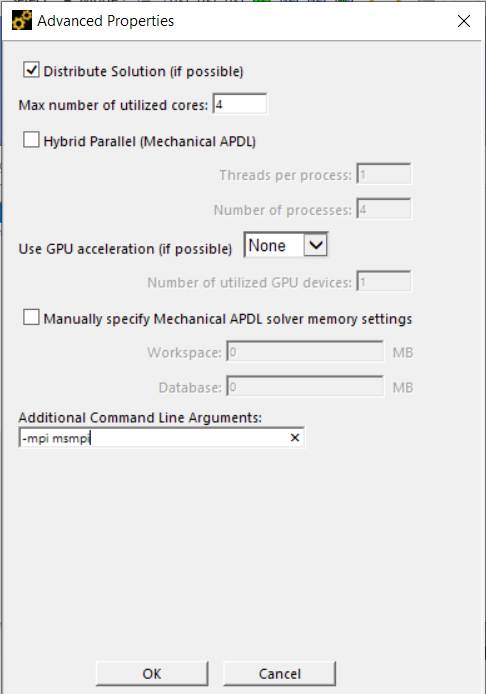
Set "Solve Process Settings" to 2 Cores.
Set GPU Acceleration to None.
Disabled "Distributed Solution" (if applicable).
Set "Connect to Solution Information updates" to No.
3. System & Installation Checks:
Clean Reinstall: Performed a full uninstall, deleted %appdata%\Ansys and %localappdata%\Ansys, and reinstalled as Administrator with Antivirus disabled.
Firewall/AV: Added exceptions for Ansys root directory and temporarily disabled Firewall during solve attempts.
Process Cleanup: Verified no "zombie" processes were running via Task Manager.
Environment Variables: Tried adding ANSYS_SYS_ARGS = -smp to force shared memory processing.
Intel MPI: Attempted to rename the Intel MPI folder to force the use of alternative MPI, but the issue persists.
DLL Conflict: Checked for libifcoremd.dll conflicts in System32.
Given that the solve.out file is never created, it appears that the command to launch the solver is being blocked at a system level or failing silently before initialization.
Could you please provide a specific solution for this behavior on recent Intel processors? I have exhausted all standard troubleshooting steps found in the documentation.
Thank you, Graziano.


















 You are navigating away from the AIS Discovery experience