-
-
February 11, 2020 at 3:32 pm
-
February 11, 2020 at 4:10 pm
Aniket
Forum ModeratorTry:
View>Reset Workspace
and
View>Reset Windows Layout
-
February 11, 2020 at 4:26 pm
Tareq044
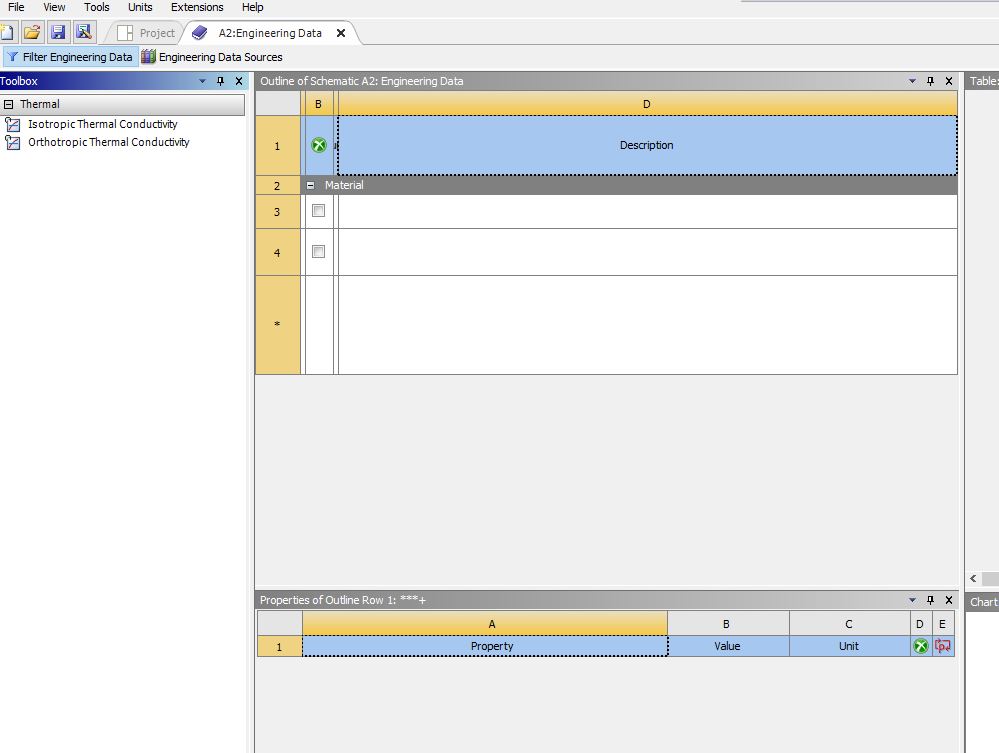
SubscriberActually i tried it several times but nothing changes and i also re-installed the software but still it is remaining like . To be honest i did a foul job , i crossed the the table when i was first in this window, now i can not restore that .
-
February 13, 2020 at 6:43 am
Aniket
Forum ModeratorYou can try resetting ANSYS configuration by renaming the %appdata%Ansys folder to anything else.
-
Viewing 3 reply threads
- The topic ‘Can not find the column for adding the name of new material in Engineering Data window’ is closed to new replies.

Innovation Space
Trending discussions
- Project lines/edges into a face with the direction normal to the face
- No preview in explorer with scdox file
- Add-in Error Excel
- Fileformats
- Discovery 2025r2 failed to initialize
- Spaceclaim problem
- Using SpaceClaim scripts vs recorded blocks for parametric optimization workflow
- Different Body Naming and Extra Surfaces after Importing Solid Edge Part
- racing royals
- New Computer
Top Contributors
-
4512
-
1494
-
1386
-
1209
-
1021
Top Rated Tags
© 2025 Copyright ANSYS, Inc. All rights reserved.
Ansys does not support the usage of unauthorized Ansys software. Please visit www.ansys.com to obtain an official distribution.