Ansys Assistant will be unavailable on the Learning Forum starting January 30. An upgraded version is coming soon. We apologize for any inconvenience and appreciate your patience. Stay tuned for updates.
Fluids

Fluids

Topics related to Fluent, CFX, Turbogrid and more.

Calculating coordinates of particle injection points

    • scabo
      Subscriber

      Hi-I am using randomize injection option to inject DPM particles from the inlet of a pipe. Different particle tracks are going in different directions in an unsteady sim. How can i find out the initial injection location of particular particle track on the inlet so that I can detect which initial injection location is causing what deflection? I have exported particle tracks into CFDPost as Fluent does not show tracks for unsteady simulation but cannot get the initial position of each track. thanks.

    • Rob
      Forum Moderator

      You'll need to interrogate the .out file (manually) so determine what goes where, or if you know the parcel ID that's gone wherever you should be able to find it's first reported position. 

    • scabo
      Subscriber

      Hi-by the .out file do you mean the particle sampling file?

    • Rob
      Forum Moderator

      Yes. 

    • scabo
      Subscriber

      But I want to visualise the particle tracks. It is doable in CFDPost but not in Fluent. But you cannot export the position variable in CFDPost. So the only option is to track the sampling file I guess.

    • Rob
      Forum Moderator

      A transient particle track is a series of points in Fluent. A steady particle track in Fluent is a line showing it's trajectory. CFD Post takes the data from Fluent so why would you export position from CFD Post when it's an input? 

    • scabo
      Subscriber

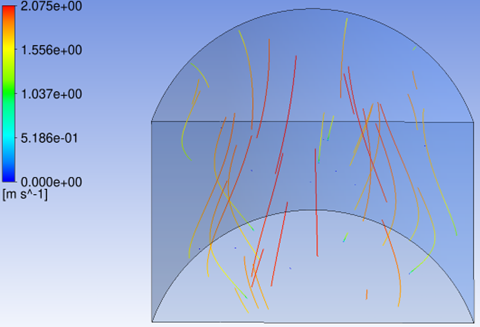
      I mean when i export the particle history data to CFDPost and import as .xml then I can see tracks (continous lines) for unsteady simulation in CFDPost. But in Fluent you cannot see those similar tracks when you select particle tracks; instead you see particle positions. So CFDPost and Fluent show different things for the same input.

    • Rob
      Forum Moderator

      Are you sure about that?  https://ansyshelp.ansys.com/public/account/Secured?returnurl=/Views/Secured/corp/v252/en/flu_ug/flu_ug_sec_particle_history_export.html

    • scabo
      Subscriber

      Hi-yes i am sure. I have attached the CFDPost image which shows the unsteady particle track but you cannot see this in Fluent. I can also play a video showing the tracks developing in time. You can see particle position only in Fluent. Does these tracks of individual particles or parcels?

    • Rob
      Forum Moderator

      It'll be parcels. 

    • scabo
      Subscriber

      Okay just to say that I can only visualise the particle tracks/trajectories in CFDPost (after export) but cannot see the particle position or distribution. I think this is a drawback of the export.

    • Rob
      Forum Moderator

      I'm confused. If you've written the position out of Fluent, why would you need it in CFD Post? What distribution? 

    • scabo
      Subscriber

      Hi-I can export all the variables except the position variables from Fluent to CFDPost in the particle history file. I wanted to measure the x,y,z positions of the particle tracks in CFDPost because we cannot visualise the tracks in Fluent.

    • scabo
      Subscriber

      Hi-I am trying to create a 2D plane in the 3D pipe and do sample>plane>injection and press start. But when i submit the job to HPC it is not writing anything in the sample file. I wanted to visualise the particle position on the plane but it is not doing anything. What could be the issue?

    • Rob
      Forum Moderator

      Does Fluent try and save the sample file to the HPC disc or does it think the file is on your desktop? 

    • scabo
      Subscriber

      It creates the files in HPC but as the simulation progresses it does not write anything in the file althogh I can see particles crossing the surfaces in the results. I am selecting the injection and the surface and then selecting start and then submitting to HPC.

    • Rob
      Forum Moderator

      I can't remember if the start/stop options are remembered. You may need to reset on the HPC via the launch/run journal. 

    • scabo
      Subscriber

      Yea i have also tried writing the /report/dpm-sample/ injection-0 () interior-fluid () () no no command but it does not help.

    • Rob
      Forum Moderator

      Is that the correct command? I assume you've tested it locally? 

    • scabo
      Subscriber

      It creates the file but does not update it. I have not tested it locally, but let me check

Viewing 19 reply threads
  • You must be logged in to reply to this topic.
[bingo_chatbox]