

TAGGED: body-of-influence, meshing
-
-
December 17, 2021 at 3:21 pm
Iwashita
SubscriberHello.
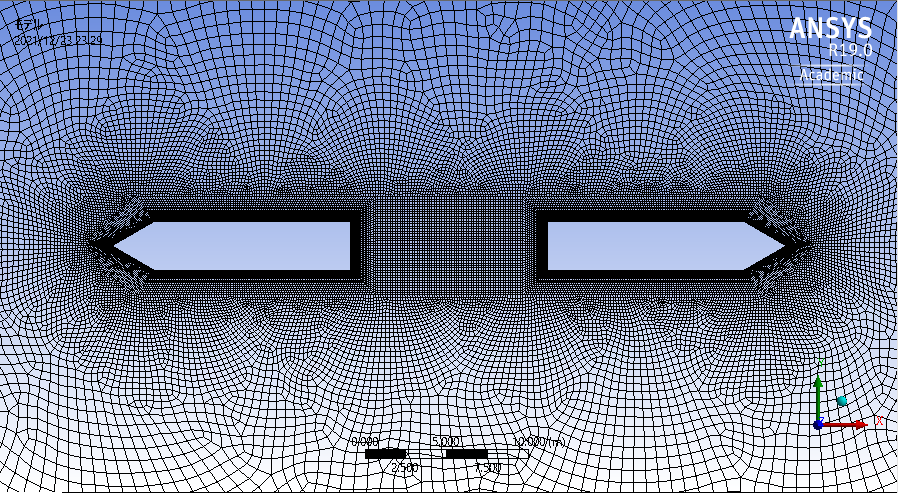
I used "body of influence" for meshing between two boxes more finely.
I selected one body around 2box as target geometry, and the area of between 2box is selected as body of influence.
But it seems to not work like follow pictures. How can I do this ?
December 20, 2021 at 3:52 pmRahul Kumar
Ansys EmployeeHello Are you looking to refine the mesh in the box region?
December 23, 2021 at 2:50 pmSubscriberRK
Yes. Now, I used square meshing instead of influence body. I could use influence body another model like 2nd picture. But in this case, I could not use it for some reason.
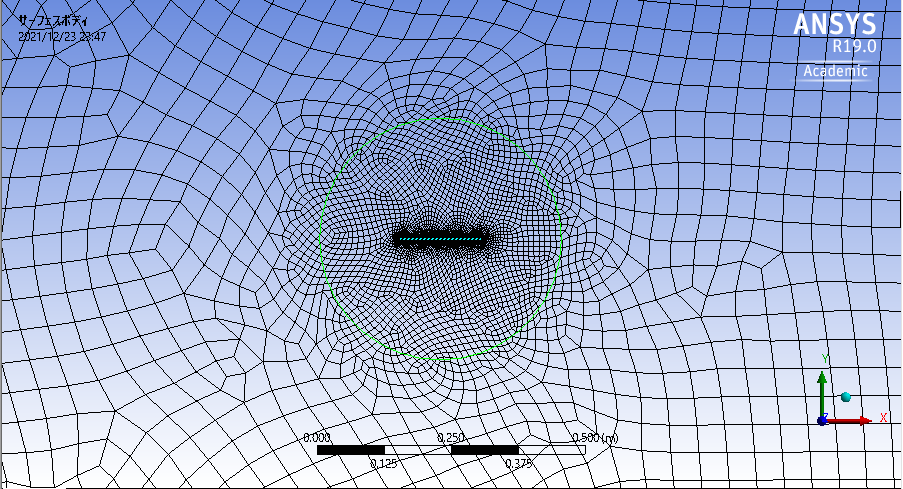
December 23, 2021 at 3:32 pmAnsys EmployeeYou could redefine the BOI geometry to enclose both the hollow geometries.
Viewing 3 reply threads- The topic ‘Body of influence does not work’ is closed to new replies.
Innovation Space Trending discussions
 Top Contributors
-
peteroznewman
 5159
5159 -
scabo
 1836
1836 -
Dennis Chen
 1387
1387 -
javat33489
 1249
1249 -
Shyam Prasad V Atri
1021
Top Rated Tags
© 2026 Copyright ANSYS, Inc. All rights reserved.
Ansys does not support the usage of unauthorized Ansys software. Please visit www.ansys.com to obtain an official distribution.
-


The Ansys Learning Forum is a public forum. You are prohibited from providing (i) information that is confidential to You, your employer, or any third party, (ii) Personal Data or individually identifiable health information, (iii) any information that is U.S. Government Classified, Controlled Unclassified Information, International Traffic in Arms Regulators (ITAR) or Export Administration Regulators (EAR) controlled or otherwise have been determined by the United States Government or by a foreign government to require protection against unauthorized disclosure for reasons of national security, or (iv) topics or information restricted by the People's Republic of China data protection and privacy laws.

 You are navigating away from the AIS Discovery experience