-
-
August 9, 2022 at 1:58 am
fakihatu.19023
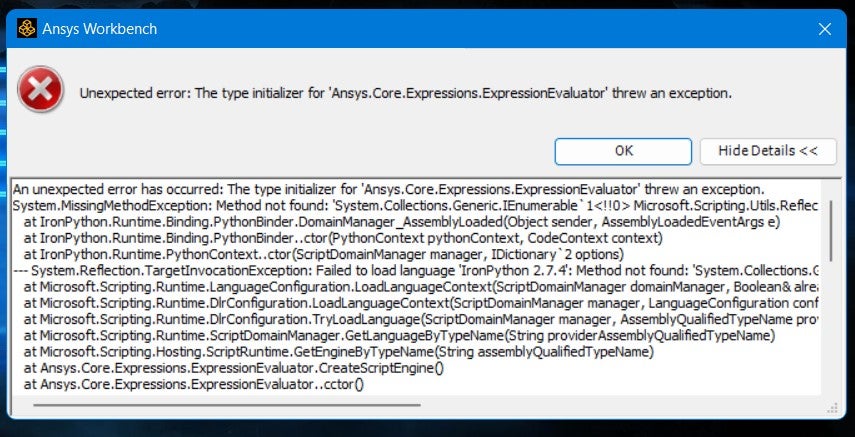
SubscriberHello everyone, I have a problem after installing Ansys Student. The installation was successful, but with an error. If I try to open the workbench, there is an error with the dialog that I picture below. I've tried to search for the solutions, but nothing. Are there any guys here who can help me with this problem? I've uninstalled and installed it again but the problem is still the same. Thank you

-
August 9, 2022 at 4:05 pm
George Karnos
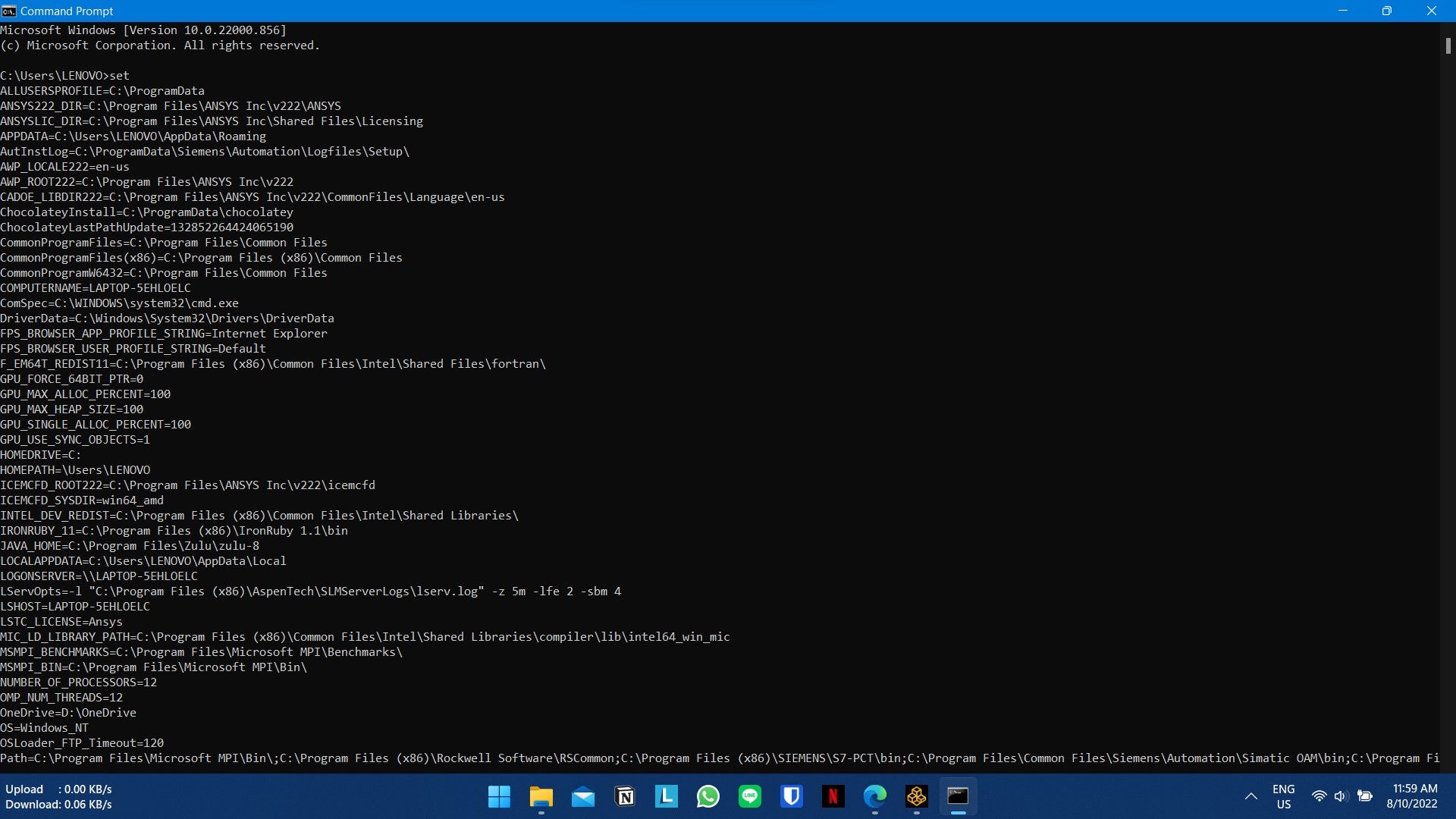
Ansys EmployeeCan you open a dos command prompt and type in the following and hit Enter:
setWhat is returned?
Â
-
August 10, 2022 at 3:12 am
fakihatu.19023
Subscriberthank you for your reply, I want to try this
Â
Â
-
August 10, 2022 at 5:02 am
-
-
August 10, 2022 at 11:38 am
George Karnos
Ansys EmployeeThank You for trying that.
What I would like to see is the environment settings, and this is what this does.
But, not everything is listed in the window you screen-shotted.
Can you type the following in the DOS Command prompt window:
set >set.txtThis will create a file named set.txt in the directory where the DOS cmd prompt opens to.
When this is finished, open the file set.txt with notepad.
copy all contents and paste in a post
Thank You.-
August 11, 2022 at 4:27 am
fakihatu.19023
SubscriberALLUSERSPROFILE=C:\ProgramData
ANSYS222_DIR=C:\Program Files\ANSYS Inc\v222\ANSYS
ANSYSLIC_DIR=C:\Program Files\ANSYS Inc\Shared Files\Licensing
APPDATA=C:\Users\LENOVO\AppData\Roaming
AutInstLog=C:\ProgramData\Siemens\Automation\Logfiles\Setup\
AWP_LOCALE222=en-us
AWP_ROOT222=C:\Program Files\ANSYS Inc\v222
CADOE_LIBDIR222=C:\Program Files\ANSYS Inc\v222\CommonFiles\Language\en-us
ChocolateyInstall=C:\ProgramData\chocolatey
ChocolateyLastPathUpdate=132852264424065190
CommonProgramFiles=C:\Program Files\Common Files
CommonProgramFiles(x86)=C:\Program Files (x86)\Common Files
CommonProgramW6432=C:\Program Files\Common Files
COMPUTERNAME=LAPTOP-5EHLOELC
ComSpec=C:\WINDOWS\system32\cmd.exe
DriverData=C:\Windows\System32\Drivers\DriverData
F_EM64T_REDIST11=C:\Program Files (x86)\Common Files\Intel\Shared Files\fortran\
GPU_FORCE_64BIT_PTR=0
GPU_MAX_ALLOC_PERCENT=100
GPU_MAX_HEAP_SIZE=100
GPU_SINGLE_ALLOC_PERCENT=100
GPU_USE_SYNC_OBJECTS=1
HOMEDRIVE=C:
HOMEPATH=\Users\LENOVO
ICEMCFD_ROOT222=C:\Program Files\ANSYS Inc\v222\icemcfd
ICEMCFD_SYSDIR=win64_amd
INTEL_DEV_REDIST=C:\Program Files (x86)\Common Files\Intel\Shared Libraries\
IRONRUBY_11=C:\Program Files (x86)\IronRuby 1.1\bin
JAVA_HOME=C:\Program Files\Zulu\zulu-8
LOCALAPPDATA=C:\Users\LENOVO\AppData\Local
LOGONSERVER=\\LAPTOP-5EHLOELC
LServOpts=-l "C:\Program Files (x86)\AspenTech\SLMServerLogs\lserv.log" -z 5m -lfe 2 -sbm 4
LSHOST=LAPTOP-5EHLOELC
LSTC_LICENSE=Ansys
MIC_LD_LIBRARY_PATH=C:\Program Files (x86)\Common Files\Intel\Shared Libraries\compiler\lib\intel64_win_mic
MSMPI_BENCHMARKS=C:\Program Files\Microsoft MPI\Benchmarks\
MSMPI_BIN=C:\Program Files\Microsoft MPI\Bin\
NUMBER_OF_PROCESSORS=12
OMP_NUM_THREADS=12
OneDrive=D:\OneDrive - Institut Teknologi Sepuluh Nopember
OneDriveCommercial=D:\OneDrive - Institut Teknologi Sepuluh Nopember
OneDriveConsumer=D:\OneDrive
OS=Windows_NT
OSLoader_FTP_Timeout=120
Path=C:\Program Files\Microsoft MPI\Bin\;C:\Program Files (x86)\Rockwell Software\RSCommon;C:\Program Files (x86)\SIEMENS\S7-PCT\bin;C:\Program Files\Common Files\Siemens\Automation\Simatic OAM\bin;C:\Program Files (x86)\Common Files\Intel\Shared Files\fortran\bin\Intel64;C:\Program Files (x86)\Common Files\Intel\Shared Libraries\redist\intel64_win\mpirt;C:\Program Files (x86)\Common Files\Intel\Shared Libraries\redist\intel64_win\compiler;C:\Windows\system32;C:\Windows;C:\Windows\System32\Wbem;C:\Windows\System32\WindowsPowerShell\v1.0\;C:\Windows\System32\OpenSSH\;C:\Program Files (x86)\NVIDIA Corporation\PhysX\Common;C:\Program Files\NVIDIA Corporation\NVIDIA NvDLISR;C:\WINDOWS\system32;C:\WINDOWS;C:\WINDOWS\System32\Wbem;C:\WINDOWS\System32\WindowsPowerShell\v1.0\;C:\WINDOWS\System32\OpenSSH\;D:\Applications & Games Data\MATLAB\R2020a\bin;C:\Program Files\MATLAB\R2020a\bin;C:\PROGRA~1\MATLAB\R2020a\bin;C:\Users\LENOVO\AppData\Roaming\Python\Python38\Scripts;C:\Program Files\Microsoft SQL Server\Client SDK\ODBC\110\Tools\Binn\;C:\Program Files (x86)\Microsoft SQL Server\120\Tools\Binn\;C:\Program Files\Microsoft SQL Server\120\Tools\Binn\;C:\Program Files\Microsoft SQL Server\120\DTS\Binn\;C:\Program Files (x86)\Windows Kits\8.1\Windows Performance Toolkit\;C:\Gradle\gradle-6.6-all\gradle-6.6\bin;C:\Program Files (x86)\Common Files\AspenTech Shared\;C:\Program Files\Common Files\AspenTech Shared\;C:\Program Files\dotnet\;C:\Program Files\CMake\bin\bin;C:\Program Files\Graphviz\bin;D:\Applications & Games Data\MATLAB\MATLAB Runtime\v94\runtime\win64;C:\Program Files\nodejs\;C:\ProgramData\chocolatey\bin;C:\Program Files\Microsoft SQL Server\110\Tools\Binn\;C:\Program Files\PKWARE\pkzipc;C:\Program Files (x86)\Common Files\Rockwell\;C:\Program Files (x86)\Common Files\Intel\Shared Libraries\redist\intel64_win\compiler\;C:\Program Files (x86)\Common Files\Intel\Shared Libraries\redist\ia32_win\compiler\;C:\Program Files (x86)\IronRuby 1.1\bin;C:\Users\LENOVO\AppData\Local\Programs\Python\Python38\Scripts\;C:\Users\LENOVO\AppData\Local\Programs\Python\Python38\;C:\Users\LENOVO\AppData\Local\Programs\Python\Python39\Scripts\;C:\Users\LENOVO\AppData\Local\Programs\Python\Python39\;C:\Users\LENOVO\AppData\Local\Microsoft\WindowsApps;C:\Users\LENOVO\AppData\Local\Programs\Microsoft VS Code\bin;C:\Users\LENOVO\AppData\Roaming\npm
PATHEXT=.COM;.EXE;.BAT;.CMD;.VBS;.VBE;.JS;.JSE;.WSF;.WSH;.MSC
PROCESSOR_ARCHITECTURE=AMD64
PROCESSOR_IDENTIFIER=AMD64 Family 23 Model 96 Stepping 1, AuthenticAMD
PROCESSOR_LEVEL=23
PROCESSOR_REVISION=6001
ProgramData=C:\ProgramData
ProgramFiles=C:\Program Files
ProgramFiles(x86)=C:\Program Files (x86)
ProgramW6432=C:\Program Files
PROMPT=$P$G
PSModulePath=C:\Program Files\WindowsPowerShell\Modules;C:\WINDOWS\system32\WindowsPowerShell\v1.0\Modules;C:\Program Files (x86)\Microsoft SQL Server\120\Tools\PowerShell\Modules\
PUBLIC=C:\Users\Public
P_SCHEMA=C:\Program Files\ANSYS Inc\v222\AISOL\CADIntegration\Parasolid\PSchema
RABBITMQ_CONFIG_FILE=C:\Program Files\AspenTech\aspenONE V12.0\rabbitmq
SCPLMD_LICENSE_FILE=C:\Program Files (x86)\Common Files\Honeywell\OLGAS\license.dat
Simatic_OAM=C:\Program Files\Common Files\Siemens\Automation\Simatic OAM
Simatic_OAM_DATA=C:\ProgramData\Siemens\Automation\Simatic OAM
SoS_debug_exe=C:\Program Files\ANSYS Inc\v222\optiSLang\sos\sos_console.exe
SoS_exe=C:\Program Files\ANSYS Inc\v222\optiSLang\sos\sos.exe
SoS_install_dir=C:\Program Files\ANSYS Inc\v222\optiSLang\sos
SW_SIM_HYDRA=C:\Program Files\Common Files\SolidWorks Shared\Simulation Worker Agent\
SW_SIM_MPIT=INTELMPI
SW_SIM_TEMP=C:\ProgramData\SOLIDWORKS\SW_net_sim_temp\
SystemDrive=C:
SystemRoot=C:\WINDOWS
TEMP=C:\Users\LENOVO\AppData\Local\Temp
TMP=C:\Users\LENOVO\AppData\Local\Temp
USERDOMAIN=LAPTOP-5EHLOELC
USERDOMAIN_ROAMINGPROFILE=LAPTOP-5EHLOELC
USERNAME=LENOVO
USERPROFILE=C:\Users\LENOVO
USE_SLM=1
VBOX_HWVIRTEX_IGNORE_SVM_IN_USE=1
VRAY_GPU_PLATFORMS=amd accelerated parallel processing gfx902 gpu index0;nvidia cuda geforce gtx 1650 gpu index0;
windir=C:\WINDOWS
-
-
August 11, 2022 at 6:22 pm
George Karnos
Ansys EmployeeTry running with your Antivirus disabled as a test...
Another user that was seeing this error stated his virus/firewall software was blocking
-
- The topic ‘ANSYS Workbench can’t Open’ is closed to new replies.
-
5024
-
1709
-
1387
-
1248
-
1021
© 2026 Copyright ANSYS, Inc. All rights reserved.