Ansys Assistant will be unavailable on the Learning Forum starting January 30. An upgraded version is coming soon. We apologize for any inconvenience and appreciate your patience. Stay tuned for updates.
Electronics

Electronics

Topics related to HFSS, Maxwell, SIwave, Icepak, Electronics Enterprise and more.

AEDT Unable to Make a Cross Section

    • marcberthoud
      Subscriber

      I'm in AEDT and would like to have a cross section to analyze the fields and see the mesh. Web search indicates I have to select the object I'm interested in then go to ... -> Surface -> Section.. But the sections is NOT AVAILABLE. What is the simplest way to get a cross section to be able to see fields and meshing inside a cube? Screenshot is at

    • Takeshi Itadani
      Ansys Employee

      The easiest method is to use the Clip Plane function.
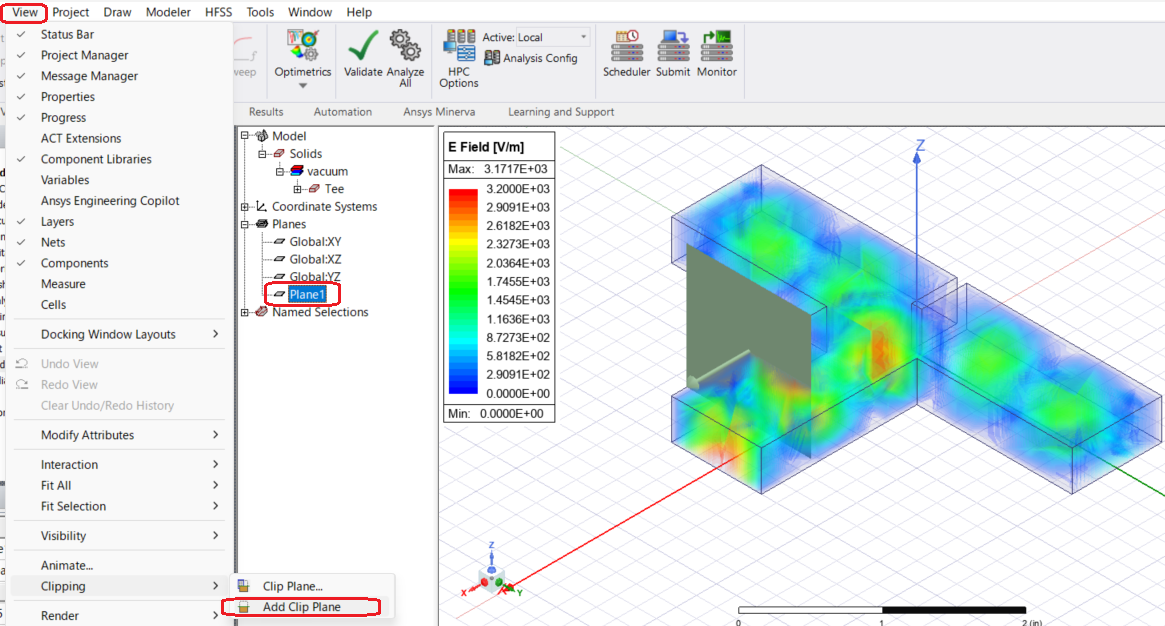
      First, create the plane you want to display the cross-section on by selecting the menu Draw > Plane.
      With the plane you just created selected under Planes in the Model tree, select the menu View > Clipping > Add Clip Plane.
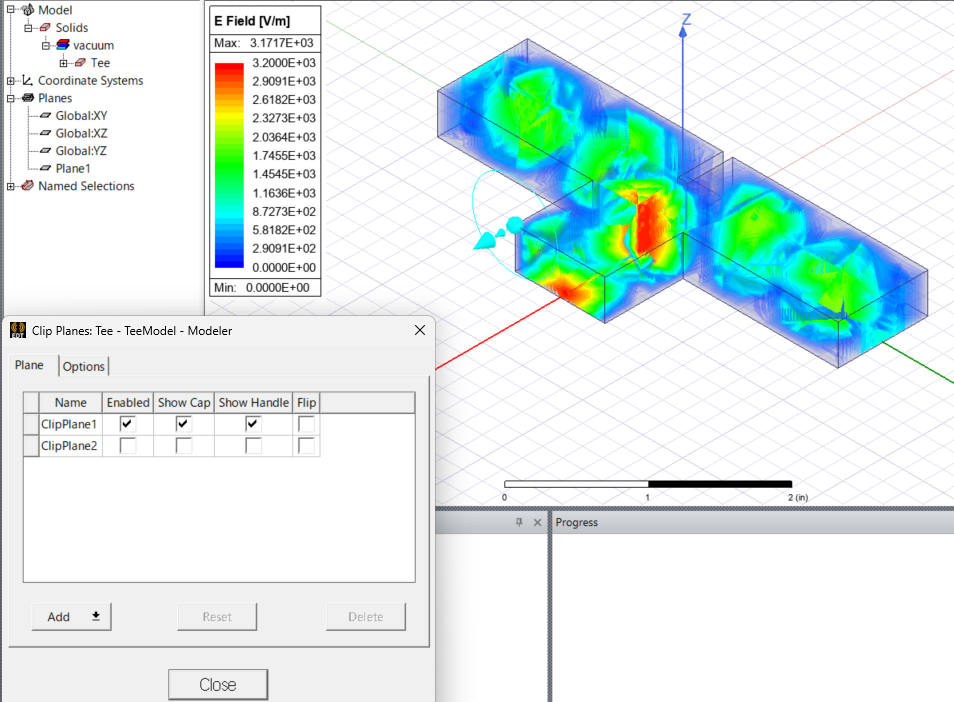
      In the Clip Plane dialog box, planes with "Enabled" checked will be enabled for cross-section display. Checking "Flip" will reverse the direction of the cross-section.


    • marcberthoud
      Subscriber

      Thank you for the details. Clipping planes is useful and while I can add a clipping plane using "Specify center, normal" the "Use selection doesn't work as shown in the attached screenshot. Any recommendation? Thanks


    • Takeshi Itadani
      Ansys Employee

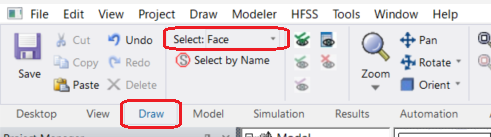
      When selecting a face using "Use selection," are you setting the Selection Mode to Face? Clip Plane does not work with Objects, etc.

    • marcberthoud
      Subscriber

      Thank you, this is very useful and allows me to study the inside of the mesh. Quick followup, is there a simple way to move a cliping plane? The only way I found is to moving the non-model plane and defining a new clipping plane with it.

      I also found that the mesh is much coarser than I want it to be as I'm interested in accurate model of the fields. Is there a way to limit the maximum length of any mesh edge?

      Thanks

    • Takeshi Itadani
      Ansys Employee
      > The only way I found is to moving the non-model plane and defining a new clipping plane with it.
       
      Yes, please run Clip Plane using that method.
       
       
      > I also found that the mesh is much coarser than I want it to be as I'm interested in accurate model of the fields. Is there a way to limit the maximum length of any mesh edge?
       
      To manually configure meshing, select the object for which you want to generate a finer mesh, and then go to the menu HFSS > Mesh > Assign Mesh Operation.
       
      For dielectrics, you can set the maximum mesh length of the Initial Mesh by selecting Inside Selection > Length Based...
       
      For conductors, you can set the maximum mesh length of the Initial Mesh by selecting On Selection > Length Based...
       
      Note that the maximum mesh length set manually is applied during the Initial Mesh process. Further finer meshes may be generated in areas requiring higher precision during subsequent Adaptive analysis.
Viewing 5 reply threads
  • You must be logged in to reply to this topic.
[bingo_chatbox]