-
-
July 10, 2020 at 10:23 pm
hnorthrup
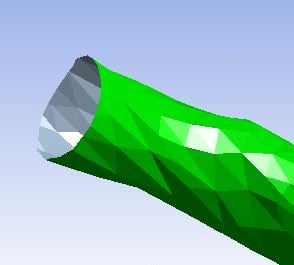
SubscriberIs there a way to add edges to an imported geometry in either SpaceClaim or Mechanical? I need to add an edge to the very end of my geometry so that I can add fixed supports in Mechanical. Right now my entire geometry is one Face so when I go to add a fixed support it adds it to the entire geometry, but I only want the ends fixed, not the entire geometry. I have attached a screenshot of the end of my geometry in Mechanical.
Thanks!
-
July 11, 2020 at 2:23 pm
peteroznewman
SubscriberIn SpaceClaim, if that shows up as a Faceted body, then right click on the body in the Outline and choose Convert so that it becomes a surface.
-
July 12, 2020 at 4:10 am
-
July 13, 2020 at 5:00 am
Keyur Kanade
Ansys EmployeeOnly converting to surface will not give you a single edge. You may need to recreate it.Â
please check following.Â
https://www.youtube.com/watch?v=sk55qdEj_T4
Regards,
Keyur
Â
If this helps, please mark this post as 'Is Solution' to help others.
Guidelines on the Student Community
How to access ANSYS help links
Â
-
July 20, 2020 at 3:36 pm
hnorthrup
SubscriberI was able to add edges by drawing a circle on the ends.Â
-
- The topic ‘Add edges to faceted body in SpaceClaim or Mechanical’ is closed to new replies.

- Basic questions about HPC license
- optiSLang: general question about output variables & expressions
- Keeping concentration same for different sized particles in discrete phase model
- 3-Way System Coupling (Thermal-Structural-Fluid)
- optiSLang & AEDT Optimetrics: response variable has value of 0
- Thermal Desktop: Running RadCAD and SINDA outside of AutoCAD
-
4818
-
1587
-
1386
-
1242
-
1021
© 2026 Copyright ANSYS, Inc. All rights reserved.