Hi all,
I am simulating a 3D system in Maxwell 2025 R2 featuring two holding electromagnets (pot/cup cores) pulling a ball bearing laterally. The magnets are configured with opposite polarities to create a continuous horseshoe loop. I am trying to visualize the 3D magnetic flux paths crossing the air gap and looping around the bearing. However, when plotting a Streamline overlay of B_Vector or H, the lines refuse to bridge the gap. They trace normally within the iron core, but either terminate abruptly at the solid boundaries or flatten completely if a global cross-section plane is chosen.
I have tried:
-Including the air Region and solid parts in the active In Volume selection list.
-Adjusting the global Streamline Plot general options under Reporter > Fields Reporters (lowering the minimum field magnitude threshold below 5% and expanding max tracking length).
-Selecting different seed planes, faces etc. (using coil face(s) as seed, using planes as seed, using 2D plane as seed)
Even with these adjustments, the lines do not smoothly propagate through the air volume to create a continuous 3D wrap. Has anyone encountered this numerical cutoff with high-permeability cores, and what is the best practice for forcing a continuous 3D loop display across a low-refined air mesh? I have found a "janky" workaround by duplicating sheets 2mm apart to get the effect, but there has to be a native way to go about this. 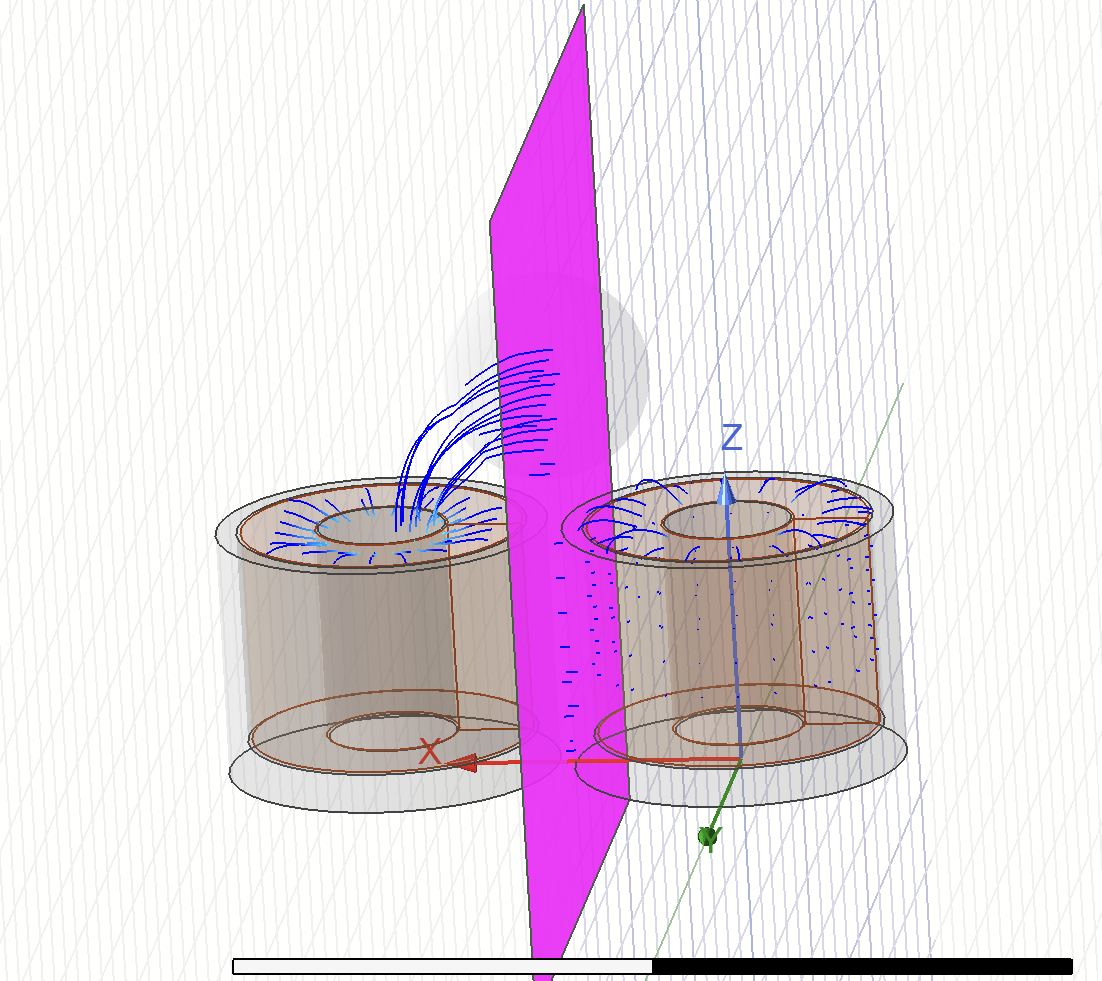





















 You are navigating away from the AIS Discovery experience