-
-
May 7, 2019 at 9:11 am
colinjames
Subscriber
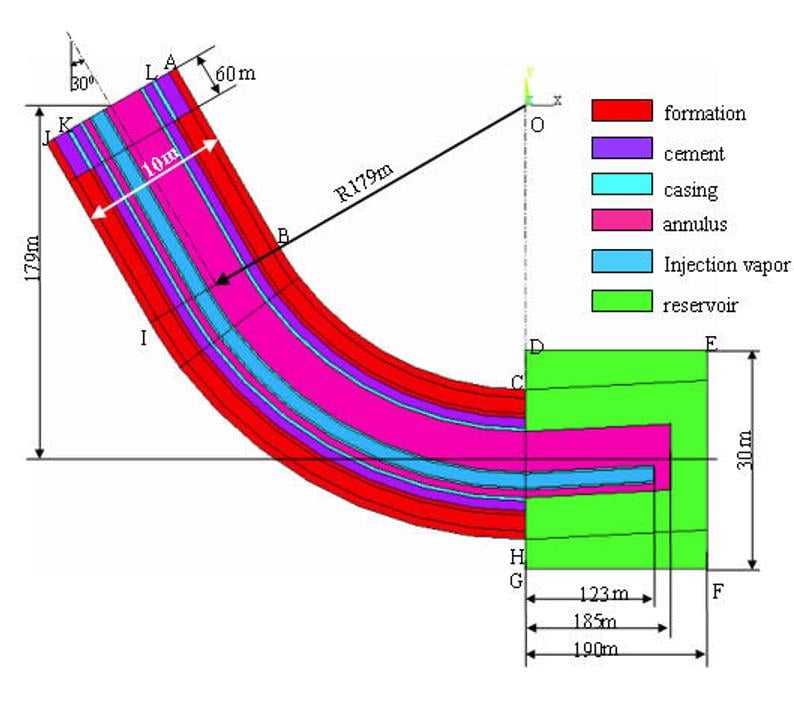
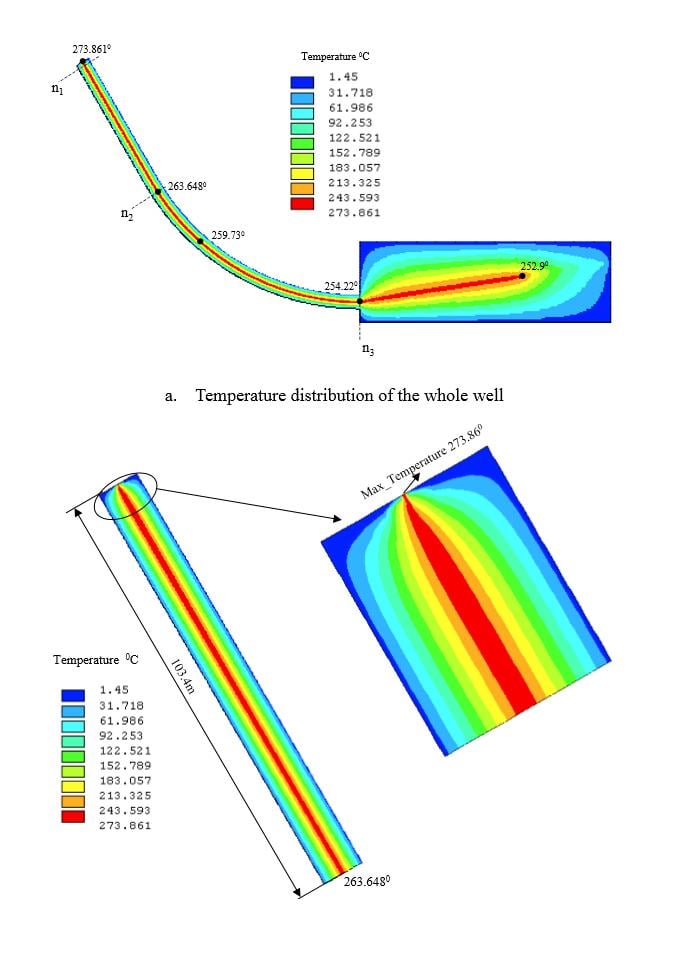
How do i begin sketching the wellbore above using design modeler with 2D analysis. I am currently having problems creating different zones like formation, cement, casing and so on. Do I begin by creating the largest circle (formation) or the smallest (annulus)? What do I do after creating the circles is it extruding and sweeping them? Also, my simulation is for temperature distribution and I intend to have results similar to these:Â
-
May 7, 2019 at 9:42 am
Rob
Forum ModeratorIn 2d I'd suggest using the sketch tools and create each section as a separate face (sketch) using a combination of sketch & Concept tools.Â
The method you describe above is how I've modelled full 3d bores. Create the bore centreline as a sketch line. Then start with the largest diameter & sweep along the path (frozen). Then the next one down & split. Continue until you have the full well.Â
Check your sizes too, 10m is an awfully big hole!Â
-
May 27, 2019 at 4:35 am
colinjames
SubscriberHi thanks for the response, do u have a 3D geometry sketch of a horizontal wellbore that I can open in workbench? I have done a 2D simulation but I have been required to do a 3D analysis which Im having trouble with. Thank you.
-
June 3, 2019 at 1:24 pm
Rob
Forum ModeratorI don't (well, not that I can share anyway). For 3d create a line (sketch for the centre line) and look into the Sweep/Extrude tools.Â
-
- The topic ‘2D sketch in Design Modeler for Wellbore’ is closed to new replies.
- Project lines/edges into a face with the direction normal to the face
- No preview in explorer with scdox file
- Add-in Error Excel
- New Computer
- Inconsistent Script
- MISSING SIMULATION SECTION/RIBBONTAP
- Unable to attach to geometry file 2025R2
- How would I select specific components and all bodies under it?
- Mesh tool questions SpaceClaim
-
4633
-
1540
-
1386
-
1225
-
1021
© 2025 Copyright ANSYS, Inc. All rights reserved.