Ansys Learning Forum › Forums › Discuss Simulation › LS Dyna › LS DYNA/ ANSYS Installation Issue › Reply To: LS DYNA/ ANSYS Installation Issue
 MangeshANSYS
Hello,
There are references to P and C drives. Where is Ansys installed ?
Can you open a command prompt by clicking windows start button and type "cmd.exe" without quotes and launch command prompt
then run these 2 commands one by one by typing them or copy pasting them one line at a time and pressing enter key after
set ANSYS231_DIR
set AWP_ROOT231
for default installation folder location the output should look like below (i.e. Ansys is installed to C:\Program Files\Ansys Inc )
C:\>set ANSYS231_DIR
ANSYS231_DIR=C:\Program Files\ANSYS Inc\v231\ANSYS
C:\>set AWP_ROOT231
AWP_ROOT231=C:\Program Files\ANSYS Inc\v231
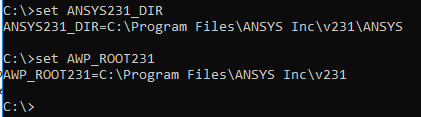
let us know what you see

 You are navigating away from the AIS Discovery experience