Ansys Learning Forum › Forums › Discuss Simulation › General Mechanical › How do I change the maximum value to scale stress results to allow direct comparison? › Reply To: How do I change the maximum value to scale stress results to allow direct comparison?
September 8, 2021 at 9:23 pm
 peteroznewman
Subscriber
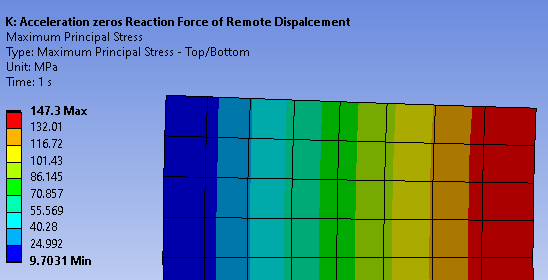
Here is the default scale. The Max and Min values are in bold on the scale.
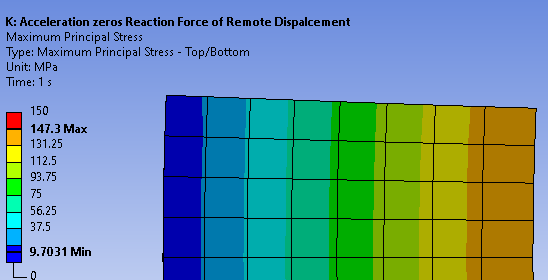
 I can type in 0 to 150 over the Max and Min numbers to stretch the range.
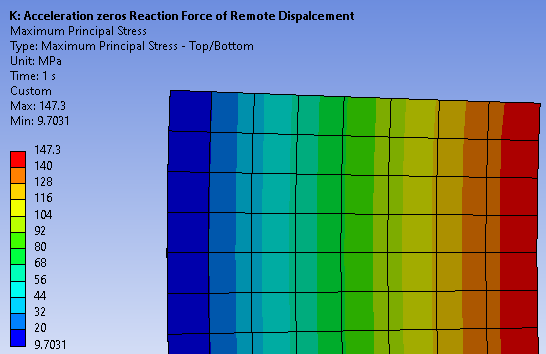
 I can type in 20 to 140 over the numbers next to the Max and Min and add some more levels by clicking on a color and clicking the + popup and right clicking to uncheck Max, Min on Color Bar. But you are right, the Max and Min values will always show for those elements that are included in the plot.
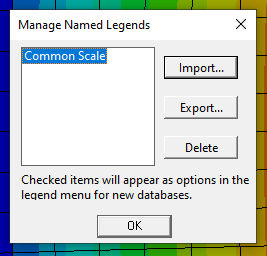
 You can Name a color scale you want to use on all the plots. I typed a name called Common Scale.
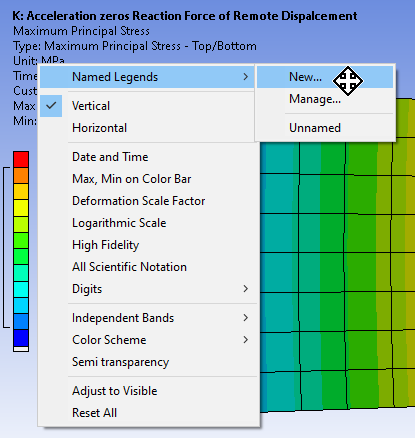 You can Export that to disk then import that into another model.
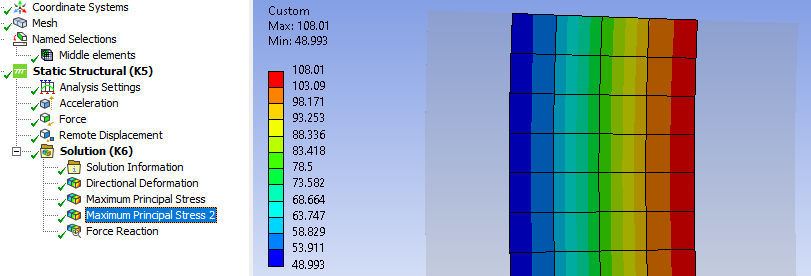
 If you want to make a Named Selection and leave some elements out, you can do that. In the image below, I made a Named Selection and called it Middle Elements.
I can type in 0 to 150 over the Max and Min numbers to stretch the range.I can type in 20 to 140 over the numbers next to the Max and Min and add some more levels by clicking on a color and clicking the + popup and right clicking to uncheck Max, Min on Color Bar. But you are right, the Max and Min values will always show for those elements that are included in the plot.You can Name a color scale you want to use on all the plots. I typed a name called Common Scale.You can Export that to disk then import that into another model.If you want to make a Named Selection and leave some elements out, you can do that. In the image below, I made a Named Selection and called it Middle Elements.

 You are navigating away from the AIS Discovery experience