

-
-
April 1, 2021 at 10:03 am
djnckln
SubscriberHi all,
I could do with some help.
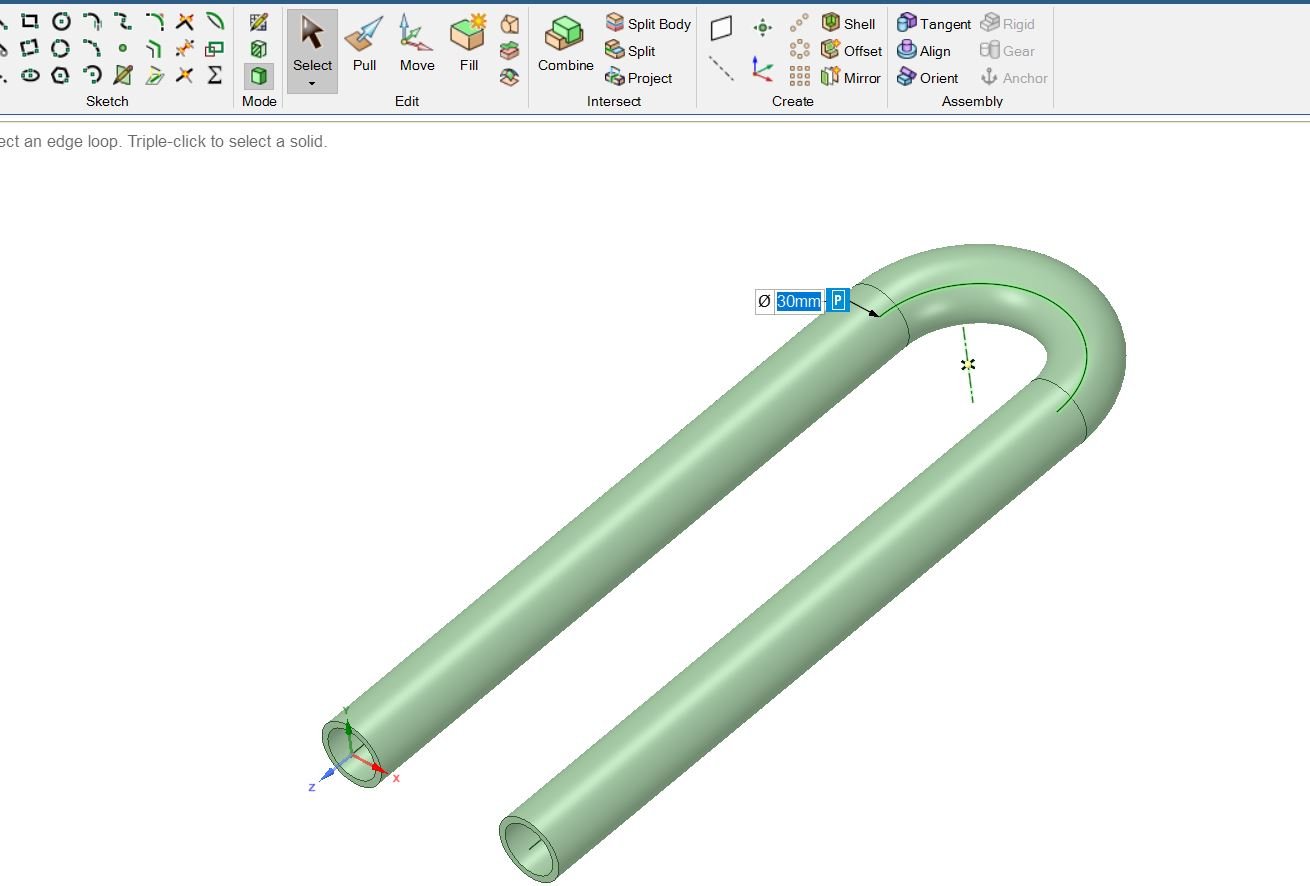
I have a pipe bent into a U shape and I want to change the radius of the bend in the pipe and make this a parameter whilst keeping the internal and external radius of the pipe the same. I also want to keep the straight sections of pipe parallel.
April 1, 2021 at 11:24 amKeyur Kanade
Ansys EmployeePlease select all outer faces and use Pull. Then create a parameter. nSimilarly create another paramter for inner faces. nRegards,nKeyurnHow to access Ansys Online Help DocumentnHow to show full resolution imagenGuidelines on the Student CommunitynHow to use Google to search within Ansys Student CommunitynApril 1, 2021 at 12:07 pmpeteroznewman
SubscribernThis is easily done in DesignModeler. Is that an option for you?nWhat is the analysis that this geometry will be used for?nApril 1, 2021 at 3:19 pmSubscriberHi both for the reply,nYour suggested method changes the external radius of the tube which is not what I need to change. I need to change the radius of the bend of the tube, whilst the internal and external diameters of the tube its self stay the same.nI do have access to but no experience in DesignModeler so it is an option. Do you mean to re-draw the geometry in DesignModeler? Or am I able to use it to modify and apply the parameter to the tube radius and if so, how is that possible?nThanks again in advance.nRegards,nApril 1, 2021 at 5:13 pmSubscriberViewing 4 reply threads- The topic ‘Radius Change Geometry – Spaceclaim’ is closed to new replies.
Innovation Space Trending discussions
 Top Contributors
-
peteroznewman
 6485
6485 -
scabo
 1906
1906 -
Dennis Chen
 1458
1458 -
javat33489
 1308
1308 -
Shyam Prasad V Atri
1022
Top Rated Tags
© 2026 Copyright ANSYS, Inc. All rights reserved.
Ansys does not support the usage of unauthorized Ansys software. Please visit www.ansys.com to obtain an official distribution.
-


The Ansys Learning Forum is a public forum. You are prohibited from providing (i) information that is confidential to You, your employer, or any third party, (ii) Personal Data or individually identifiable health information, (iii) any information that is U.S. Government Classified, Controlled Unclassified Information, International Traffic in Arms Regulators (ITAR) or Export Administration Regulators (EAR) controlled or otherwise have been determined by the United States Government or by a foreign government to require protection against unauthorized disclosure for reasons of national security, or (iv) topics or information restricted by the People's Republic of China data protection and privacy laws.

 You are navigating away from the AIS Discovery experience