
Problem with Advanced Geometry Option -> Analysis Type -> 2D, 3D

TAGGED: 2D, 3d, advanced-features
-
-
March 7, 2021 at 8:17 am
DanielRojas
SubscriberHello,
I am using the free student version of Ansys 2021 R1 and I have a problem when choosing between 2D or 3D in the Analysis Type under the Advanced Geometry Option of the Geometry.
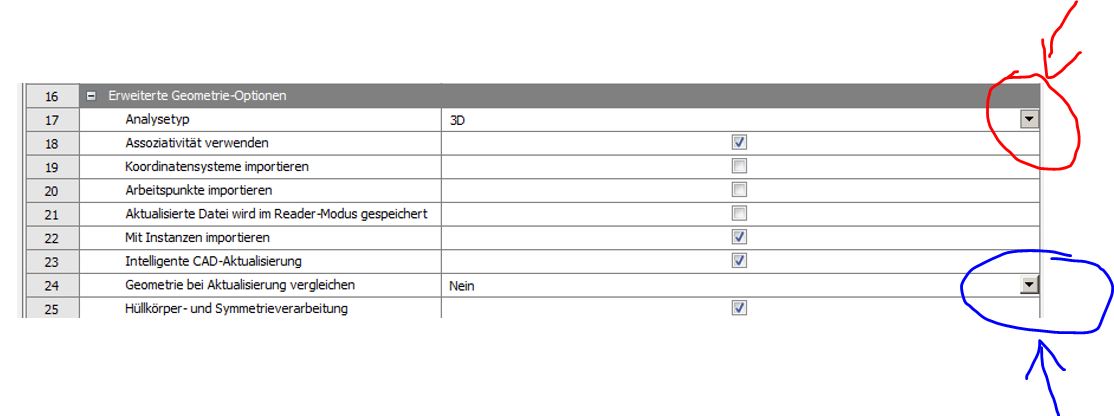
When I create a new analysis and try to select a 2D Analysis Type the drop down list containing the 2D and 3D option does not work. It is presented as pressed but does not work. See the red arrow in the attached image.
Can anyone help me with this problem? I can't find any solution on the internet.
Thank you.
Daniel
March 8, 2021 at 3:20 amKeyur Kanade
Ansys EmployeeIf you want to use 2D then make sure that you create geometry in XY plane. nIf you have created it and not able to select 2D in properties, then please check if this happens to all projects or only this one. nPlease try to uninstall and reinstall program. The installation may not be correct. If it is installation issue, please create a discussion under installation category. nRegards,nKeyurnHow to access Ansys Online Help DocumentnHow to show full resolution imagenGuidelines on the Student CommunitynHow to use Google to search within Ansys Student CommunitynViewing 1 reply thread- The topic ‘Problem with Advanced Geometry Option -> Analysis Type -> 2D, 3D’ is closed to new replies.
Innovation Space Trending discussions
 Top Contributors
-
peteroznewman
 6570
6570 -
scabo
 1906
1906 -
Dennis Chen
 1463
1463 -
javat33489
 1311
1311 -
Shyam Prasad V Atri
1022
Top Rated Tags
© 2026 Copyright ANSYS, Inc. All rights reserved.
Ansys does not support the usage of unauthorized Ansys software. Please visit www.ansys.com to obtain an official distribution.
-


The Ansys Learning Forum is a public forum. You are prohibited from providing (i) information that is confidential to You, your employer, or any third party, (ii) Personal Data or individually identifiable health information, (iii) any information that is U.S. Government Classified, Controlled Unclassified Information, International Traffic in Arms Regulators (ITAR) or Export Administration Regulators (EAR) controlled or otherwise have been determined by the United States Government or by a foreign government to require protection against unauthorized disclosure for reasons of national security, or (iv) topics or information restricted by the People's Republic of China data protection and privacy laws.

 You are navigating away from the AIS Discovery experience