TAGGED: rsm
-
-
March 2, 2021 at 7:18 am
sametgoner
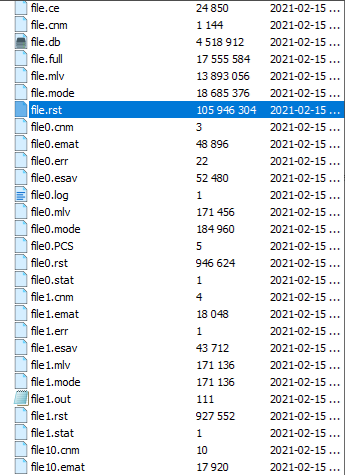
SubscriberHi All, nI am sending the job with rsm to the cluster. Then the clusters solve the job and cluster send all results to my local computer. However, i want to get the only one result file because i do not have enough memory for all the results at my local. How can i arrange that the only one result file come to my local? nThanks alot. nBest regards,n -
March 2, 2021 at 12:16 pm
Amine Ben Hadj Ali
Ansys EmployeeI do not think there is an easy way to change that. Which files yo do not want to have back?n -
March 2, 2021 at 12:37 pm
-
March 3, 2021 at 1:38 am
mrife
Ansys EmployeeHi. All the files are brought back as the default assumption is that you may need to run a restart analysis. Perhaps the easiest way to address this is to change the Analysis Settings, Restart Controls to not create any restart file. And to delete any unneeded files.nMiken -
March 5, 2021 at 4:20 pm
mrife
Ansys EmployeeWell, learn something new every day! Or in my case remember something every day. I had forgotten about this: if you are using version 2021 R1 there is a new way to do this. In Mechanical go to File -> Options; Results -> RSM File Manager: RSM Output Files Downloaded. Change the value to 'Show'. Ok out of the Options window. Now next time you retrieve files from a remote solve a form will pop-open that lists all the solve files. You can uncheck those that you do not want retrieved. Any files not retrieved will be deleted. nMiken -
March 5, 2021 at 5:08 pm
sametgoner
SubscriberHi Mike,nthank you for your help and interest:) .i will apply. nBest wishes and have nice weekendnSametn -
March 8, 2021 at 7:13 am
-
March 8, 2021 at 3:32 pm
mrife
Ansys EmployeeBe sure to change the setting back to Hide when you are going to solve locally.n
-
Viewing 7 reply threads
- The topic ‘can remote solve manager choose the results which export to local from cluster’ is closed to new replies.

Innovation Space
Trending discussions
Top Contributors
-
5159
-
1836
-
1387
-
1249
-
1021
Top Rated Tags
© 2026 Copyright ANSYS, Inc. All rights reserved.
Ansys does not support the usage of unauthorized Ansys software. Please visit www.ansys.com to obtain an official distribution.