

TAGGED: ansys-workbench, meshing, workbench
-
-
February 25, 2021 at 10:56 pm
yha
SubscriberHello,
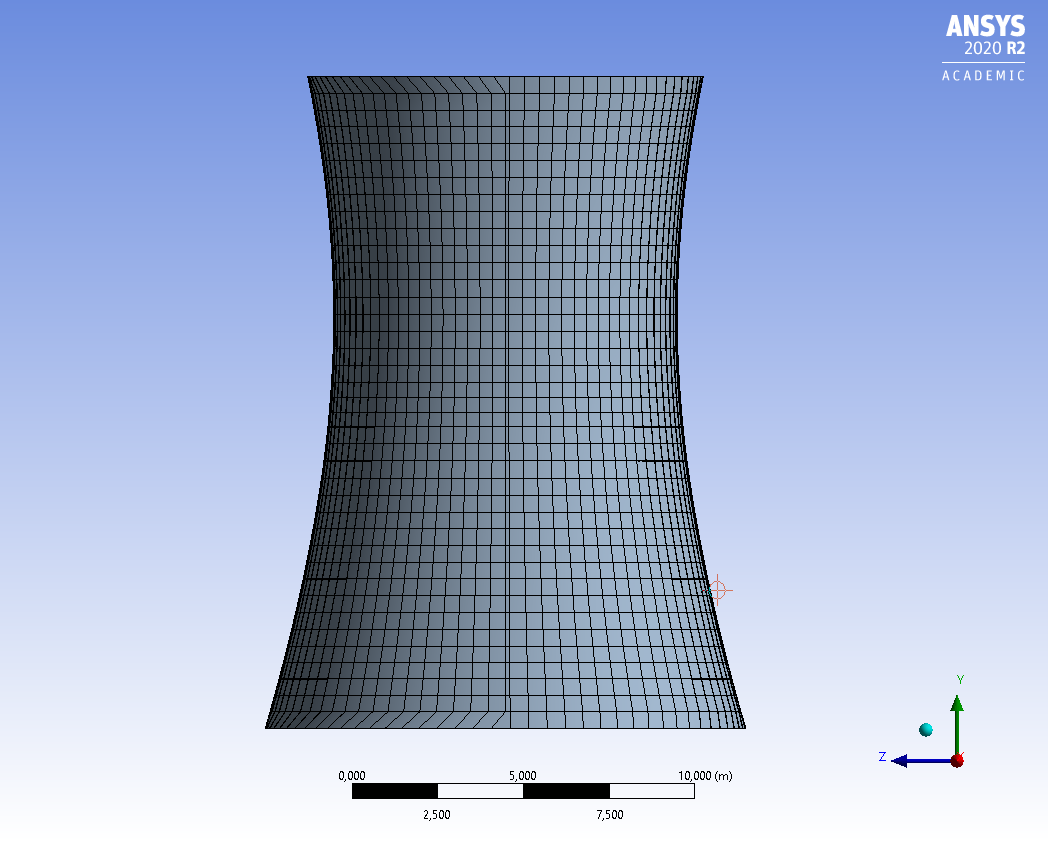
I'm new to this program and so I don't know a lot yet but my mesh looks quite strange. It's so irregular, especially vertically in the middle. I think it might be the reason why the top and bottom look so strange too.
February 26, 2021 at 1:21 amSubscriberEdit: Apparently this middle line is exactly where my function isn n
February 26, 2021 at 3:04 am
n
February 26, 2021 at 3:04 ampeteroznewman
SubscribernThough the mesh is not uniform, it is valid and will give useful results. nFebruary 26, 2021 at 11:40 amSubscriberOh really? I thought it had to look regularnFebruary 26, 2021 at 6:03 pmmrife
Ansys EmployeeDo you mean those elements at the top/bottom (defining +/- Y to be top/bottom) group of elements on the left side being slightly skewed? If so I run into this quite a bit with cylinders and cylindrical type of bodies. The CAD that created has clocked the top/bottom edges relative to the other edges, so the elements are skewed as they follow the same clocking. If the effect is not too bad on the element shape we can just ignore it. If not we can often 'repair' the edges by splitting the geometry in some manner. In Mechanical there is the Virtual Topology feature which can split an edge. You can try that and see if the resulting split edges lose that clocking and the elements end up with no skewness.nMikennMarch 2, 2021 at 8:00 pmSubscriberSo I just tried it with Virtual Topology and it solved my problem. Thanks a lot! Also thank you for your extra information, it was really helpful for my understanding.nViewing 5 reply threads- The topic ‘Why does my mesh look so strange?’ is closed to new replies.
Innovation Space Trending discussions
 Top Contributors
-
peteroznewman
 4878
4878 -
scabo
 1587
1587 -
Dennis Chen
 1386
1386 -
javat33489
 1242
1242 -
Shyam Prasad V Atri
1021
Top Rated Tags
© 2026 Copyright ANSYS, Inc. All rights reserved.
Ansys does not support the usage of unauthorized Ansys software. Please visit www.ansys.com to obtain an official distribution.
-


The Ansys Learning Forum is a public forum. You are prohibited from providing (i) information that is confidential to You, your employer, or any third party, (ii) Personal Data or individually identifiable health information, (iii) any information that is U.S. Government Classified, Controlled Unclassified Information, International Traffic in Arms Regulators (ITAR) or Export Administration Regulators (EAR) controlled or otherwise have been determined by the United States Government or by a foreign government to require protection against unauthorized disclosure for reasons of national security, or (iv) topics or information restricted by the People's Republic of China data protection and privacy laws.

 You are navigating away from the AIS Discovery experience

