

TAGGED: 2-way-fsi, command-line-interface, fluent, fsi, mechanical-apdl
-
-
December 15, 2020 at 11:03 am
jfonken
SubscriberHi all,
For my PhD project, I've been working on running FSI models. So far, I've been using Ansys 2020R1 and have been able to run my models. However, I'd like to switch to Ansys 2020R2 and I'm facing some problems doing so. My separate Fluent and Mechanical APDL simulations run successfully, but I have problems starting the FSI model from the CLI using the example of the this tutorial ( TUTORIALS WITH WORKBENCH SETUP AND COMMAND-LINE INTERFACE (CLI) EXECUTION): https://ansyshelp.ansys.com/account/secured?returnurl=/Views/Secured/corp/v202/en/sysc_tut/sysc_tut_oscplate_sci-cli_fluent.html
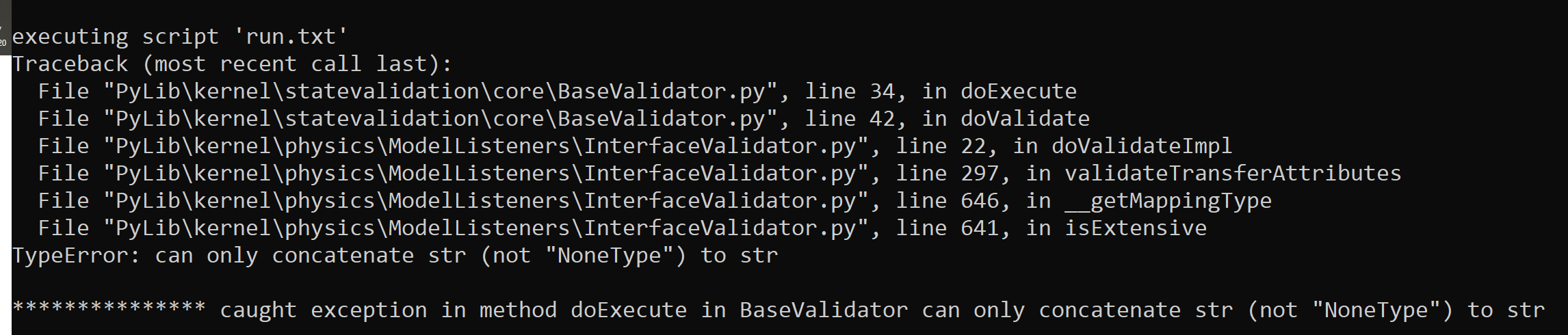
In Ansys 2020R1, this worked perfectly fine. However, when I import my .sci file (using: ImportSystemCouplingInputFile(FilePath = 'FSI-Coupling.sci') in Ansys 2020R2 system coupling, I get the following error:
December 15, 2020 at 9:00 pmSteve
Ansys EmployeeHi Judith,nWe're looking into it and will get back to you shortly. In the mean time you can set up your case with the method described in this tutorial.nhttps://ansyshelp.ansys.com/account/secured?returnurl=/Views/Secured/corp/v202/en/sysc_tut/sysc_tut_oscplate_cli_fluent.htmlnSystem Coupling Tutorials \ Tutorials with Command-Line Interface (CLI) Workflows \ Oscillating Plate FSI with Fluent and MechanicalnStevenDecember 15, 2020 at 9:56 pmAnsys EmployeeJudith, can you copy and paste the contents in the .scl file into the comment?nViewing 2 reply threads- The topic ‘Problem running FSI from CLI in Ansys 2020R2’ is closed to new replies.
Innovation Space Trending discussions
 Top Contributors
-
peteroznewman
 6710
6710 -
scabo
 1906
1906 -
Dennis Chen
 1469
1469 -
javat33489
 1313
1313 -
Shyam Prasad V Atri
1022
Top Rated Tags
© 2026 Copyright ANSYS, Inc. All rights reserved.
Ansys does not support the usage of unauthorized Ansys software. Please visit www.ansys.com to obtain an official distribution.
-


 You are navigating away from the AIS Discovery experience