Ansys Assistant will be unavailable on the Learning Forum starting January 30. An upgraded version is coming soon. We apologize for any inconvenience and appreciate your patience. Stay tuned for updates.
3D Design

3D Design

Topics related to Ansys Discovery and Ansys SpaceClaim.

Boolean method

    • farah shakhtour
      Bbp_participant

      Hi everyone,

      I'm working on an orthodontic finite element model consisting of a tooth, PDL, and aligner.

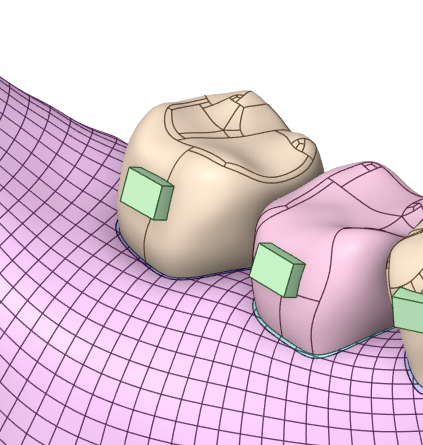
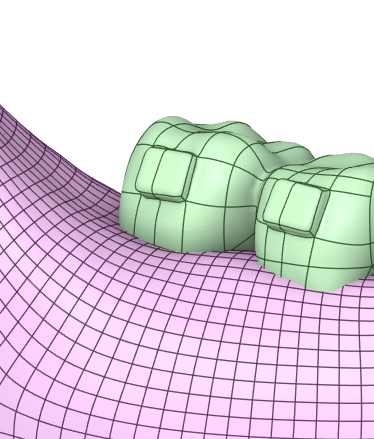
      The green geometry is the aligner. The tooth is located inside the aligner, and it is surrounded by a PDL layer

      The aligner was created in SpaceClaim using the following workflow:

      1. Generated the aligner using Shell with an outside thickness of 0.5 mm.
      2. Joined the resulting bodies so that the aligner became a single solid part.
      3. Applied Shrinkwrap with AutoSkin to obtain a clean watertight geometry.

      The issue is that the aligner extends apically beyond the desired bone level. I would like to cut the aligner so that its lower edge follows the anatomical bone level exactly (represented by the pink geometry in the attached image).

      I have already tried:

      • Split Body, but I could not get it to work correctly.
      • Using a plane as the cutting tool, but this only produced a straight, sharp cut. Since the bone level is curved and irregular, the result is not anatomically realistic.

      What I am looking for is a method that allows the aligner edge to follow the contour of the pink bone, rather than creating a flat planar cut. When I tried the intersect, the extra edges out of the bone remined and couldnt be deleted

    • skulkarn
      Subscriber

      Hello,

      You can try to use No merge option while Combine tool and then apply the Share Topology.

Viewing 1 reply thread
  • You must be logged in to reply to this topic.
[bingo_chatbox]