Ansys Assistant will be unavailable on the Learning Forum starting January 30. An upgraded version is coming soon. We apologize for any inconvenience and appreciate your patience. Stay tuned for updates.
Fluids

Fluids

Topics related to Fluent, CFX, Turbogrid and more.

Querry in Post processing of Rocky DEM

TAGGED: 

    • smithamohanam
      Subscriber

      Respected Sir,

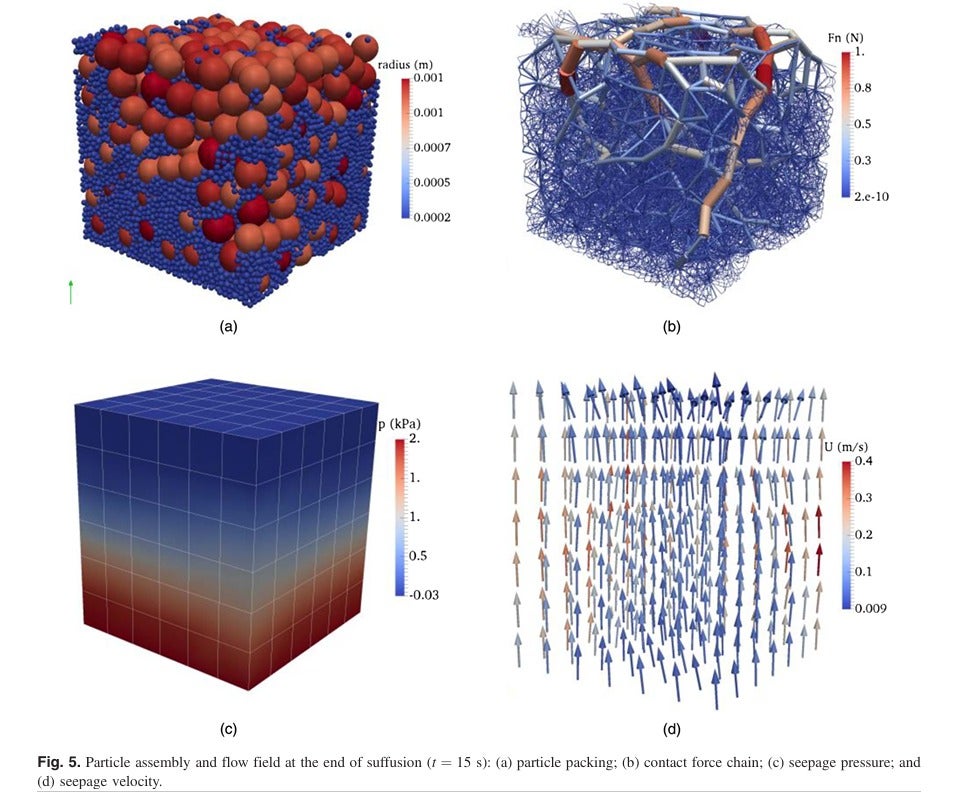
      I am working with ANSYS Rocky 2024 R1 on a coupled DEM–CFD simulation and would like to know whether the following post-processing results can be generated directly in Rocky (or through Rocky–Fluent coupling):

      • Particle packing visualization with particle size distribution
      • Contact force chain network
      • Seepage pressure distribution
      • Seepage velocity vector field

      The attached figure is from a published paper and represents the type of outputs I am trying to reproduce.

      Kindly help me to take the above results after CFD-DEM coupling simulation for porous medium.


    • Rob
      Forum Moderator

      a) Yes, in Rocky and it's covered in several of the tutorials (look in Help)

      b) Unsure, but I'll check

      c) In Fluent, as it's a flow variable. Some Fluent results are available in Rocky in 25Rx but I'd use Fluent for this sort of work

      d) If you're using semi resolved particles the result makes sense. For a porous media coupling there is no acceleration due to the way porous media is handled. 

    • Rob
      Forum Moderator

      Having checked as I'm a little out of date with the current release. 

      b) Yes, look in the contacts data. 

      c & d) Available in Rocky

    • smithamohanam
      Subscriber

      Thank you sir,  for your kind reply

    • smithamohanam
      Subscriber

      Respected sir,as you mentioned above we have seen option for contact data . Can we get the data by just enablibling the contact data . I would also like to know whether the contact force chain diagram can be drawn from DEM itself or we should use any another platform for visualising it.Thanking you for your time and concern.

    • Rob
      Forum Moderator

      From a colleague. You should be able to colour by the contacts network as opposed to the nodes, and the lines will then show up and you can colour those.

      If you click on Help in Rocky you should have access to all of the documentation. 

Viewing 5 reply threads
  • You must be logged in to reply to this topic.
[bingo_chatbox]