Ansys Assistant will be unavailable on the Learning Forum starting January 30. An upgraded version is coming soon. We apologize for any inconvenience and appreciate your patience. Stay tuned for updates.
General Mechanical

General Mechanical

Topics related to Mechanical Enterprise, Motion, Additive Print and more.

additional elements through thickness w/o specifying edge # of divisions?

    • jbettinger
      Subscriber

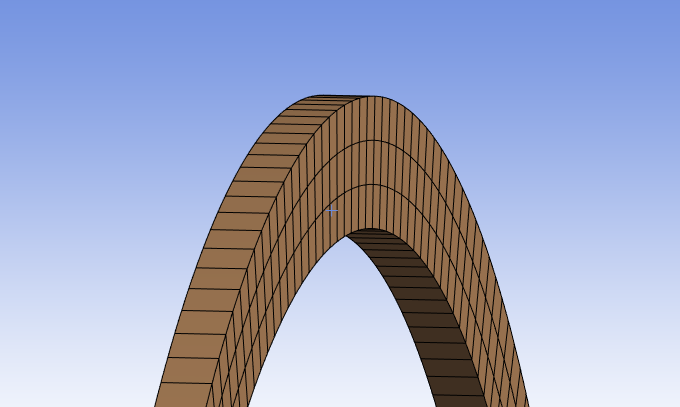
      I am working with an axisymmetric spacer component made out of a material which spaces between two components in the axial direction. I am attempting to generate more elements through the thickness of the component without significantly increasing the mesh density (decreasing element size), as this is a portion of a much larger system. In the past, I had been able to put a split line in my model before importing into ANSYS, which gave me an "edge" to use an "edge sizing -> # of divisions" mesh control. However this has also prevented me from using the "axisymmetric sweep" mesh method on this component.

      I was wondering if there was a way that I could increase the elements through thickness without using a split line edge and "# of divisions" control, so that I can keep the "axisymmetric sweep" mesh method on this component?

      I am using Ansys Mechanical 26R1. I do not have access to discovery/spaceclaim.
    • peteroznewman
      Subscriber

      Right click on the Mesh and Show Sweepable Bodies, the spacer should highlight in green to confirm that the mesher recognizes that body.

      The spacer you show should be a sweepable body, so insert a Mesh Method of Sweep, pick the body and select the Source and Target faces as the flat faces. The sweep direction is though-the-thickness and you can specify the number of divisions for the sweep without requiring an edge.  It is the Multizone method that requires an edge to specify number of divisions.

    • ErKo
      Ansys Employee

      Just to add to the comments and for clarity:

      The multizone if set to Decom. Type: Thin Sweep and Solid element option then we can also give how many elements we want thorugh the thick. dir. (sweep number of divisions) as you want here, so this is an alternative.

      All the best


      Erko

    • jbettinger
      Subscriber

      Thank you both. I tried the sweep method with defining source and target faces and that seemed to work well. The mesh technically isn't as clean looking as it is with the axisymmetric sweep, but at least I get the elements through thickness that I need. I do also need to apply that to every spacer that needs it, but at least this works. I still need to properly try the multizone meshing method. Every time I have tried multizone control on anything it basically hasn't worked, but that is a problem for another time and another thread lol.

Viewing 3 reply threads
  • You must be logged in to reply to this topic.
[bingo_chatbox]









