Hi all!
I've created a .lib library using primarily C++, and now I am trying to use it in Ansys Fluent (25R1). However, I am not sure if I can build my C++ files manually.
As I understand, I can compile and link .cpp files containing appropriate DEFINE_ function using the GUI. However, when trying to compile a UDF using TUI, I am getting errors on the step where I must use nmake in each directory. I am using the compiler included in the MS Visual Studio Community 2022.
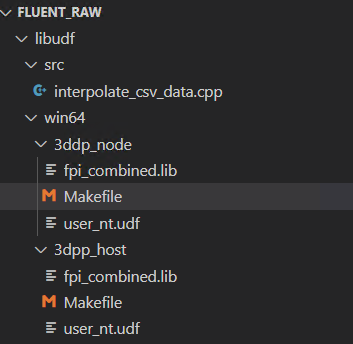
Following Ansys Fluent UDF Manual, I've created the needed directory structure (fig. 1).
I've changed user_nt files as stated. An example of one user_nt file is shown below (for the node; this is all the text that is inside the file):
FLUENT_INC=D:\Program Files\ANSYS Inc\v251\fluent
FLUENT_ARCH=win64
CSOURCES = $(SRC)interpolate_csv_data.cpp
HSOURCES =
VERSION = 3dpp_node
PARALLEL_NODE = msmpi
USER_OBJECTS = fpi_combined.lib
Here is my interpolate_csv_data.cpp file at the moment:
#include "udf.h"
DEFINE_ON_DEMAND(interpolate_csv_data)
{
    Message("Successfull call!");
}
While using nmake, I am getting the following errors:
# Generating ud_io1.h
        resolve.exe -udf ..\..\src\interpolate_csv_data.cpp -head_file ud_io1.h
        cl -nologo /c /DUDF_EXPORTING /DUDF_NT /DWIN64 /EHa /wd4224  -I.  -I"D:\Program Files\ANSYS Inc\v251\fluent"\fluent25.1.0\win64\3dpp_node  -I"D:\Program Files\ANSYS Inc\v251\fluent"\fluent25.1.0\src\main  -I"D:\Program Files\ANSYS Inc\v251\fluent"\fluent25.1.0\src\addon-wrapper  -I"D:\Program Files\ANSYS Inc\v251\fluent"\fluent25.1.0\src\io  -I"D:\Program Files\ANSYS Inc\v251\fluent"\fluent25.1.0\src\species  -I"D:\Program Files\ANSYS Inc\v251\fluent"\fluent25.1.0\src\pbns  -I"D:\Program Files\ANSYS Inc\v251\fluent"\fluent25.1.0\src\numerics  -I"D:\Program Files\ANSYS Inc\v251\fluent"\fluent25.1.0\src\sphysics  -I"D:\Program Files\ANSYS Inc\v251\fluent"\fluent25.1.0\src\storage  -I"D:\Program Files\ANSYS Inc\v251\fluent"\fluent25.1.0\src\mphase  -I"D:\Program Files\ANSYS Inc\v251\fluent"\fluent25.1.0\src\bc  -I"D:\Program Files\ANSYS Inc\v251\fluent"\fluent25.1.0\src\models  -I"D:\Program Files\ANSYS Inc\v251\fluent"\fluent25.1.0\src\material  -I"D:\Program Files\ANSYS Inc\v251\fluent"\fluent25.1.0\src\amg  -I"D:\Program Files\ANSYS Inc\v251\fluent"\fluent25.1.0\src\util  -I"D:\Program Files\ANSYS Inc\v251\fluent"\fluent25.1.0\src\mesh  -I"D:\Program Files\ANSYS Inc\v251\fluent"\fluent25.1.0\src\udf  -I"D:\Program Files\ANSYS Inc\v251\fluent"\fluent25.1.0\src\ht  -I"D:\Program Files\ANSYS Inc\v251\fluent"\fluent25.1.0\src\dx  -I"D:\Program Files\ANSYS Inc\v251\fluent"\fluent25.1.0\src\turbulence  -I"D:\Program Files\ANSYS Inc\v251\fluent"\fluent25.1.0\src\acoustics  -I"D:\Program Files\ANSYS Inc\v251\fluent"\fluent25.1.0\src\parallel  -I"D:\Program Files\ANSYS Inc\v251\fluent"\fluent25.1.0\src\etc  -I"D:\Program Files\ANSYS Inc\v251\fluent"\fluent25.1.0\src\ue  -I"D:\Program Files\ANSYS Inc\v251\fluent"\fluent25.1.0\src\dpm  -I"D:\Program Files\ANSYS Inc\v251\fluent"\fluent25.1.0\src\dbns  -I"D:\Program Files\ANSYS Inc\v251\fluent"\fluent25.1.0\cortex\src  -I"D:\Program Files\ANSYS Inc\v251\fluent"\fluent25.1.0\client\src  -I"D:\Program Files\ANSYS Inc\v251\fluent"\fluent25.1.0\tgrid\src  -I"D:\Program Files\ANSYS Inc\v251\fluent"\fluent25.1.0\multiport\src  -I"D:\Program Files\ANSYS Inc\v251\fluent"\fluent25.1.0\multiport\mpi_wrapper\src  -I"D:\Program Files\ANSYS Inc\v251\fluent"\include  ..\..\src\interpolate_csv_data.cpp
interpolate_csv_data.cpp
D:\Program Files\ANSYS Inc\v251\fluent\fluent25.1.0\src\main\config.h(122): error C4430: missing type specifier - int assumed. Note: C++ does not support default-int
D:\Program Files\ANSYS Inc\v251\fluent\fluent25.1.0\src\main\config.h(122): error C2059: syntax error: ':'
D:\Program Files\ANSYS Inc\v251\fluent\fluent25.1.0\src\main\config.h(122): error C2143: syntax error: missing ';' before 'constant'
D:\Program Files\ANSYS Inc\v251\fluent\fluent25.1.0\src\main\config.h(122): error C4430: missing type specifier - int assumed. Note: C++ does not support default-int
C:\Program Files\Microsoft Visual Studio\2022\Community\VC\Tools\MSVC\14.44.35207\include\stdarg.h(16): error C2143: syntax error: missing ';' before '{'
C:\Program Files\Microsoft Visual Studio\2022\Community\VC\Tools\MSVC\14.44.35207\include\stdarg.h(16): error C2447: '{': missing function header (old-style formal list?)
NMAKE : fatal error U1077: 'cl -nologo /c /DUDF_EXPORTING /DUDF_NT /DWIN64 /EHa /wd4224  -I.  -I"D:\Program Files\ANSYS Inc\v251\fluent"\fluent25.1.0\win64\3dpp_node  -I"D:\Program Files\ANSYS Inc\v251\fluent"\fluent25.1.0\src\main  -I"D:\Program Files\ANSYS Inc\v251\fluent"\fluent25.1.0\src\addon-wrapper  -I"D:\Program Files\ANSYS Inc\v251\fluent"\fluent25.1.0\src\io  -I"D:\Program Files\ANSYS Inc\v251\fluent"\fluent25.1.0\src\species  -I"D:\Program Files\ANSYS Inc\v251\fluent"\fluent25.1.0\src\pbns  -I"D:\Program Files\ANSYS Inc\v251\fluent"\fluent25.1.0\src\numerics  -I"D:\Program Files\ANSYS Inc\v251\fluent"\fluent25.1.0\src\sphysics  -I"D:\Program Files\ANSYS Inc\v251\fluent"\fluent25.1.0\src\storage  -I"D:\Program Files\ANSYS Inc\v251\fluent"\fluent25.1.0\src\mphase  -I"D:\Program Files\ANSYS Inc\v251\fluent"\fluent25.1.0\src\bc  -I"D:\Program Files\ANSYS Inc\v251\fluent"\fluent25.1.0\src\models  -I"D:\Program Files\ANSYS Inc\v251\fluent"\fluent25.1.0\src\material  -I"D:\Program Files\ANSYS Inc\v251\fluent"\fluent25.1.0\src\amg  -I"D:\Program Files\ANSYS Inc\v251\fluent"\fluent25.1.0\src\util  -I"D:\Program Files\ANSYS Inc\v251\fluent"\fluent25.1.0\src\mesh  -I"D:\Program Files\ANSYS Inc\v251\fluent"\fluent25.1.0\src\udf  -I"D:\Program Files\ANSYS Inc\v251\fluent"\fluent25.1.0\src\ht  -I"D:\Program Files\ANSYS Inc\v251\fluent"\fluent25.1.0\src\dx  -I"D:\Program Files\ANSYS Inc\v251\fluent"\fluent25.1.0\src\turbulence  -I"D:\Program Files\ANSYS Inc\v251\fluent"\fluent25.1.0\src\acoustics  -I"D:\Program Files\ANSYS Inc\v251\fluent"\fluent25.1.0\src\parallel  -I"D:\Program Files\ANSYS Inc\v251\fluent"\fluent25.1.0\src\etc  -I"D:\Program Files\ANSYS Inc\v251\fluent"\fluent25.1.0\src\ue  -I"D:\Program Files\ANSYS Inc\v251\fluent"\fluent25.1.0\src\dpm  -I"D:\Program Files\ANSYS Inc\v251\fluent"\fluent25.1.0\src\dbns  -I"D:\Program Files\ANSYS Inc\v251\fluent"\fluent25.1.0\cortex\src  -I"D:\Program Files\ANSYS Inc\v251\fluent"\fluent25.1.0\client\src  -I"D:\Program Files\ANSYS Inc\v251\fluent"\fluent25.1.0\tgrid\src  -I"D:\Program Files\ANSYS Inc\v251\fluent"\fluent25.1.0\multiport\src  -I"D:\Program Files\ANSYS Inc\v251\fluent"\fluent25.1.0\multiport\mpi_wrapper\src  -I"D:\Program Files\ANSYS Inc\v251\fluent"\include  ..\..\src\interpolate_csv_data.cpp' : return code '0x2'
Stop.
Did I miss something? As I understand, the problem is Makefile files are set up in such a way that there is no distinction between .c and .cpp files. The compiler sees my file is .cpp and is trying to build all files using C++ standards and failing to do so because Ansys UDF headers are written in plain C. Is there a workaround to fix this issue? Or is the only way to rewrite my .lib file in C or create some kind of C bridge?.
Could this issue be caused by compiler flags used to build my .lib file? As I see it, the building process hasn't advanced enough to the steps where this would matter, but I may be wrong.
Right now I am not sure what to do next, so any help would be appreciated.


















 You are navigating away from the AIS Discovery experience