-
-
June 19, 2020 at 12:08 pm
KnHw
SubscriberHello,
Â
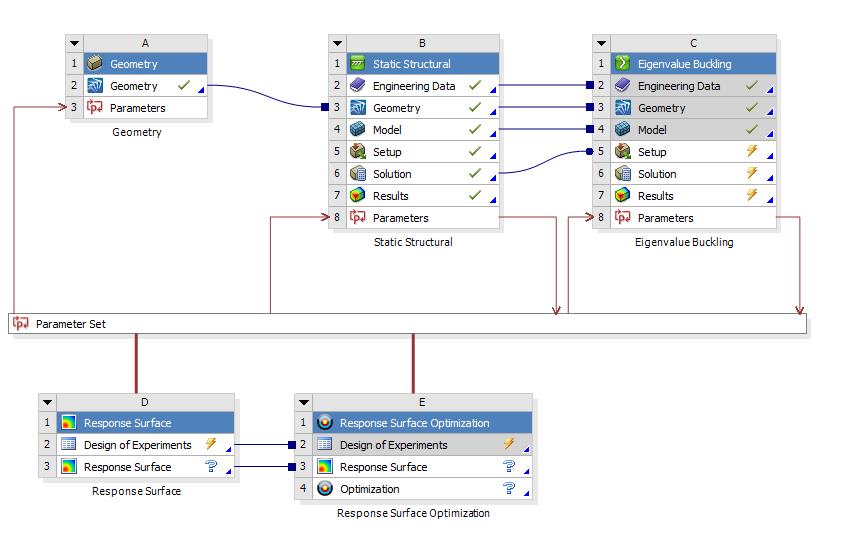
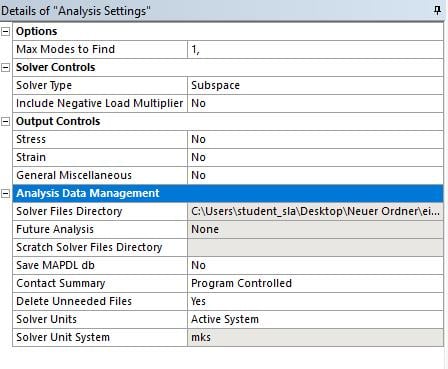
i try to run some design Optimizations for a cylinder. Therefore i want to compare different stiffner typs and a unstiffened version. When i try to run the unstiffened Version, i alwys got the same total deformation(1;1,0001m) for several r/t(radius/wall thickness) ratios.When i try to simulate thin walls, Ansys can't "Performe Mode Extraction"(radius=750 thickness <20mm). I tried some settings explained in the Help-Section: Checking all specific settings for linear buckling, changing the solver to Subspace(default for linear is Direct) both didn't work.
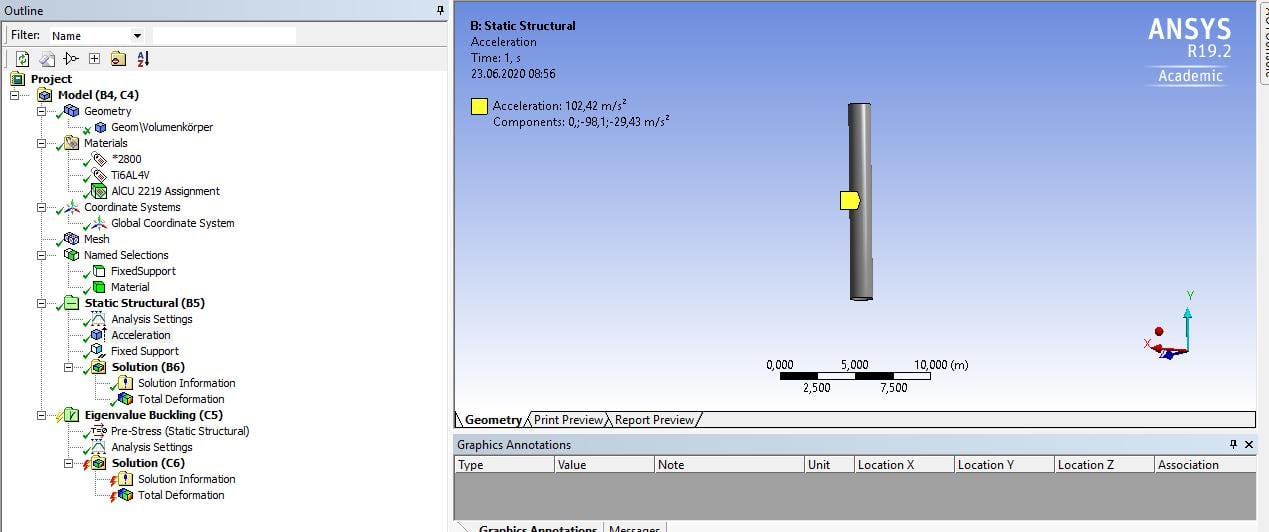
Loads and Boundary conditions:
acceleration in axial and radial direction
fixed support on one front face
i turned of negative Load Factors
It did worked before, but there i mixed the Units for my Youngs' Module. (Now GPA then MPA->Factor 1000 more now)
Â
Greetings KnHw
-
June 19, 2020 at 2:03 pm
Wenlong
Ansys EmployeeHello KnHw,
Buckling mode shapes do not represent actual displacements but help you to visualize how a part or an assembly deforms when buckling.
Regards,
Wenlong
================ Note ====================
If you have trouble opening the links I attached, please see the first useful link below
Â
Â
Useful Links
- How to access Ansys Online Help Document
- How to show full resolution image
- How to use Google to search within Ansys Student Community
Â
-
June 20, 2020 at 7:40 am
-
June 22, 2020 at 8:00 am
KnHw
SubscriberFound a similar Post with no solution. I think it is a important question/Problem for multiple users
Â
/forum/forums/topic/eigenvalue-buckling-problem/?order=all#comment-58c4d644-0f7d-4b24-b433-ab3e0132bc40
-
June 22, 2020 at 1:56 pm
Wenlong
Ansys EmployeeHi KnHw,
Sorry about the late reply. Could you please insert several images about your model boundary conditions and analysis settings?
If you need the actual displacement, you would need to conduct a nonlinear eigenvalue buckling analysis. You can find more info here:Â https://ansyshelp.ansys.com/account/secured?returnurl=/Views/Secured/corp/v191/ans_str/Hlp_G_STR7_4.html
Thanks,
Regards,
Wenlong
-
June 23, 2020 at 7:03 am
-
June 23, 2020 at 2:38 pm
Wenlong
Ansys EmployeeHi KnHw,
Your setup looks fine for me. I duplicated your setup and I am able to extract the modal shape. I am using a similar geometry size you described (radius 750mm, thickness 15mm). And I have tried solid and shell elements both work fine.Â
Can you please show me the exact error message? Also, what's the material property you are using? That could be the only input that's different from us.Â
Regards,
Wenlong
Â
-
June 23, 2020 at 5:43 pm
KnHw
SubscriberHello Wenlong,
Â
can you plz try a thickness of less then 3mm? I could run a simulation today at my University and i was able to run 5mm (using the Subspace Solver) after changing the solver process settings(unchecking Distribute solution) .but less was not working. I got similar issues by using variuos stiffened shells (isogrid, orthogrid, trusscore and Honeycomb) modells. But i think for them i should open a new thread/ maybe the solution here will also work, then i would comment this here at the end.
Error:
on my other PC i got this solver output:
Â
*** NOTE ***Â Â Â Â Â Â Â Â Â Â Â Â Â Â Â Â Â Â Â Â Â Â Â Â Â Â Â CP =Â Â Â Â Â 30.594Â Â TIME= 18:22:18
Â
The initial memory allocation (-m) has been exceeded.                 Â
Â
  Supplemental memory allocations are being used.                      Â
Â
Â
Â
 SUBSPACE CALCULATION OF UP TO   1 EIGENVECTORS.
Â
 NUMBER OF EQUATIONS             =      612864
Â
 MAXIMUM WAVEFRONT               =         147
Â
 MAXIMUM MODES STORED            =           1
Â
 MINIMUM EIGENVALUE              = 0.00000E+00
Â
 MAXIMUM EIGENVALUE              = 0.10000E+31
Â
Â
Â
 Memory allocated for solver             = 4180.559 MB
Â
 Memory required for in-core solution    = 3983.583 MB
Â
 Memory required for out-of-core solution =  545.658 MB
Â
Â
Â
*** NOTE ***Â Â Â Â Â Â Â Â Â Â Â Â Â Â Â Â Â Â Â Â Â Â Â Â Â Â Â CP =Â Â Â Â Â 99.406Â Â TIME= 18:22:45
Â
The Sparse Matrix Solver is currently running in the in-core memory   Â
Â
 mode. This memory mode uses the most amount of memory in order to    Â
Â
 avoid using the hard drive as much as possible, which most often      Â
Â
 results in the fastest solution time. This mode is recommended if    Â
Â
 enough physical memory is present to accommodate all of the solver    Â
Â
 data.
Â
Â
Â
Material properties:
and the secon material is used:
Â
When i quit the solving process i got this message on my workbench:
(DP 1) Update of the Lösung component in Eigenwert-Beulanalyse for Design Point 1 failed: Error updating cell Lösung in system Eigenwert-Beulanalyse for design point 1.
Â
Best regards Bastian
-
June 24, 2020 at 2:01 pm
KnHw
SubscriberHello Wenlong,
Â
just giving you a short update, I tried some different boundary conditions for another Load Case with a deplacement on the top and the Bottom:
it worked out fine, so thats why i am thinking it is not working because of the fixed support. One Guy from the Team mentioned that he had some Problems with thin shells because of the inertial Relief settings in the structual settings-> I tried to simulate the shell, while inertial relief was turned on but I got the error message that inertial relief is not working for Buckling prestress analysis. Is it right, that i have to turn it of for Buckling analysis?
Â
Dealing with this i got a Meeting with the guy from the University and we want to analyse a different Loading Case if this one is not working, maybe you can answer one short question for this Loading case:
Is it possible to give the add a deplacement for the Centroid of the Geometry? So that i can actually see the Buckling, when this Cylinder is accelerated without any external support.
Â
Thank you very much for your support!
Â
Best regards
KnHw
-
June 25, 2020 at 2:28 pm
Wenlong
Ansys EmployeeHi KnHw,
Regarding assigning displacement to the centroid of the geometry, you can try "remote displacement". Then when you assign the remote displacement location, you can select the cylinder body and Ansys will find out the centroid for you.Â
Regards,
Wenlong
Â
-
June 26, 2020 at 12:31 pm
KnHw
SubscriberHello Wenlong,
Â
ok thank you for this advise, I could select the faces of my cylinders but not the body is this a problem?
 Secondly I have a problem using inertial relief and buckling analsys. I read in some forums that it is possible to use it in other FEA Software, so i think it is also in ANSYS but i missed some settings.
In the end my Task is to simulate a Rocketsell while it is accelerated, so it should not have any supports. Thats why i think i need inertial relief and a remote displacement. Maybe you got another idea?
Â
Here is my new set up: I have a remote Displacement with a pinbal of 0.75m.
load stays the same acceleration in lateral and axial axis.
Running my static strutural parts works fine. But then when i try to use Buckling analysis i got this message: Inertial Relief is not valid for Prestress Environment
Â
Can some one explain me why i can't or how i can use interial relief with eigenvalue buckling?
Â
Thanks in Advance
Â
Best regards KnHw
-
June 26, 2020 at 5:01 pm
Wenlong
Ansys EmployeeHi KnHw,
In your case, I think assigning acceleration and remote disp will be enough, right? Inertia relief is used to calculate accelerations to counterbalance the applied loads in static analysis. Also please note below ( https://ansyshelp.ansys.com/account/secured?returnurl=/Views/Secured/corp/v201/en/wb_sim/ds_Solver_Controls.html?q=inertia%20relief):Â
If the Inertial Relief property is set to On, then any analysis linked to the Static Structural analysis is invalid. This includes a Static Structural analysis linked to the following analysis types:
Pre-stressed Modal
Eigenvalue Buckling
Pre-stressed FULL Harmonic Response
Pre-stressed MSUP Harmonic Response
Pre-stressed MSUP Transient
Pre-stressed Response Spectrum
Pre-stressed Random Vibration
Regards,
Wenlong
Â
-
- The topic ‘Eigenvalue Buckling of thin walled cylinders and stiffened cylinders’ is closed to new replies.
-
5874
-
1906
-
1420
-
1306
-
1021
© 2026 Copyright ANSYS, Inc. All rights reserved.