-
-
June 15, 2020 at 10:08 am
obschti
SubscriberHey!
For my current project I want to analyse the temperature at special points for different input heat power values. I found out that I can set a parameter in Fluent for my heatet body so that I can change the power systematicly. I can change the parameter sets in Workbench.Â
What I still need is to set an output parameter. I want to set some points and the output parameter should be the temperature at that points. Where can I set the points and read out its temperatures? I'm not able to find this in Post-CFD.
Thanks in advance an best regards!
-
June 15, 2020 at 1:13 pm
Rob
Forum ModeratorYou set these points in the CFD solver. If you're using Fluent, you're looking at Reports on Monitor Points.Â
-
June 15, 2020 at 2:36 pm
obschti
SubscriberHey rwoolhou,
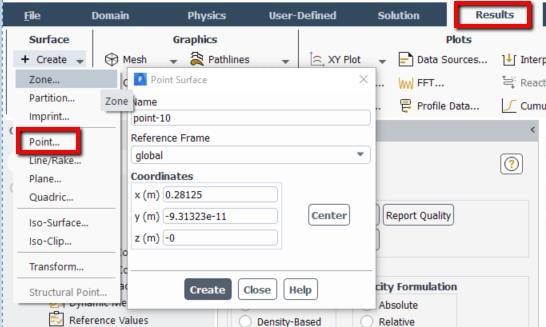
thanks for your quick reply. I'm sorry but where exactly can I do this?
If I go to "Reports" in Fluent I can go on "Definitions". There, I can find things like "Max" oder "Min" for a volume. Where can I define points?
I'm a beginner in Ansys so I don't have to much knowledge yet.
Thanks for an easy understandable answer!
Best regards!
-
June 17, 2020 at 8:45 pm
-
June 18, 2020 at 7:56 am
obschti
SubscriberHi Kremella,
thanks for your help!
How can I set the temperatur of this point as an output parameter?
Best regards!
-
June 18, 2020 at 12:11 pm
Karthik Remella
AdministratorOnce you create the point, you should now be able to go into the Solution tab.
Under Reports: Definitions -> Surface Reports -> Vertex Average (or Maximum or Minimum)
This will open the surface report definition dialog box. You should be able to set your desired variable and finally check the box at the bottom left corner which says 'Create Output Parameter'. This should create the parameter.
If this works for you, please mark it as 'Is Solution' to benefit others in the community.
Thanks.
Karthik

-
- The topic ‘parameter in fluent’ is closed to new replies.
-
4673
-
1565
-
1386
-
1231
-
1021
© 2025 Copyright ANSYS, Inc. All rights reserved.