TAGGED: -Ansys-Maxwell-electronics
-
-
January 22, 2026 at 6:46 am
mmjprecise
SubscriberHi all,
I have a quick question as I'm new to maxwell interface.
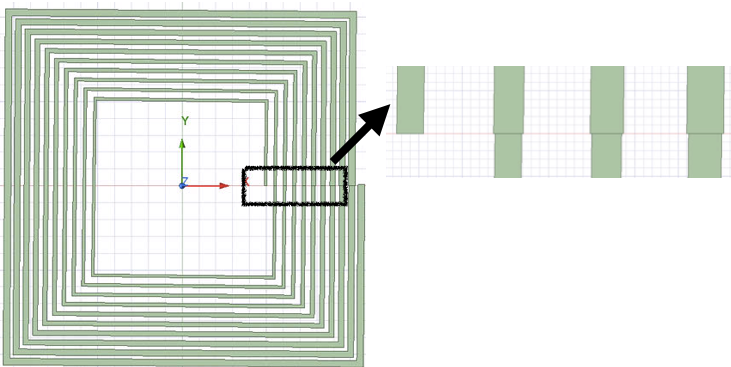
I am design a coil and the width of the turns changes for each turn. I see when I unite all to one the design doesn't look good and I'm afraid this will affect the quality of results.
Any suggestions on how to join each turn so that the connection is seamless? I used "User defined primitive", "SegmentedHelix", "RecHelix", then split the coil in half, separated all turns so that I can easily edit each turn separately. Also, if there is another method to do this, I'd appreciate any advice. Thank you. -
January 22, 2026 at 3:18 pm
MirandaH
Ansys EmployeeHi, there are a few ways to achieve a smooth transition between coil layers in Maxwell: 1. Use Fillets on Connection Edges Select the edge where the two segments meet and apply a fillet. This rounds the sharp corner and produces a smoother geometric transition. 2. Create a Small Gap and Connect Surfaces Leave a slight gap between the end of one coil and the beginning of the next layer. Then select both end faces, create objects from those faces, and use: Modeler → Surface → Connect This forms a smooth transitional surface between layers. 3. Use Closed Turns and Series Coil Terminals Model each turn as a fully closed loop. Then assign all the coil terminals to the same winding so Maxwell treats them as a series connection. The third method is usually the simplest and and most commonly used, while provides an equivalent representation with cleaner geometry.
-
Viewing 1 reply thread
- You must be logged in to reply to this topic.
Innovation Space
Trending discussions
Top Contributors
-
4934
-
1638
-
1386
-
1242
-
1021
Top Rated Tags
© 2026 Copyright ANSYS, Inc. All rights reserved.
Ansys does not support the usage of unauthorized Ansys software. Please visit www.ansys.com to obtain an official distribution.