Ansys Assistant will be unavailable on the Learning Forum starting January 30. An upgraded version is coming soon. We apologize for any inconvenience and appreciate your patience. Stay tuned for updates.
Fluids

Fluids

Topics related to Fluent, CFX, Turbogrid and more.

Update failed for the Fluent Solution component in Workbench

    • roysubhrajit03
      Subscriber

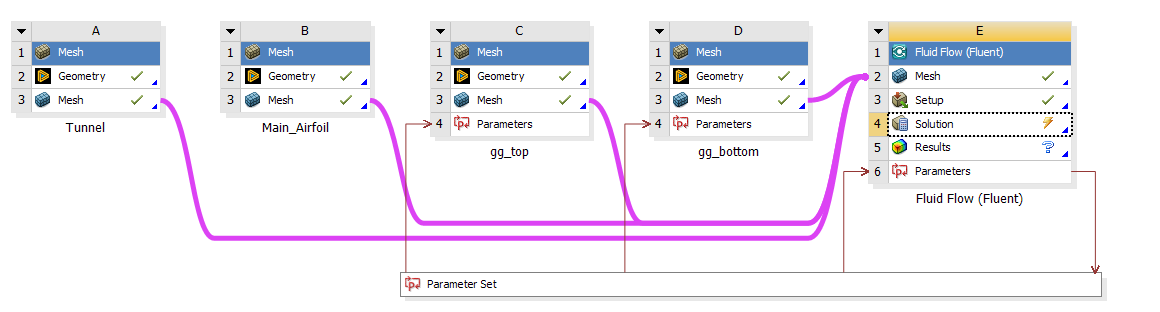
      I'm trying to run an with overset meshes a series of different parameter inputs. When I try to update a Design Point from the project schematic, I get "Update failed for Solution component in Fluid Flow (Fluent) for Design Point 0. Update Solution Failed." From that point I can either open up Solution and run it manually abd everything goes fine, or I can open Setup (and do nothing in Setup at all) and update again from workbench and everything works fine. I can also right-clock on the Solution cell in workbench and hit "Update" and it starts working. I am trying to automate my setup and this behavious is really unexpected.
      Can someone please help? I can't figure out what the problem is.

    • Anilkumar
      Ansys Employee

      Hello,

      Thanks for reaching out to Ansys Forum Support.

      Can you please delete all the design points from WB parametric table and then open the DP0 point Fluent Setup.

      Please check if all the setup is correct, add the desired post processing/reports and then initialize the problem. See if the initial report is getting generated and contours are there.

      Save the WB project now and then add the deisred design points to the parametric table. Then you can Run/update the complete project or only DP0 by RMB on the DP0 and then update rest of the design points.

      From Parameter Set properties make sure the Design point initialization is from Previous Updated option is selected.

      Regards,

      Anil

Viewing 1 reply thread
  • You must be logged in to reply to this topic.
[bingo_chatbox]