Hi JoshuaNenadich,
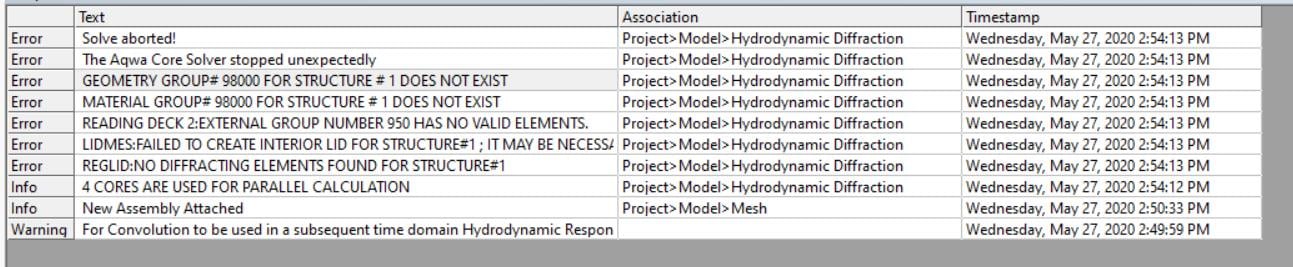
With Aqwa errors it is best to look at the errors in the order that they are reported, which means means starting from the bottom of the Output window and reading up.
In this case "REGLID: NO DIFFRACTING ELEMENTS FOUND FOR STRUCTURE#1" indicates that there are no diffracting elements for your first structure, i.e. it is entirely out of the water, or it has been marked as Non-Diffracting in the Surface Body details. This is usually allowed in an Aqwa analysis, but the next error message "LIDMES: FAILED TO CREATE INTERIOR LID FOR STRUCTURE#1" suggests that you have turned on the Generate Internal Lid option for the structure. For an Internal Lid to be generated, the structure must have some diffracting elements and it must cut the water plane.
We have also seen rare instances where geometry does not get translated correctly from SpaceClaim, and this could possibly cause the error you see above. However, this is fixed in Release 2022 R1. Please let me know if you are using an earlier release, and share a screenshot of the geometry if that's possible.
Cheers, Mike



















 You are navigating away from the AIS Discovery experience