3D Design

3D Design

Topics related to Ansys Discovery and Ansys SpaceClaim.

How would I select specific components and all bodies under it?

    • angmyto
      Subscriber

      For example, if we look at Lesson 3 - Objects, Selections, Named Selections, we see the functions GetAllBodies/GetBodies/etc. and GetAllComponents/etc. I want to select all components containing a string and all the bodies under it to merge it.
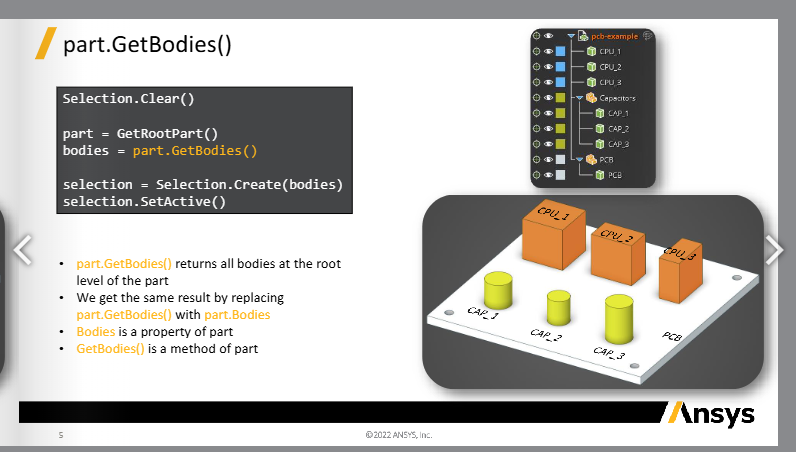
      Looking at this, let's say I have another component called Capacitors 2, with the bodies CAP_4, 5, 6. How would I call all bodies under both Capacitors groups without using GetAllBodies("CAP")?


    • NickFL
      Subscriber

      Is there a reason why you don't want to use the answer you provided with GetAllBodies("CAP")?

      This may not be the most elegant solution, but it could work for your case:

      # Get the Components with name Capacitors
      q = GetRootPart().GetComponents('Capacitors')
      # Create Empty Selection
      sel = BodySelection.Empty()

      # Loop through each component in q and get the bodies and add to selection
      for component in q:
          newSel = BodySelection.Create(component.GetBodies())
          sel = Selection.Union(sel, newSel)

      • angmyto
        Subscriber

        The geometry that I am using is imported from solidworks so I have multiple parts whose bodies have the name "Sweep[   ]" and I wanted to seperate it by the part names. I originally had to change the body names individually when I was using GetAllBodies. Thank you for the solution!

Viewing 1 reply thread
  • You must be logged in to reply to this topic.







