TAGGED: ansys-mapdl, gpu-acceleration, nvidia, polyflow
-
-
September 19, 2025 at 6:49 am
ansumansahu
SubscriberI am using Ansys 2021 R2 on a workstation that has an NVIDIA RTX 4500 Ada generation (24 GB) GPU. Since this GPU is not listed in the list of compatible GPUs for Ansys 2021 R2, I tried to troubleshoot in the following ways:
- First I followed instructions from the official Ansys 2021 R2 Help documentation and created the environment variable ANSGPU_OVERRIDE and assigned it a value of 1. However, even after this, the GPU could not be utilised for the simulation (both APDL and Polyflow modules showed error messages).
- With the ANSGPU_OVERRIDE environment variable now created (and = 1), I followed some further suggestions from an earlier post : https://innovationspace.ansys.com/forum/forums/topic/gpu-acceleration-in-mechanical/ in Ansys Innovation Space and installed the NVIDIA CUDA Toolkit 12.8 (by running the command nvidia-smi in the command line I found that version 12.8 of the CUDA Toolkit was compatible with the GPU).
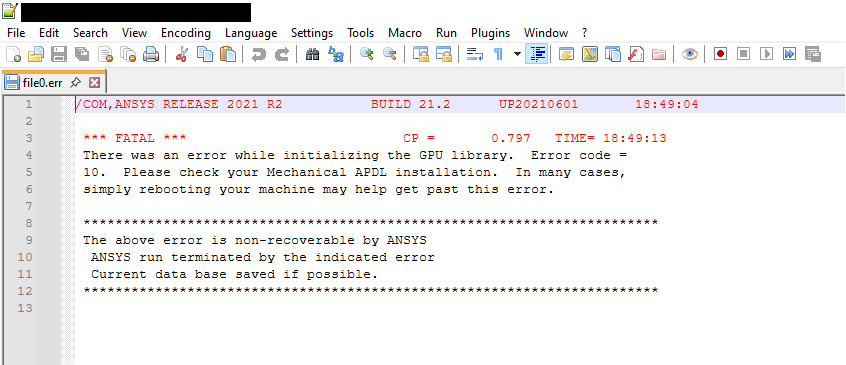
However after following this step, I am still unable to utilise the GPU with MAPDL. On running Ansys MAPDL from the command line with the command ansys212 -acc nvidia -na 1, I am getting the following error message (refer screenshot below) when trying to implement GPU acceleration in Ansys APDL. This error message was stored in the error (.err) log file. I tried searching a lot on the internet, but there was nothing even remotely close to this type of error message (error code = 10) discussed anywhere. I had tried implementing the GPU acceleration for Ansys Polyflow module as well however I received a similar error message (although I have not documented that).
As I am novice with regard to techincal knowledge on GPUs and their compatibility with Ansys software, any technical assistance/suggestions regarding enabling of NVIDIA RTX 4500 Ada generation for GPU acceleration of Ansys APDL and Polyflow would be of great help to me. Please let me know if any further details are required to elaborate this issue. Looking forward to suggestions and assistance in this regard. -
September 19, 2025 at 3:07 pm
Gary_S
Ansys EmployeeDouble check the Nvidia driver verison.Â
Perhaps try a newer verison of Ansys just to see if the card is recognized. -
October 7, 2025 at 4:31 pm
ansumansahu
SubscriberHello Sir. Thank you for responding. I have checked the driver version. It is 572.60 which is one of the latest NVIDIA driver versions and is compatible with CUDA Toolkit 12.8. Since I do not have access to a newer version of Ansys (I mean the full licensed software), could you suggest some other method?
-
October 7, 2025 at 4:46 pm
Gary_S
Ansys EmployeeI would install an earlier model GPU that is listed as being supported with the ~2021 version of the program(s). Â
-
- You must be logged in to reply to this topic.
-
5849
-
1906
-
1420
-
1305
-
1021
© 2026 Copyright ANSYS, Inc. All rights reserved.