-
-
May 14, 2020 at 3:36 pm
cloudstrife12
SubscriberHi,
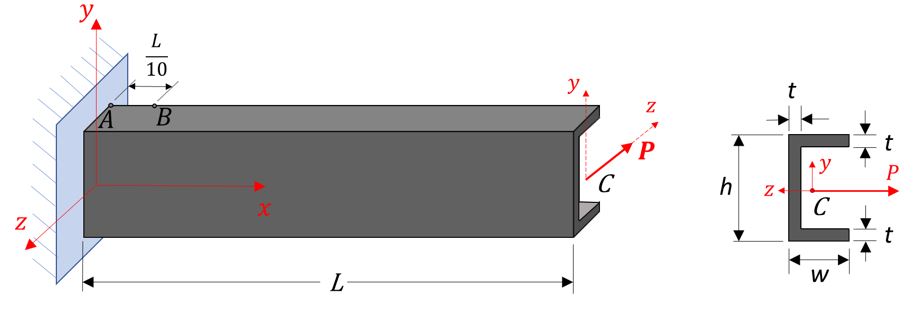
I'm currently trying to model this beam shown below in ANSYS APDL. I'm very new to the software so I'm still trying to get the hang of it and I need to learn it for my undergraduate studies.
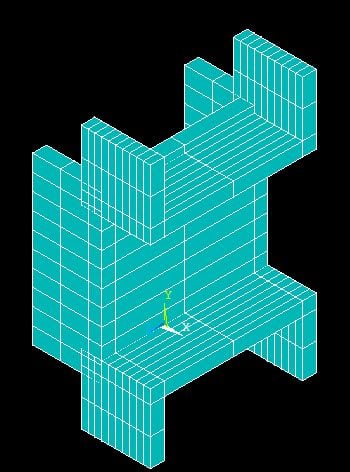
But the problem is, whenever I do try to model it on APDL, the structure looks like this:
Is there any way to orient it similar to the intended structure in the first image? Any help would be appreciated.
-
May 14, 2020 at 4:00 pm
cloudstrife12
SubscriberThe code that I generated looks something like this, just for reference. Any help would be greatly appreciated.
/PREP7 ! Enter preprocessing phase
! Define keypoints
K, 1, 0.05, 0, 0
K, 2, 0, 0, 0
K, 3, 0.15, 0.06, 0 ! This keypoint is where the force, P, is
K, 4, 0, 0.12, 0
K, 5, 0.05, 0.12, 0
! Define lines
L, 1, 2
L, 2, 4
L, 4, 5
! Define elements
ET, 1, BEAM189
! Define cross-section
SECTYPE, 1, BEAM, CHAN
SECDATA, 0.05, 0.05, 0.12, 0.01, 0.01, 0.01
SECPLOT, 1 ! Plots the current cross-section
! Define material properties
MP, EX, 1, 200e9 ! Elastic modulus in Pa
MP, PRXY, 1, 0.3 ! Poisson's Ratio
! Mesh the beam
LESIZE, ALL, , ,10, 1, 1 ! specify divisions on unmeshed lines
LMESH, ALL ! Mesh all lines
FINISH ! Finish preprocessor phase
Â
-
May 15, 2020 at 12:43 am
peteroznewman
SubscriberThe way it works is you have just one line between two points, a distance L apart.
The cross section is applied to that one line.
-
May 15, 2020 at 1:39 am
cloudstrife12
SubscriberThank you, I will give it a try. I also wanted to ask, when applying constraints, since at one end of the channel it is a fixed support, do I then just apply it to those two points you've mentioned? Much appreciated
-
May 18, 2020 at 10:10 pm
peteroznewman
SubscriberYou apply the fixed support to one vertex.
-
- The topic ‘Beam Channel’ is closed to new replies.
-
4728
-
1565
-
1386
-
1242
-
1021
© 2026 Copyright ANSYS, Inc. All rights reserved.