-
-
August 19, 2025 at 9:43 pm
kaeden.freston
SubscriberI’m seeing repeat failures of Fluent–Mechanical coupling that don’t appear model-specific.
Environments
Local (Windows): Ansys 2025 R1 (v251) via Workbench.
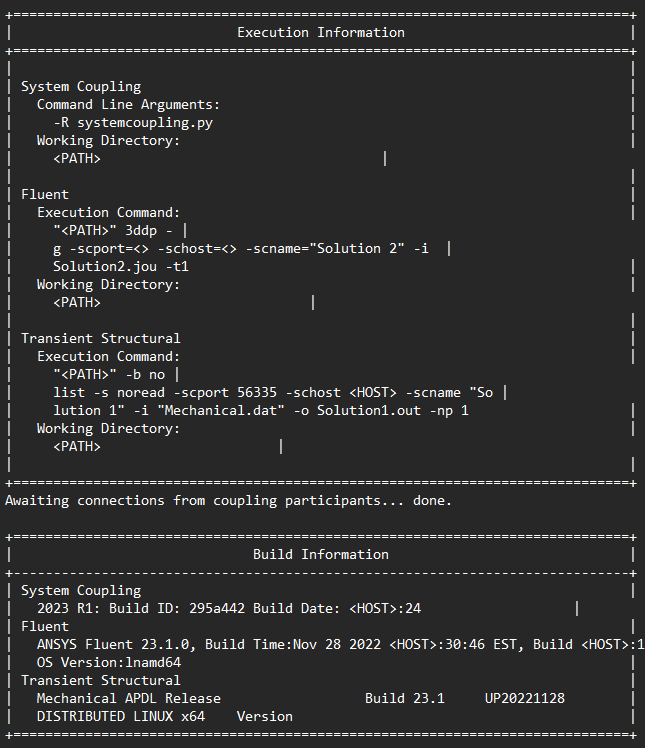
Cluster (Linux/SLURM): Ansys 2023 R1 (v231), single-node jobs, System Coupling shows Intel MPI.
Symptoms
Local v251: The stock Reed Valve FSI Simulation tutorial (no edits) fails during initial participant connection; System Coupling reports that one participant exited during handshake.
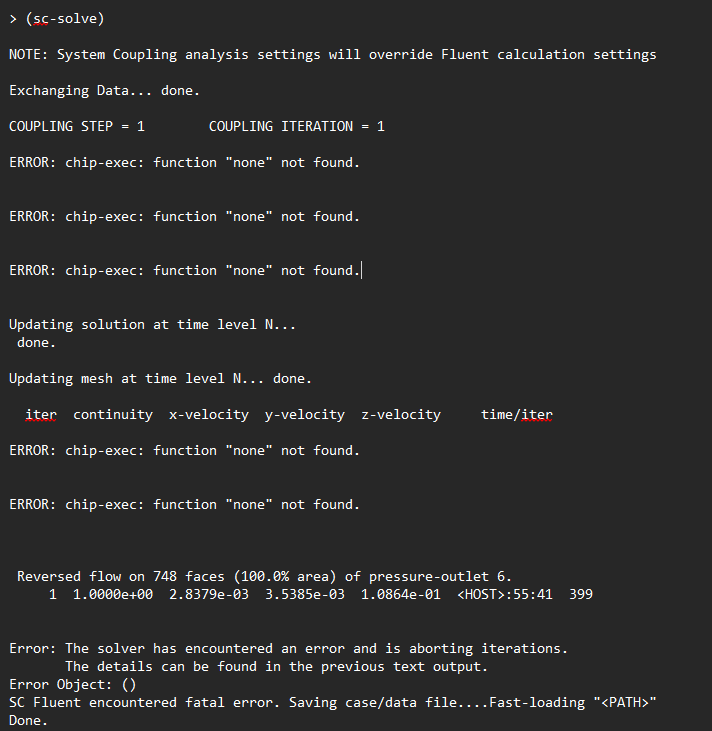
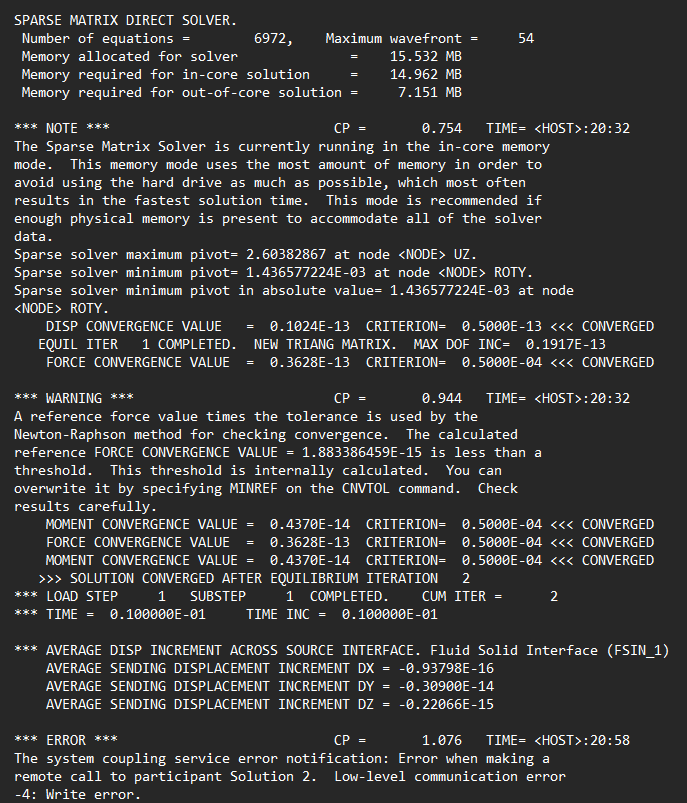
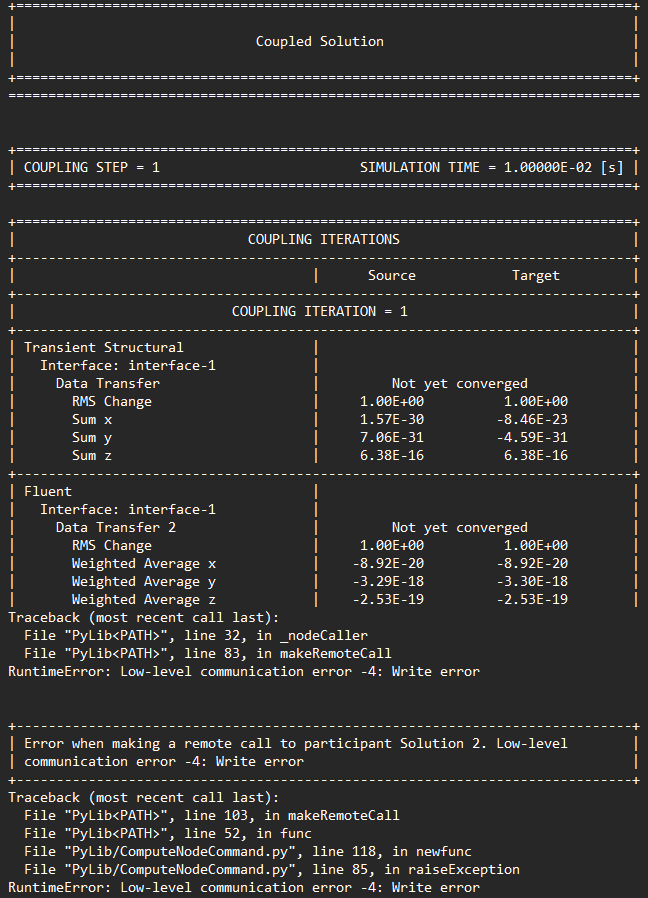
Cluster v231: My minimal two-way FSI prototype launches and connects, Mechanical begins solving, then System Coupling aborts on the first data exchange with “Low-level communication error −4: Write error” while making a remote call to Fluent.
What I’ve tried
Reproduced with both my prototype and the unmodified Ansys tutorial.
Multiple runs on both environments with the same outcome.
No custom MPI flags; default SC-assigned ports; single node.
Ask
Known causes/fixes for error −4 (Write error) when SC calls Fluent?
Recommended diagnostics (Fluent/SC logging flags, environment variables) to pinpoint socket/RPC shutdowns.
Any version-specific issues with v251/v231 affecting SC ↔ Mechanical/Fluent handshake?
MPI/fabric or port/hostname settings you recommend for single-node SC runs (e.g., loopback vs host IP, firewall notes)?
I can upload the SC/Fluent/MAPDL logs (local and cluster) if needed.
Thank you
-
August 28, 2025 at 3:48 pm
Rahul
Ansys EmployeeShare SC/Fluent/MAPDL logs images
-
August 28, 2025 at 4:59 pm
-
August 29, 2025 at 3:09 am
Rahul
Ansys EmployeeIs this log for your prototype or ansys tutorial?
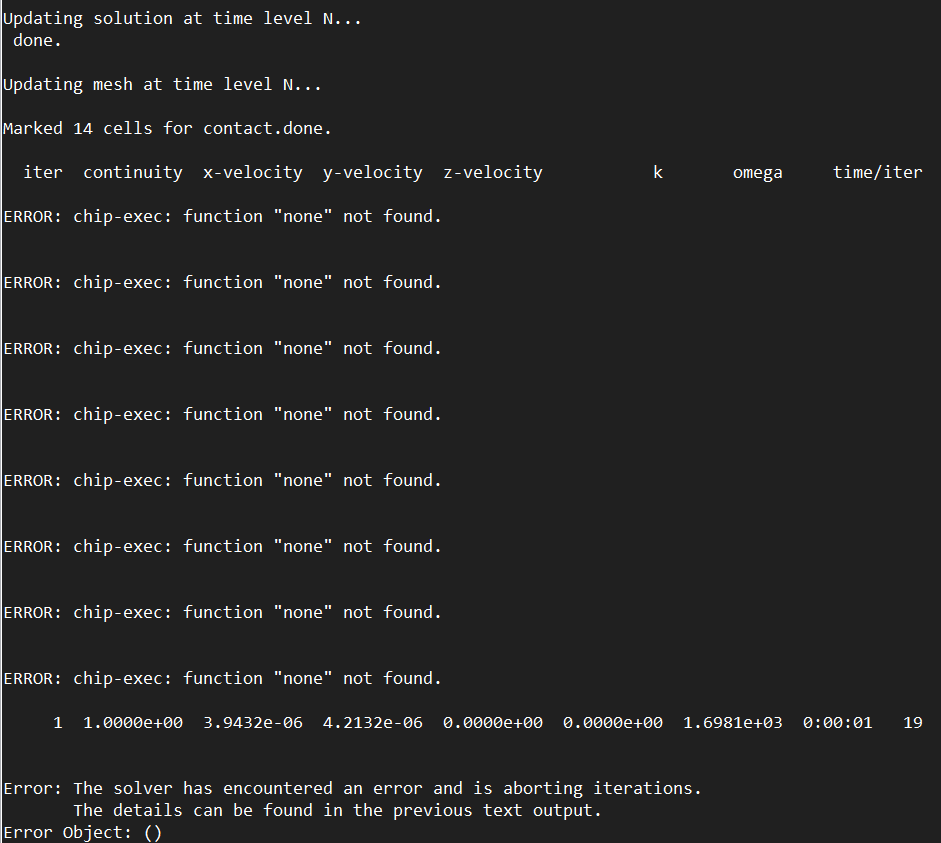
From logs, it looks like it is failing in Fluent with the error: chip-exec function 'none' not found.
Are you using UDMI in your UDF? If you are using UDMI, please set User-defined memory. -
August 29, 2025 at 6:51 pm
kaeden.freston
SubscriberThanks for your reply. This log is for my prototype. Just to clarify, I was not originally using a UDF — today, I tried experimenting with a “noop” Scheme script because of the repeated "Error: chip-exec: function "none" not found" messages during iterations. That was a workaround I tried based on advice that this might be an Ansys bug, but I've only been able to define the function on the host side.
Since I never had a UDF to begin with, I’m not using UDMI or any user-defined memory. From what I can tell, the error is coming from some execute-commands hook in the case/data that’s trying to call
chip-exec noneevery iteration.Could you advise:
What’s the correct way to check whether UDMI is expected/required for this case?
If no UDFs are involved, is there a way to disable or clear the execute-commands list so nothing tries to call "none"? I've already tried deleting all exisiting commands but there are none to delete.
Or is there a recommended way to cleanly define a placeholder when no UDF is present?
I want to make sure I’m not mis-configuring my setup or missing a step with user-defined memory allocation. Thank you

-
August 30, 2025 at 4:52 am
Rahul
Ansys EmployeeYou mentioned that the Reed Valve FSI Simulation tutorial also fails with this error. Share logs from that run to debug the issue.
-
August 31, 2025 at 6:03 pm
-
September 1, 2025 at 3:02 am
Rahul
Ansys EmployeeAre you able to solve the Fluent only simulation (without coupling)? Let's run this to isolate the issue to see if it's coming from Fluent or system coupling.
-
September 1, 2025 at 2:28 pm
kaeden.freston
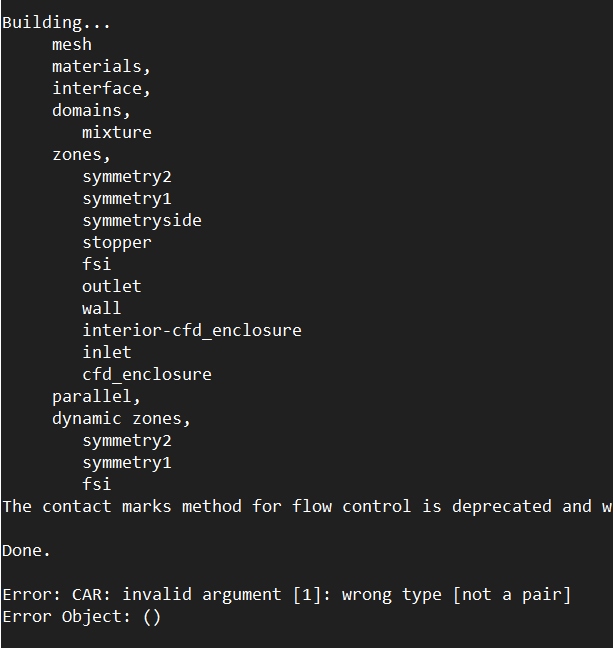
SubscriberI ran the Fluent-only simulation on the cluster (no System Coupling, just fluent.cas.gz). After Fluent finishes “Building…” I still get:
Error: CAR: invalid argument [1]: wrong type [not a pair] Error Object: ()This happens before I even try to iterate. When trying to iterate, I get the same chip-exec function error.
I confirmed there are no UDFs or UDMI in this model.
Execute-Commands shows no entries.
Disabling residual monitors and saving/reloading did not resolve it.
I also reproduced the same CAR error using the official Reed Valve tutorial.
- Importantly, I’ve submitted Fluent-only cases to the cluster in the past without any issues. The error only shows up with cases exported as part of the two-way FSI workflow (with Mechanical and System Coupling).
-
September 1, 2025 at 2:44 pm
Rahul
Ansys EmployeeAs this issue is just happening while running the files exported for system coupling analysis, could you please share the settings used?
-
September 1, 2025 at 2:58 pm
kaeden.freston
SubscriberFluent setup used in my two-way FSI workflow:
General
Time: Transient
Materials
Imported blood material
Cell Zone Conditions
Fluid region changed from air → blood
Boundary Conditions
Wall: wall
Inlet: velocity inlet
Velocity profile with average velocity chosen so that wall shear stress ≈ 1.5 Pa
Outlet: pressure outlet
Gauge Pressure = 0.0 Pa
Dynamic Mesh
Dynamic mesh enabled
Mesh methods: Smoothing + Remeshing
Smoothing:
Method = Diffusion
Diffusion function = boundary-distance
Diffusion parameter = 1
Remeshing:
Methods = Local Cell, Local Face, Region Face
Parameters: Use Defaults, Size Remeshing Interval = 1
Dynamic Mesh Zones:
Inlet → Stationary
Outlet → Stationary
Wall → System Coupling
Solver Options: Activate Solution Stabilization
Scale Factor = 0.5
Method = coefficient-based
Region → Deforming
Meshing Options: Smoothing + Remeshing
Zone parameters:
Minimum length scale = 1.1 × (zone scale info min)
Maximum length scale = 0.9 × (zone scale info max)
Solution → Monitors → Residuals
Convergence criteria:
Continuity = 1e-5
X-, Y-, Z-velocity = 1e-5
Solution → Run Calculations
Time step size = 1
Number of time steps = 1
Max iterations per step = 400
-
- You must be logged in to reply to this topic.
-
6545
-
1906
-
1463
-
1311
-
1022
© 2026 Copyright ANSYS, Inc. All rights reserved.